Someone asks whether the integration is ready to go live. The answer that comes back is “it works.” Those are different statements, and the gap between them is where the next three months of interruptions live.
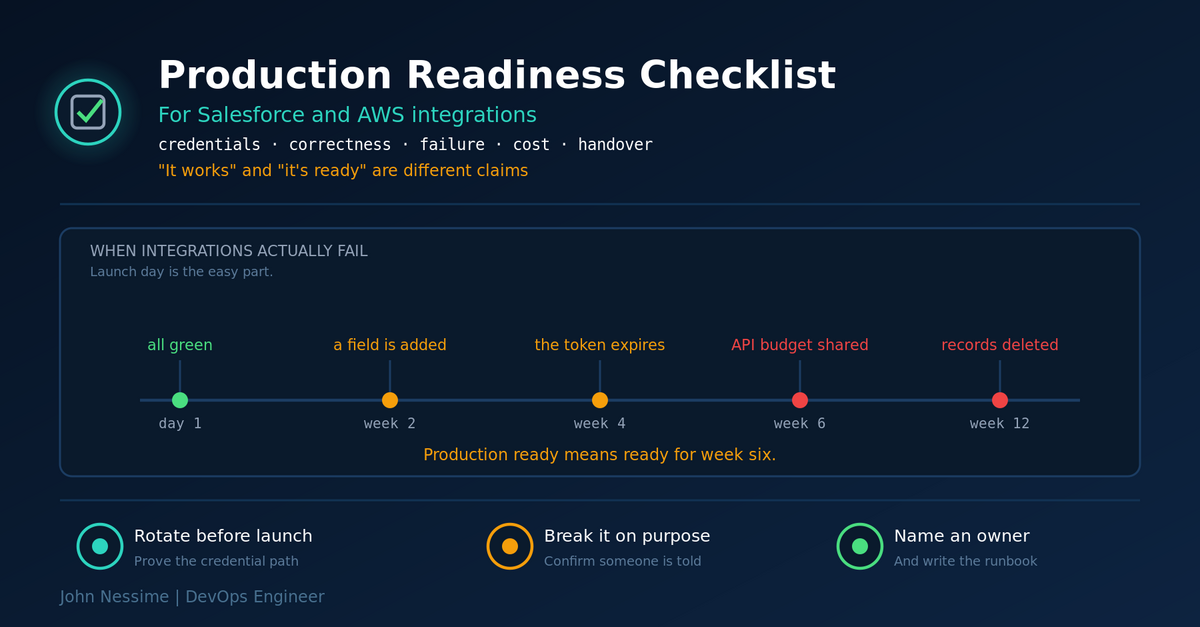
Integrations very rarely fail on launch day. They fail in week six. That is roughly when the OAuth token first expires, when an admin adds a field nobody mentioned, when a second tool starts consuming the same API allowance, and when enough records have been deleted for the row counts to visibly diverge. None of those conditions exist in staging, which is why staging said yes.
So this is a Salesforce AWS integration checklist aimed at week six rather than at Tuesday. Every item has a pass test, because “we thought about that” is not the same as “we checked.”
1. Credentials and identity
- The integration has its own Salesforce user. Pass: the username is not a person’s, and nobody uses it interactively.
- That user is API-only and cannot log in through the UI. Pass: someone tried and was refused.
- Its profile grants only the objects and fields you actually read. Pass: you have the field-level permission list and can explain every entry.
- Credentials live in a secrets manager, not in environment variables or config files. Pass: the secret is retrievable by ARN and nothing in the repo contains it.
- You have rotated the credential at least once, in production, and the pipeline survived. Pass: there is a dated record of the rotation and no incident attached to it.
- You know what invalidates the refresh token. Pass: you can name the events that revoke it, including password resets and session policy changes on the integration user.
That last item is the classic week-four failure. A refresh token feels permanent right up until an admin does something routine to the user account it belongs to.
2. Network, versions and deadlines
- You know whether the compute needs to be in a VPC, and why. Pass: if it is, you can name the private resource it reaches.
- If it is in a VPC, S3 traffic goes through a gateway endpoint. Pass: the endpoint exists and the route table references it.
- The Salesforce API version in your endpoints is pinned and current. Pass: it is not a version on a retirement list.
- IAM permissions are scoped to the specific resources involved. Pass: no wildcard on S3 buckets or Secrets Manager paths.
- Login IP restrictions and connected app policies are configured deliberately. Pass: you know whether IP relaxation is on and made that choice on purpose.
The API version item has real dates attached, so it is worth stating plainly rather than leaving as a vague “keep current”. Salesforce retired versions 7.0 through 20.0 in Summer ’22 and versions 21.0 through 30.0 in Summer ’25, and has announced that 31.0 through 40.0 retire in June 2028, with the SOAP login() call retiring separately in June 2027. Retired versions return HTTP 410 on REST rather than degrading gracefully.
Usefully, Salesforce warns you first. Calls to legacy versions come back with a Warning header, so this is detectable today rather than on the morning it breaks:
# If this matches anything, you have a deadline you did not know about.
grep -i "Warning:" integration.log | sort -u
3. Correctness
- Deletes are handled, not just creates and updates. Pass: you can point at the code path and name the mechanism it uses.
- Merged records do not double-count. Pass: you have checked what happens to the losing record of a merge.
- Formula and computed fields are either recalculated downstream or documented as snapshots. Pass: there is a written list of which columns are derived.
- Re-running the same window produces the same result. Pass: you ran it twice and diffed the output.
- One real aggregate reconciles against Salesforce for a closed period. Pass: daily and monthly totals both match, not just daily.
- Timezone handling is explicit at the boundary. Pass: someone can say which timezone the date column is in without guessing.
If daily figures reconcile and monthly ones do not, that is a timezone problem at period boundaries, not missing data. Find it now, because finding it inside somebody’s board pack is a worse day.
4. Failure handling
- Retries are scoped to failures that deserve them. Pass: transient errors retry, data errors do not, and you can show which is which.
- Backoff is exponential with jitter. Pass: a fixed sleep does not appear anywhere in the retry path.
- A partial failure leaves recoverable state. Pass: the watermark advances only after data lands, not when the API call returns.
- You can replay an arbitrary historical window on demand. Pass: someone has done it, in production, with a command you could hand to a colleague.
- Rate limiting is treated as an expected condition. Pass: a 429 or a limit error produces a backoff, not an alert and a failed run.
5. Observability
- The pipeline emits a metric on successful completion. Pass: the metric exists and you can graph it.
- An alarm fires when that metric stops arriving. Pass: you disabled the schedule on purpose and the alarm went red.
- Data freshness is measured on the destination side. Pass: you can answer “how far behind are we right now” from a dashboard.
- Salesforce API allowance consumption is graphed. Pass: there is a percentage on a chart with a threshold line.
- Alerts describe symptoms and link to a runbook. Pass: the alarm description contains a URL somebody could follow at 3am.
The second item is the one people skip and it is the only one that matters. An alarm you have never seen fire is a belief, not a control.
6. Cost
- Every resource carries a cost allocation tag. Pass: Cost Explorer filtered to that tag returns a number.
- Log groups have a retention period. Pass: none of them say “Never expire”.
- The schedule matches how the output is actually used. Pass: somebody named the decision the data supports and the latency it tolerates.
- Average object size in the destination is sensible. Pass: you have looked, and it is not thousands of tiny files per partition.
- A budget alert exists on the pipeline’s tag. Pass: it has a threshold and a recipient who is not on holiday.
7. Operations and handover
- The integration has a named owner. Pass: a person, not a team inbox, and they know.
- A runbook exists covering the three most likely failures. Pass: someone who did not build it followed the runbook successfully.
- Infrastructure is defined as code. Pass: you could rebuild it in a fresh account from the repository.
- Schema drift produces a notification. Pass: adding a field in a sandbox generated an alert somewhere.
- Personal data has an access policy and a retention policy. Pass: both are written down and somebody outside the team has read them.
- You know what a Salesforce sandbox refresh does to it. Pass: you have been through one, or you know what will break when you do.
If you only do five
Nobody clears a thirty-item list before a deadline. These five catch most of what actually goes wrong:
- Rotate the credential once before go-live. It proves the whole credential path works and it is the failure with the longest fuse.
- Break it deliberately and confirm someone is told. Disable the schedule, watch the alarm, put it back.
- Reconcile one real number against Salesforce for a closed period, daily and monthly.
- Set log retention and one cost allocation tag. Five minutes, and it is the difference between a knowable bill and a mystery.
- Write the runbook and name the owner. If it is nobody’s, it is nobody’s at 3am too.
FAQ
What actually breaks first in production?
Credentials, usually around the first expiry or the first time an admin touches the integration user. After that, schema drift and API allowance contention with a tool somebody else added.
How do I know if I’m on a retiring API version?
Look at the version string in your endpoint URLs, and search your logs for the Warning header Salesforce returns on legacy versions. Retired versions fail with an HTTP 410 rather than degrading, so there is no soft landing.
Is a staging environment enough to sign off?
No, because the conditions that break integrations barely exist there: real volume, real credential lifecycles, real deletions, and a shared API budget. Staging proves the code runs. It cannot prove the thing survives contact with an organisation.
How often should I revisit the list?
Quarterly for the alarm test and the reconciliation, annually for permissions, credentials and API versions. Put both in a calendar, because an integration that works is one nobody thinks about until it does not.
Does this apply to managed connectors too?
Most of it. You inherit retries and pagination from the vendor, but credentials, permissions, reconciliation, cost, alerting and ownership are all still yours. A managed connector removes code, not accountability.
The one thing to remember
“It works” is a statement about today. “It’s ready” is a claim about week six, and the only honest way to make it is to have tested the things that only happen later: rotate the credential, break the schedule, reconcile a number, follow the runbook.
If you cannot point at evidence for an item, it is not done. It is intended, which is a different thing, and the gap between the two is where you will spend your next quarter.
Want a second pair of eyes before go-live?
Readiness reviews are cheap compared with the incidents they prevent, and they go faster with someone who has seen the same six failures repeatedly. Work I take on:
- Pre-launch readiness review against this checklist, with evidence collected rather than assurances taken.
- Credential and permission audit: integration users, profiles, field-level security, secret storage and rotation.
- Reconciliation harness so row counts and aggregates are checked automatically rather than when someone complains.
- Alerting and runbooks, including a failure drill that proves the alerts reach a human.
- Legacy API version audits ahead of the announced retirement deadlines.
- Cost tagging, log retention and budget alerts so the first month’s bill is not a surprise.
Tell me which items on this list you have evidence for, and I will tell you which of the rest matter most for your setup.