The message usually arrives on a quiet afternoon. A secret scanner has flagged your infrastructure repo, and the finding is a Postgres connection string sitting in a values.yaml that someone committed a long time ago and deleted a few weeks later. The file is gone from the working tree. The commit is not.
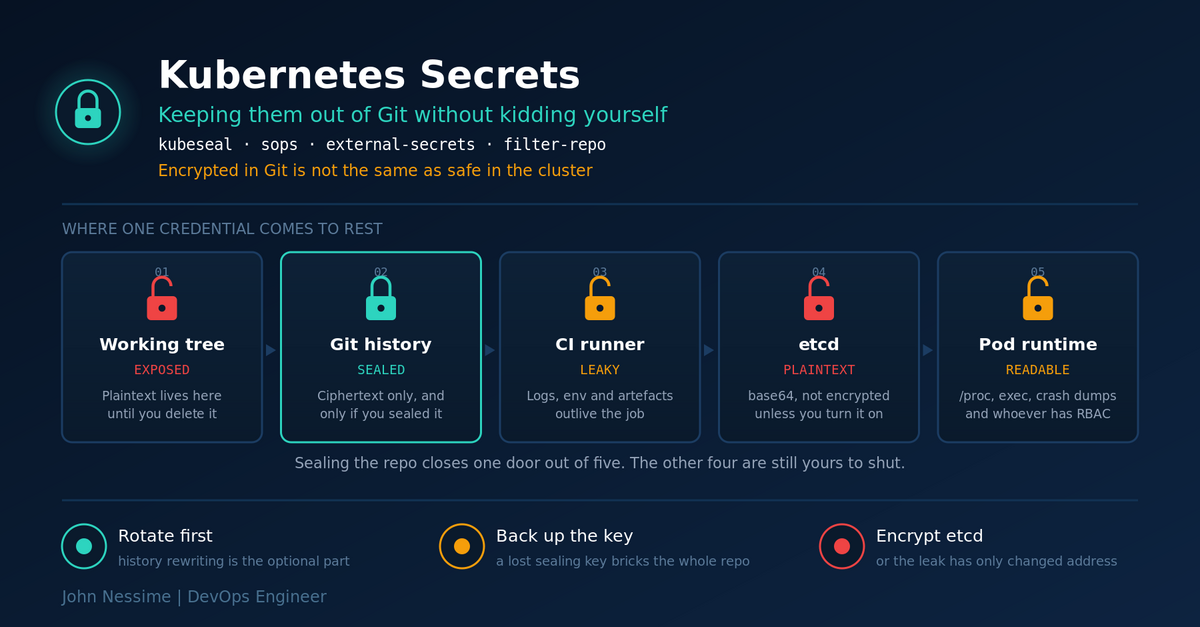
The reflex at that point is to reach for history rewriting. That is the wrong first move, and I will come back to why. But the bigger problem is the one that shows up six months after you clean up: teams migrate to Sealed Secrets or SOPS, tick the box, and quietly assume the whole class of problem is now solved. It is not. Encrypting a value before it enters Git closes exactly one door out of about five.
This post covers how to keep Kubernetes secrets out of Git in a way that survives contact with a real cluster: the three families of solution and where each one genuinely wins, the disaster-recovery trap that bites hardest, how to stop plaintext reaching the repo in the first place, and what to actually do about credentials already in your history.
The failure that actually bites: encrypted in Git, wide open in the cluster
Sealed Secrets and SOPS both terminate in the same place. The controller decrypts, the API server accepts, and what lands in etcd is an ordinary Kubernetes Secret. Ordinary means base64-encoded, which is an encoding, not a cipher. Anyone who can run kubectl get secret -o yaml in that namespace reads the value in one pipe through base64 -d.
So the honest description of what these tools buy you is narrower than the marketing suggests. They stop the credential appearing in a public object store with permanent history and a CDN in front of it. They do nothing about the cluster’s own blast radius.
Three things need to be true alongside whichever tool you pick:
- Encryption at rest is on. A stock Kubernetes control plane writes Secrets to etcd unencrypted unless you configure an
EncryptionConfiguration, ideally with a KMS provider. Managed distributions vary. On EKS, envelope encryption is something you enable, not something you inherit. Check yours rather than assuming. - RBAC on secrets is actually restrictive. A depressing number of clusters grant blanket
getandliston secrets to service accounts that only ever needed one. That single verb turns a namespace compromise into a credential dump. - Secrets are mounted as files, not shoved into environment variables where you can help it. Environment variables leak through
/proc/<pid>/environ, through anything that dumps the environment on crash, and through every debug endpoint an application framework has ever shipped. A projected volume with tight permissions is the quieter option.
Quick sanity check on the RBAC side, which takes about ten seconds and surprises people:
# Can the default service account in a namespace read every secret in it?
kubectl auth can-i get secrets
  --namespace production
  --as system:serviceaccount:production:default
If that returns yes, your Git hygiene is not the weakest link in the chain.
Already leaked? Rotate first, rewrite second, and understand what rewriting does not do
Order matters here more than technique. GitHub’s own guidance is blunt about it: once a credential has been pushed, revoke or rotate it first, because that step alone removes the attacker’s ability to use it. History surgery is the optional follow-up, not the fix.
The reason is that a force-push does not reach everywhere the commit went. Objects survive in forks, which inherit the full object graph at fork time. They survive in colleagues’ clones. On GitHub they remain reachable by SHA through cached views and through pull requests that referenced them, and purging those caches is a support request, not a git command. If the repo was public even briefly, treat the credential as burned and move on.
When you do rewrite, use git filter-repo. It has replaced filter-branch as the recommended tool and it is dramatically faster on any repo with real history.
# Work on a bare mirror, never your day-to-day clone.
git clone --mirror git@github.com:org/infra.git infra-clean.git
cd infra-clean.git

# Strip one path from every commit that ever touched it.
git filter-repo --path clusters/production/values.yaml --invert-paths

# filter-repo deletes the origin remote on purpose, so you cannot
# force-push a half-finished rewrite by muscle memory. Add it back.
git remote add origin git@github.com:org/infra.git
git push --force --all
git push --force --tags
Then the unglamorous part: close or merge open pull requests before you start, because every SHA downstream of the rewrite changes. Tell every collaborator to delete their clone and clone again. A git pull will happily drag the old objects back in.
Two families of solution, and how to tell which one you are in
Every approach to this problem is either encrypt the value and commit the ciphertext, or commit a pointer and fetch the value at runtime. Everything else is implementation detail. The choice is mostly about whether you already run a secret store, and whether you can tolerate the CLI step in the middle of your workflow.
Sealed Secrets: the lowest-friction way to start
A controller in the cluster holds an RSA private key and publishes the matching certificate. The kubeseal CLI encrypts a Secret manifest against that certificate and produces a SealedSecret custom resource. Only that controller can decrypt it, so the resulting YAML is safe to commit.
# Fetch the controller's public certificate. This is safe to commit;
# it can only encrypt, never decrypt.
kubeseal --fetch-cert
  --controller-name=sealed-secrets
  --controller-namespace=kube-system
  > pub-cert.pem

# Build a Secret manifest locally. --dry-run=client means it is rendered
# and never sent to the API server.
kubectl create secret generic db-auth
  --from-literal=password='<value>'
  --dry-run=client -o yaml > db-auth.yaml

# Encrypt against the cert. Offline, so no cluster access needed here.
kubeseal --cert pub-cert.pem --format yaml < db-auth.yaml > db-auth-sealed.yaml

rm db-auth.yaml
Because you can hand out pub-cert.pem, developers can seal secrets without any cluster credentials at all. That is the underrated part, and it is the reason this is the one I reach for first on a small team with no existing vault.
Two details that catch people. First, sealing is scoped by default: a SealedSecret is bound to its exact name and namespace, and moving the file to a different namespace makes it undecryptable. That is deliberate, it stops a developer sealing a secret into a namespace they should not have access to, and you can relax it with --scope namespace-wide or --scope cluster-wide if you genuinely need to. Second, the Helm chart names the controller sealed-secrets while the CLI looks for sealed-secrets-controller by default, so --controller-name is not optional in practice.
Where it stops being the right answer: multi-cluster. Each cluster generates its own key pair, so a sealed file is not portable, and a fleet means either copying private keys around or maintaining per-cluster ciphertext for the same value. Rotation is also manual. There is no dynamic secret story here at all.
SOPS with age: encrypt files, not just Kubernetes objects
SOPS encrypts the values inside a structured file and leaves the keys readable, so a diff still tells you which field changed even if it cannot tell you what it changed to. Paired with age, which uses short X25519 keys instead of the GPG keyring experience, it is pleasant to live with.
A .sops.yaml at the repo root drives everything through path matching, which is how you get per-environment key separation without anyone having to remember flags:
creation_rules:
  - path_regex: clusters/production/.*.yaml$
    encrypted_regex: '^(data|stringData)$'
    age: age1...   # production recipient
  - path_regex: clusters/staging/.*.yaml$
    encrypted_regex: '^(data|stringData)$'
    age: age1...   # staging recipient
The encrypted_regex line is the one worth understanding rather than copying. Without it SOPS encrypts everything including metadata, and you lose the readable-diff property that made this approach attractive. Restricting it to data and stringData keeps names, namespaces and labels reviewable in a pull request.
Flux decrypts SOPS natively: you point a Kustomization at a Secret holding the age private key via decryption.provider: sops and it handles the rest. Argo CD does not have equivalent built-in support, so you bolt it on with a config management plugin such as KSOPS or the Argo CD Vault Plugin. Worth confirming against current Argo CD docs before you commit to it, because plugin mechanics there have changed more than once.
SOPS also handles files that are not Kubernetes manifests: Terraform variable files, Ansible vars, plain .env. If you have config living outside the cluster, that reach is a real advantage over Sealed Secrets.
External Secrets Operator: stop putting the value in Git at all
The third approach sidesteps encryption entirely. You commit a reference, and a controller resolves it against a real secret store: HashiCorp Vault, AWS Secrets Manager, Azure Key Vault, Google Secret Manager, or one of the newer hosted options like Doppler, Infisical or 1Password. The repo contains a path, never a value.
apiVersion: external-secrets.io/v1
kind: ExternalSecret
metadata:
  name: db-auth
  namespace: production
spec:
  refreshInterval: 1h
  secretStoreRef:
    name: vault-backend
    kind: ClusterSecretStore
  target:
    name: db-auth
  data:
    - secretKey: password
      remoteRef:
        key: production/postgres
        property: password
This is the only one of the three that gives you rotation without a commit. Change the value in Vault, wait for refreshInterval, and the cluster Secret updates. It also gives you a real audit trail, because reads happen against a system built to log them.
The cost is honest and worth stating. You have introduced a runtime dependency: if the store is unreachable, new workloads cannot get their credentials. You still have a bootstrap credential problem, because the operator needs to authenticate to the store somehow, and that root of trust has to get into the cluster by some other path. And Git is no longer the complete description of your system, which is a genuine philosophical cost if GitOps purity matters to you.
One live upgrade trap. The external-secrets.io/v1beta1 API was removed in ESO 0.17.0. Before that, in the 0.16 series, a conversion webhook served both versions and rewrote stored objects to v1, which produced permanent drift in Argo CD for anyone whose Git manifests still said v1beta1. Argo sees v1 in the cluster, Git says v1beta1, and it reconciles forever. Update your manifests to v1 before you cross that boundary, not after.
Secrets Store CSI Driver: when a Secret object is one object too many
Worth knowing about even if you do not use it. The CSI driver mounts values from an external store directly into the pod as a volume, so no Kubernetes Secret object needs to exist at all. That closes the etcd exposure completely. It costs you the ability to consume the value as an environment variable, and it means the secret is only available to pods that mount it, which is either exactly what you want or a nuisance depending on the workload. Use it where the compliance posture demands that etcd never sees the value.
The key you forgot to back up
This is the failure I would put money on, and it is the one nobody rehearses. Every encrypt-into-Git approach concentrates all your risk into one small piece of key material. Lose it and your repository turns into a directory of well-organised noise.
Concretely: rebuild a cluster from scratch, install a fresh Sealed Secrets controller, and it generates a new key pair. Every SealedSecret in your repo is now undecryptable. Your GitOps repo, the one that was supposed to let you recreate everything, cannot recreate anything that needed a credential. You find this out during the incident, not before it.
- Back up the sealing key out of band. The controller’s private key lives in a Secret in its namespace. Export it, encrypt it, and store it somewhere that is not the cluster and not the repo. A password manager or an offline copy is fine. Test the restore.
- Same for age. The private key is one line of text. Its size makes it feel unimportant. It is the entire thing.
- Add a second recipient for anything that matters. SOPS encrypts the data key once per recipient, so listing both an age key and a KMS key means either path can decrypt. The developer works with age locally, the cluster decrypts through KMS, and no single lost key is fatal.
- Know your re-key procedure before you need it. For SOPS that is
sops updatekeysacross every file matched by the rule. For Sealed Secrets it means re-sealing everything against the new certificate. Neither is hard. Both are miserable to work out under pressure.
Stopping plaintext from reaching the repo in the first place
All of the above assumes the encryption step happens. The commit that leaks is always the one where somebody skipped it, usually while debugging at the end of a long day.
- Put a scanner in the pre-commit hook.
gitleaksandtrufflehogboth work well here. Local hooks are bypassable, which is fine, because their job is catching accidents rather than stopping a determined person. - Run the same scan in CI, on the whole history, not just the diff. The diff-only scan misses everything that predates the day you added the scanner.
- Turn on server-side push protection. GitHub’s push protection rejects known credential patterns at push time. GitLab and platforms like GitGuardian offer equivalents. This is the layer that actually holds, because it does not depend on anyone’s local setup.
- Make the plaintext path short-lived by construction. Never write a plaintext manifest to a tracked path. Use
/tmp, or pipe straight into the encrypt step so the value never lands on disk at all. - Add
*.dec.yaml,secret.yamland friends to.gitignoreas a convention. Not a control, just one less way to be careless. - Remember your shell history. A
--from-literalwith a real password ends up in~/.bash_historyin cleartext. Use--from-file, or read from a variable, or prefix the command with a space if your shell is configured to skip those.
Troubleshooting the four things that go wrong
The SealedSecret applies cleanly but no Secret appears
Almost always a scope mismatch. The resource was sealed for one name or namespace and applied to another. The API server accepts the custom resource happily; the controller is where the failure surfaces.
# The controller logs are the only place this error lives.
kubectl logs -n kube-system deploy/sealed-secrets --tail=50

# Confirm what the CRD actually thinks its name and namespace are.
kubectl get sealedsecret db-auth -n production -o yaml
The second common cause: the file was sealed against a certificate from a different cluster, or from before a key rotation. Re-fetch the cert and re-seal.
The ExternalSecret sits there doing nothing
The status conditions carry the real message, and the events under describe usually name the provider error directly.
kubectl get externalsecret db-auth -n production
kubectl describe externalsecret db-auth -n production
kubectl describe clustersecretstore vault-backend
Check the store before the secret. If the SecretStore is not Ready, nothing referencing it will ever sync, and the error you want is on the store, not the ExternalSecret. When using a ClusterSecretStore, remember that any secret reference inside it needs an explicit namespace, because a cluster-scoped object has no namespace of its own to fall back on.
Argo CD or Flux reports permanent drift
Two usual causes. Either an API version conversion is rewriting stored objects to a version your Git manifests do not use, as with the ESO v1beta1 removal above, or a controller is adding fields to the generated Secret that your reconciler then tries to remove. Compare the live object against the rendered manifest field by field before you start changing anything.
SOPS decryption fails only in the cluster
You encrypted for one recipient and the cluster holds a different key. This is the classic outcome of listing multiple recipients in .sops.yaml but running sops --encrypt with an explicit --age flag that overrides the rule. Decrypt locally to prove your key works, then check which recipients are actually listed in the file’s SOPS metadata block. The recipient list is stored in the file, in the clear, which makes this a fast thing to diagnose.
Common mistakes
- Rewriting history before rotating the credential, and treating the rewrite as the remediation.
- Assuming a private repo is safe enough. Private repos get forked internally, cloned onto laptops, and made public by accident.
- Committing the encrypted file and the plaintext source next to it, because the encrypt step wrote to a new filename and nobody deleted the original.
- Never backing up the sealing key or the age identity.
- Leaving encryption at rest off, so the credential moves from a Git leak to an etcd snapshot leak.
- Encrypting the entire manifest with SOPS instead of just
dataandstringData, and losing every useful diff. - Using one age key or one sealing controller for all environments, so a staging compromise reaches production ciphertext.
- Piping a Helm release’s rendered output into a debug artefact in CI. Helm renders secrets in the clear, and CI artefacts are frequently world-readable inside an organisation.
How I would actually decide
Skip the feature matrix and answer three questions in order.
- Do you already run a secret store? If Vault or a cloud secret manager is already in your environment and someone owns it, use External Secrets Operator. You get rotation and audit for almost no additional conceptual load, and the argument is over.
- Do you have config outside Kubernetes? Terraform variables, Ansible vars, application
.envfiles. If yes, SOPS with age, because one tool covers all of it and the per-path rules give you environment separation for free. - Neither? Sealed Secrets. One cluster, a handful of secrets, a team that wants this solved this afternoon. It is the shortest distance to a repo with no plaintext in it, and migrating away later is straightforward because the plaintext values are recoverable from a running cluster.
Whichever you land on, the cluster-side work is the same and it is not optional: encryption at rest, tight RBAC on secrets, files rather than environment variables, and a tested backup of whatever key material the scheme depends on. On a managed control plane from a provider like DigitalOcean, Linode or a hyperscaler, the encryption-at-rest configuration is partly theirs and partly yours, so read the specific documentation rather than trusting a general answer. On a self-managed cluster running on your own VPS instances, for instance a k3s setup on InterServer or similar, all of it is yours and none of it is on by default.
FAQ
Is base64 in a Kubernetes Secret a form of encryption?
No. Base64 is an encoding that exists so binary values survive YAML parsing. It is reversed with a single command and provides no confidentiality whatsoever. Anyone reading the manifest reads the secret.
Should I use Sealed Secrets or External Secrets Operator?
If you already run Vault, AWS Secrets Manager or an equivalent, use External Secrets Operator: you get rotation without commits and a proper audit trail. If you have no secret store and no appetite to run one, Sealed Secrets is a faster path with fewer moving parts. The trade-off is that Sealed Secrets has no rotation story and its keys are per-cluster.
What happens if I lose the Sealed Secrets private key?
Every SealedSecret in your repository becomes permanently undecryptable, and you regenerate every credential from source. This is the single most common way this setup fails in practice. Back the key up somewhere outside the cluster and the repo, and test restoring it.
Do I still need to rewrite Git history after rotating a leaked credential?
Often not. Once the credential is revoked it cannot be used, which usually resolves the actual risk. Rewriting is worth the disruption when the value is not rotatable, when it is personal data rather than a credential, or when a compliance process requires it. Weigh it against breaking every open pull request and forcing everyone to re-clone.
Can Argo CD decrypt SOPS files on its own?
Not natively, unlike Flux, which has SOPS decryption built into its Kustomize controller. With Argo CD you add a config management plugin such as KSOPS or the Argo CD Vault Plugin. Check the current Argo CD documentation for the supported plugin mechanism before building around it.
Is it safe to commit the Sealed Secrets certificate or the age public key?
Yes, and committing them is the point. Both are public halves of an asymmetric pair and can only encrypt. Putting them in the repo is what lets developers seal new secrets without cluster access. The private halves never go anywhere near Git.
The one thing worth remembering
If you take one idea away, make it this: the work to keep Kubernetes secrets out of Git and the work to keep them safe in the cluster are two separate jobs, and finishing the first one feels a lot like finishing both. It is not. A repo full of SealedSecret resources sitting in front of an unencrypted etcd with permissive RBAC has moved the exposure, not removed it.
Pick the approach that matches what you already run. Back up the key on day one, not after the first rebuild. Turn on encryption at rest. And when something does leak, rotate before you reach for filter-repo, because rotation is the part that actually stops the bleeding.
Need help sorting out secrets in your cluster?
This is work I do regularly, and most of it is less dramatic than it sounds once someone has done it before. Things I can help with:
- Auditing a GitOps repo for committed credentials, including full history, and producing a prioritised rotation list rather than a wall of scanner output
- Setting up Sealed Secrets, SOPS with age, or External Secrets Operator against Vault or a cloud secret manager, including the key backup and restore procedure
- Migrating an existing repo off plaintext or off a scheme that no longer fits, without a big-bang cutover
- Fixing Argo CD or Flux reconciliation loops caused by secret controllers and API version conversions
- Enabling and verifying etcd encryption at rest, and tightening RBAC on secrets across namespaces
- Adding pre-commit and CI secret scanning that people will not immediately disable because of false positives
If you have a controller log, a stuck ExternalSecret, or a scanner report you are not sure how to triage, send it over and I will tell you what I make of it.