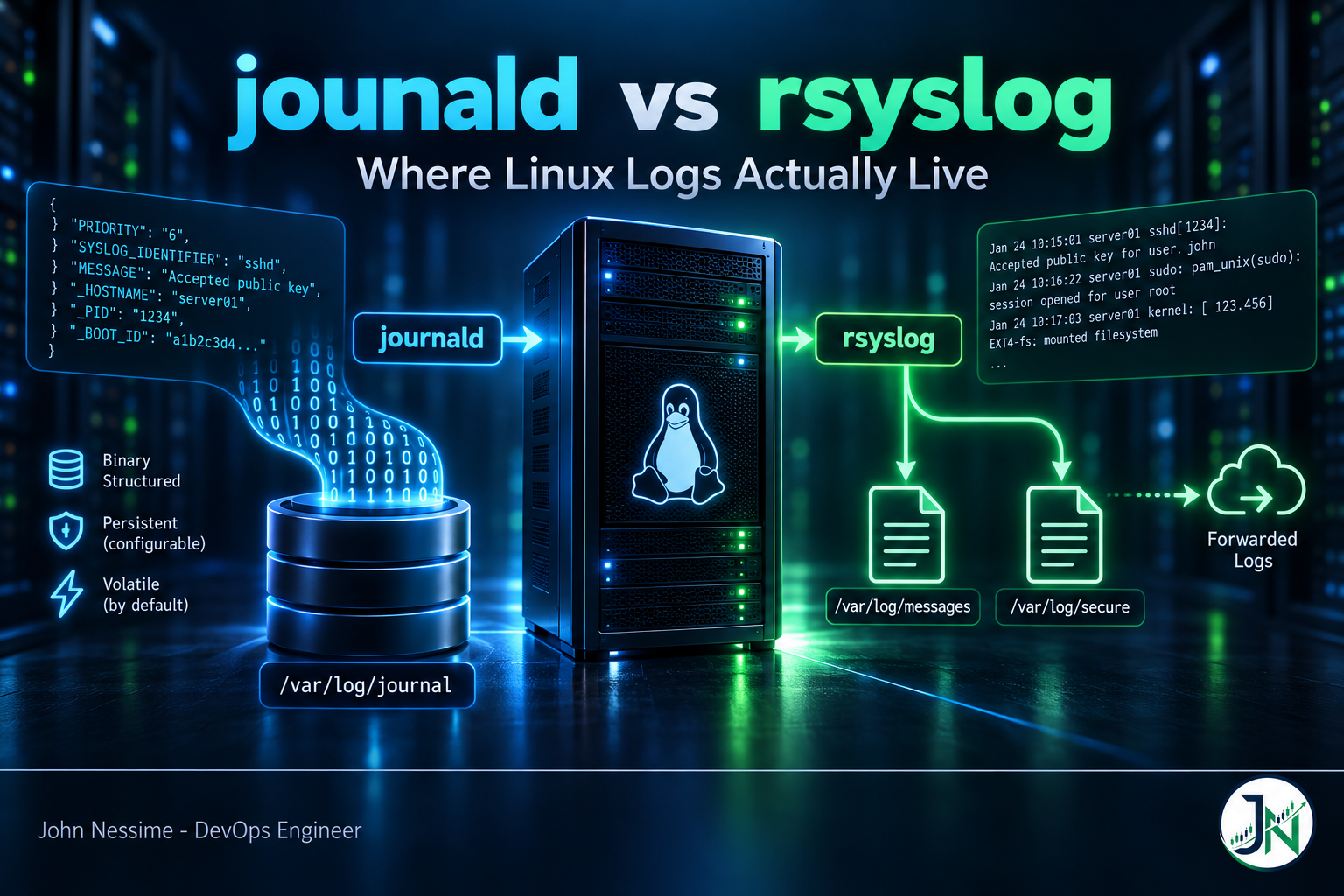
The disk alert usually comes first. /var sitting at 94 percent on a box that runs three services and logs almost nothing interesting. You go digging and find the same night’s SSH failures in two places: compressed binary files under /var/log/journal/, and plain text in /var/log/secure. Same events. Two copies. Nobody decided that. It is just what the distro shipped.
The worse version of this problem is the mirror image. You reboot a server to clear something, come back to read what led up to it, and the journal starts at the reboot. Everything before is gone. Not rotated, not compressed, not archived somewhere clever. Gone, because the journal was living in RAM and nobody ever told it otherwise.
Both of those are the same misunderstanding wearing different clothes: not knowing where your logs actually live. This post walks through the journald vs rsyslog split on a modern Linux server, what each one really stores, the three failure modes that bite in production, and how to decide which of the two is the copy you keep.
What actually happens when a process logs a line
On any systemd-based distribution, systemd-journald is the first stop for almost everything. It is not one option among several. It sits underneath.
- Anything a unit writes to stdout or stderr, because systemd wires those to the journal by default.
- Kernel messages, read from the kernel ring buffer.
- Classic
syslog(3)calls from libc, which land on the/dev/logsocket that journald owns. - Native journal API calls from anything linked against libsystemd, which carry structured key-value fields instead of a flat string.
- Audit records, if
Audit=yesis in effect.
journald writes all of that into indexed binary journal files. Then, on most server distributions, rsyslog gets a second copy of the same events and writes them out as text into /var/log/messages, /var/log/secure, /var/log/maillog and friends.
That handoff happens one of two ways, and which one your box uses matters more than most people expect. More on that below. First, the part that costs you an outage.
Before changing anything, look at the effective journald configuration rather than the file you think is authoritative. Distributions ship drop-ins under /usr/lib/systemd/journald.conf.d/ that quietly override upstream defaults:
# Print the merged configuration, including every drop-in, in load order
systemd-analyze cat-config systemd/journald.conf
This is the single most useful command in this whole post. Half the arguments about “what the default is” evaporate once you run it, because upstream systemd and your distribution frequently disagree about ForwardToSyslog.
Failure one: the journal that was never on disk
journald’s Storage= setting defaults to auto. That word does more work than it looks like. Under auto, journald writes to /var/log/journal/ only if that directory already exists. If it does not, journald falls back to /run/log/journal/, which is tmpfs. Memory. Wiped on reboot.
Nothing warns you. journalctl works fine, colours are pretty, filters work. You just silently have no history.
The quickest test is boot history. If the journal is persistent you see multiple boots; if it is volatile you see exactly one:
journalctl --list-bootsTo make it persistent, create the directory, let systemd-tmpfiles apply the correct ownership and ACLs, then restart the daemon and flush anything still held in RAM:
sudo mkdir -p /var/log/journal
sudo systemd-tmpfiles --create --prefix /var/log/journal
sudo systemctl restart systemd-journald
sudo journalctl --flush
journalctl --list-boots
The systemd-tmpfiles step is the one people skip. The journal directory needs specific group ownership and ACLs so that unprivileged users can read their own entries and members of the systemd-journal group can read everything. Creating the directory with a bare mkdir and walking away usually works, but it is the kind of “usually” that produces a confusing permissions ticket six months later.
If you want the behaviour to be explicit rather than inferred from a directory’s existence, set it in /etc/systemd/journald.conf.d/00-storage.conf:
[Journal]
Storage=persistent
A drop-in file is better than editing the main config, because package upgrades will not fight you over it.
Failure two: paying for the same log line twice
Once the journal is persistent, you are storing everything twice on a default server build: once as compressed binary in the journal, once as text under /var/log/. Two stores, two completely separate retention policies, neither of which knows the other exists.
The journal is capped by SystemMaxUse= and SystemKeepFree=. Left unset, they default to 10 percent and 15 percent of the filesystem respectively, and journald honours whichever is stricter. Recent systemd also caps those calculated defaults so they do not grow without bound on a large disk, which is worth knowing if you have ever wondered why a huge volume did not produce a proportionally huge journal.
The text copy is capped by logrotate, configured somewhere completely different, usually /etc/logrotate.d/rsyslog, on a weekly or daily schedule with its own rotate count.
Measure both before you tune either:
# What the journal is actually consuming on disk
journalctl --disk-usage

# What everything under /var/log costs, sorted, biggest last
sudo du -sh /var/log/* | sort -h
On a small VPS this stops being academic quickly. A modest instance from a provider like InterServer, Hetzner or DigitalOcean often has /var sharing a single root volume of 20 to 40 GB. A journal allowed to take 10 percent of that, plus four weeks of rotated text logs, plus a database, plus a container image cache, is how you end up paged at two in the morning for something that is not a real incident.
If you decide the text files are the copy you keep, put the journal on a short leash:
[Journal]
# Hard ceiling on total journal size
SystemMaxUse=200M
# Never let the journal push free space below this
SystemKeepFree=1G
# Discard entries older than this regardless of size
MaxRetentionSec=2day
Those three do different jobs and you generally want at least two of them. SystemMaxUse bounds the journal itself. SystemKeepFree protects the rest of the filesystem from the journal. MaxRetentionSec bounds it in time, which is what auditors and data-retention policies actually care about.
To reclaim space immediately without waiting for the next rotation:
# Trim archived journal files until the total falls below 500M
sudo journalctl --vacuum-size=500M

# Or trim by age instead
sudo journalctl --vacuum-time=7d
One caveat that surprises people: vacuuming only removes archived journal files. The currently active file is never deleted. If almost all your usage is in one large active file, run journalctl --rotate first, then vacuum.
Failure three: two rate limiters, both silent
This is the one that is invisible until it matters, and it is the real reason to understand the journald vs rsyslog relationship rather than treating them as interchangeable.
There are two independent rate limiters in the default pipeline, and both drop messages quietly.
journald’s limiter
journald applies RateLimitIntervalSec= and RateLimitBurst= per service, defaulting to 30 seconds and 10000 messages. Exceed the burst inside the interval and the rest of that service’s messages in that window are discarded. Not queued. Discarded.
The one piece of good news is that journald tells you, in the journal itself. Grep for it:
journalctl --grep="Suppressed" -n 50 --no-pagerA chatty web server or a container using the journald log driver will hit this. Rather than disabling rate limiting globally, override it for the one unit that needs it, using a drop-in:
# /etc/systemd/system/nginx.service.d/logging.conf
[Service]
LogRateLimitIntervalSec=30s
LogRateLimitBurst=50000
Per-unit values override journald.conf for that unit only, which is exactly what you want. Turning the global limiter off means one runaway process can fill your disk and take the box down. Turning it up for the single service you know is noisy is a bounded decision.
rsyslog’s limiter
If rsyslog is reading via the imjournal module, it applies its own rate limit on top, defaulting to 20000 messages per 600 seconds. A message can therefore survive journald’s limiter, land in the journal, and still never reach /var/log/messages or your remote log host.
That is the nasty case, because your local investigation finds the events but your centralised alerting never fired. Two people look at two sources and reach opposite conclusions about whether something happened.
rsyslog exposes counters for this through its statistics module, including how many messages it read from the journal, how many it submitted onward, and how many it discarded to rate limiting. Enable impstat if you run anything log-volume-sensitive; the discard counter is the number that tells you whether your pipeline is lying to you.
How rsyslog gets its copy: imjournal or imuxsock
There are two mechanisms, they behave differently under load, and running both at once is a classic source of duplicate lines.
imuxsock: journald pushes a copy to a socket
With ForwardToSyslog=yes in journald, journald writes a classic syslog-formatted copy of each message to a dedicated socket, and rsyslog reads it with imuxsock.
- Where it wins: simple, no state file, no second rate limiter, and no possibility of rsyslog reading back its own output and looping.
- Where it does not: you get the flat syslog view only. Structured journal fields such as the originating unit are not carried across.
imjournal: rsyslog pulls from the journal
imjournal reads journal files directly and keeps a state file so it can resume where it left off after a restart.
- Where it wins: structured fields survive the trip. If you want to route or template on the systemd unit name rather than parsing it out of a message string, this is the only option of the two.
- Where it does not: extra rate limiter to reason about, a state file that can drift, and a documented risk that a corrupted journal database causes rsyslog to re-read the same entries in a loop. rsyslog’s own documentation recommends using
imuxsockinstead unless you specifically need the structured data.
A representative imjournal load line, with the rate limit stated explicitly rather than left implicit:
module(load="imjournal"
       StateFile="imjournal.state"
       Ratelimit.Interval="600"
       Ratelimit.Burst="20000")
Writing the defaults out by hand is worth the two extra lines. The next person to debug missing messages will see the limiter exists instead of assuming there isn’t one.
To find out which mechanism your box is using right now:
grep -R "imjournal|imuxsock" /etc/rsyslog.conf /etc/rsyslog.d/ 2>/dev/null
grep -R "ForwardToSyslog" /etc/systemd/journald.conf /etc/systemd/journald.conf.d/ /usr/lib/systemd/journald.conf.d/ 2>/dev/null
If the first command returns both modules and the second returns ForwardToSyslog=yes, you have a duplication problem. Pick one path and disable the other.
Only one of the two leaves the box
This is the argument that settles most journald vs rsyslog debates in practice. journald is a local store. In a stock server install it has no mechanism for shipping logs to another host. There are separate systemd components for journal upload and reception, and third-party projects that read the journal and forward it, but none of that is in the default path.
rsyslog forwards as a first-class feature, and it does the part that actually matters: it buffers when the destination is unreachable.
global(workDirectory="/var/spool/rsyslog")

action(type="omfwd"
       target="logs.example.net"
       port="514"
       protocol="tcp"
       action.resumeRetryCount="-1"
       queue.type="LinkedList"
       queue.filename="fwd_loghost"
       queue.maxDiskSpace="1g"
       queue.saveOnShutdown="on")
Line by line, because these are not decoration:
workDirectoryis where spool files get written. Without it, the disk queue has nowhere to go.protocol="tcp"rather than UDP. UDP syslog silently drops under congestion, which defeats the point of forwarding at all.queue.type="LinkedList"makes the action asynchronous so a slow destination does not block local processing.queue.filenameis what actually enables disk assistance. In-memory queue first, spilling to disk when it fills. The name must be unique across every action in the config.queue.maxDiskSpacecaps that spool. Set it, or a long outage at the far end fills the disk you were trying to protect.queue.saveOnShutdown="on"persists whatever is still queued across a service restart.
One honest caveat on action.resumeRetryCount="-1". Infinite retry is the right default for “never lose a log line”, but there are reported cases where a relay under sustained back-pressure stops accepting new inbound messages while retrying forever. If your host is a relay rather than a leaf, test that behaviour deliberately with the destination firewalled off before you trust it.
rsyslog is not the only way off the box. Grafana Alloy into Loki, Vector, and Fluent Bit all read the journal directly and speak modern backends, and hosted platforms such as Better Stack, Papertrail or Datadog will take a plain syslog stream if you would rather not run the storage side. The mechanism differs; the decision does not. Something has to own the write path off the machine, and journald on its own is not it.
journald vs rsyslog: how I would decide
Stop asking which is better. Ask which one is the copy you are willing to be judged on, then make the other one cheap.
- Do logs need to leave this machine? If yes, rsyslog or a dedicated shipper owns the outbound path. That is settled before anything else.
- Do you troubleshoot mostly by unit? If
journalctl -u something -bis your muscle memory, journald is your primary read path and should get the retention budget. - Do existing tools read text files? Fail2ban, logwatch, older SIEM collectors and a lot of home-grown scripts parse
/var/log/*. Turning rsyslog off breaks them quietly. - How much disk do you actually have? Under about 40 GB, keeping two full copies is an unforced error. Cap one hard.
- Is tamper-evidence a requirement? journald supports Forward Secure Sealing, which detects after-the-fact modification of journal files. Shipping to an append-only remote store is the more commonly accepted answer, and the two are not mutually exclusive.
The configuration I reach for first on a general-purpose server: journald persistent with a hard cap for a few days of fast local querying, rsyslog kept for the syslog files that other tools expect plus reliable forwarding off-box, imuxsock as the handoff unless something genuinely needs structured fields, and logrotate retention trimmed down because the remote copy is the one that matters for anything older than a week.
Troubleshooting
- Journal only shows the current boot. Volatile storage.
journalctl --list-bootsconfirms it, and the fix is the persistent-storage sequence above. - Events in journalctl but not in /var/log/messages. Either rsyslog is not reading from the journal at all, or the
imjournalrate limiter is discarding. Check which input module is loaded first. - Every line appears twice in the text logs. Both
imjournalandimuxsockare active whileForwardToSyslog=yes. Disable one path. - Bursts of messages disappear during incidents. That is a rate limiter, and incidents are exactly when services get loud. Search for suppression notices and raise the limit for that specific unit.
- journalctl reports corruption or behaves oddly. Run
journalctl --verify. If files are damaged,journalctl --rotatestarts a fresh active file so new writes are clean, then vacuum the bad archives. - “Journal has been rotated since unit was started.” Not an error. Rotation happened mid-session, so
journalctl -ucannot map the full range. Re-run the query without the unit filter or widen the time range. - Disk still full after vacuuming. Vacuum skips the active journal file. Rotate first, then vacuum again.
Common mistakes
- Assuming the journal is persistent because
journalctlreturns results. It always returns results. The question is how far back. - Disabling rsyslog on a box where fail2ban, logwatch or a scraper still reads
/var/log/secure. Nothing errors. Detection just stops. - Setting
RateLimitBurst=0globally to “stop losing logs”, then having a crash-looping service fill the disk in an afternoon. - Editing
/etc/systemd/journald.confdirectly and being surprised when a vendor drop-in overrides it. Use a drop-in of your own with a name that sorts later. - Forwarding over UDP because it is the one-line version. It drops silently under exactly the load that produced the logs you wanted.
- Enabling a disk-assisted queue without
queue.maxDiskSpace, turning a remote outage into a local disk-full outage. - Tuning journald limits on a machine whose real problem is that one application logs every health check at info level. Fix the source first.
Best practices
- Make storage explicit.
Storage=persistentorStorage=volatile, never left toautoon a server you care about. - Always set
SystemKeepFreealongsideSystemMaxUse. The first bounds the journal, the second protects everything else on the volume from it. - Decide consciously which store is authoritative, and write it in the runbook. Two stores with no stated owner means neither gets maintained.
- Use exactly one journal-to-rsyslog path. Both is duplication; neither is silent data loss.
- Override rate limits per unit, not globally.
- Monitor
journalctl --disk-usageas a metric, not as something you check after the alert. - Ship off-box with TCP and a bounded disk-assisted queue, and test it with the destination firewalled off before you rely on it.
- Keep the local copy short and the remote copy long. Local disk is the expensive place to store history.
Frequently asked questions
Can I just disable rsyslog and use journald only?
On a self-contained box with no remote logging and nothing parsing text files, yes, and it saves real disk. Before you do it, grep your configuration management and cron jobs for /var/log/ paths, and check whether fail2ban or any monitoring agent reads those files. That is where this bites people.
Can I disable journald and use rsyslog only?
Not meaningfully. journald is how systemd captures unit stdout and stderr, so it stays in the path regardless. What you can do is set Storage=volatile with a small RuntimeMaxUse so it holds a short in-memory window and rsyslog owns everything durable.
Where are journald logs stored?
/var/log/journal/ when persistent, /run/log/journal/ when volatile. They are indexed binary files, not text, so grep and tail do not work on them directly. Use journalctl, or journalctl -o json if you want to pipe structured output into something else.
Why does journalctl show entries that never reached /var/log/messages?
Three usual causes: rsyslog is not reading the journal at all, the imjournal rate limiter dropped them, or a severity filter such as MaxLevelSyslog or an rsyslog rule excluded that facility or priority. Check in that order.
Is the binary journal format a problem for log analysis?
Locally, no. Structured fields and fast filtering are genuinely better than parsing text with regex. It becomes a problem when you need to move logs somewhere else, because almost every collector expects text or JSON. That conversion step is precisely the role rsyslog or a modern shipper plays.
How much disk should the journal be allowed to use?
Work backwards from how far back you actually query locally. If you rarely look past yesterday, a few hundred megabytes with MaxRetentionSec set to two or three days is plenty. Anything older belongs in a remote store where it is cheaper and survives the machine.
Does journald compress logs automatically?
Yes. Compress= defaults to enabled and applies to entries above a size threshold, which is one reason the journal is often smaller than the equivalent text files despite carrying more metadata. It does not remove the need for a size cap.
The one thing worth remembering
The journald vs rsyslog question is not a contest. On a stock server both are running, both are storing the same events, and the defaults were chosen by your distribution rather than by you. The failure modes all come from that: a journal in RAM that vanishes on reboot, two uncoordinated retention policies eating the same disk, and two rate limiters dropping messages without anyone noticing.
Run systemd-analyze cat-config systemd/journald.conf and journalctl --list-boots on your servers. Two commands, thirty seconds, and you will know whether the logs you would reach for during an incident are actually there.
Need help sorting out your logging pipeline?
Logging is one of those areas where the defaults work well enough to hide the problem until an incident makes it expensive. If any of the above sounded familiar, these are the things I take on:
- Auditing journald and rsyslog on existing servers and telling you exactly where each log line lives, how long it survives, and what is being silently dropped.
- Fixing volatile journals, runaway
/vargrowth and duplicate text-and-binary storage on small VPS instances. - Setting up reliable off-box forwarding with disk-assisted queues, TCP or RELP transport, and TLS where it is required.
- Migrating from text-file scraping to a structured pipeline into Loki, Elasticsearch or a hosted log platform, without losing the alerts you already depend on.
- Tuning rate limits and retention per service so noisy applications stop hiding the messages that matter.
- Writing the runbook that says which store is authoritative, so the next engineer does not have to reverse-engineer it during an outage.
Send me your journald.conf, your rsyslog.conf, or the output of journalctl --disk-usage and I will tell you what I see before we talk about scope.