The architecture review goes fine right up until someone from security asks the only question that matters: when the agent answers a customer’s question, where exactly does that customer’s data go, and who keeps a copy?
“Salesforce handles it” is not an answer. Neither is “it’s in our VPC,” because it usually isn’t, and the parts that are in your VPC are the parts nobody has threat-modelled.
This post traces a single Agentforce request end to end and stops at each boundary it crosses. Agentforce and AWS get wired together in three or four standard patterns, and every one of them has a specific point where Salesforce’s guarantees stop and yours start. I will cover where that line sits, what changes about the security model when you cross it, and one default that surprises almost everyone.
The boundaries a single request crosses
One user turn touches more systems than the diagrams suggest. Roughly:
- Retrieval. The agent grounds itself in CRM records, Data Cloud objects and knowledge content.
- Reasoning. The request gets classified to a topic, then an action gets chosen. Both steps involve a model call.
- Generation. A prompt is assembled and sent through the LLM gateway to a model provider.
- Action. If the agent decides to do something, it calls out. That callout is where AWS usually enters the picture.
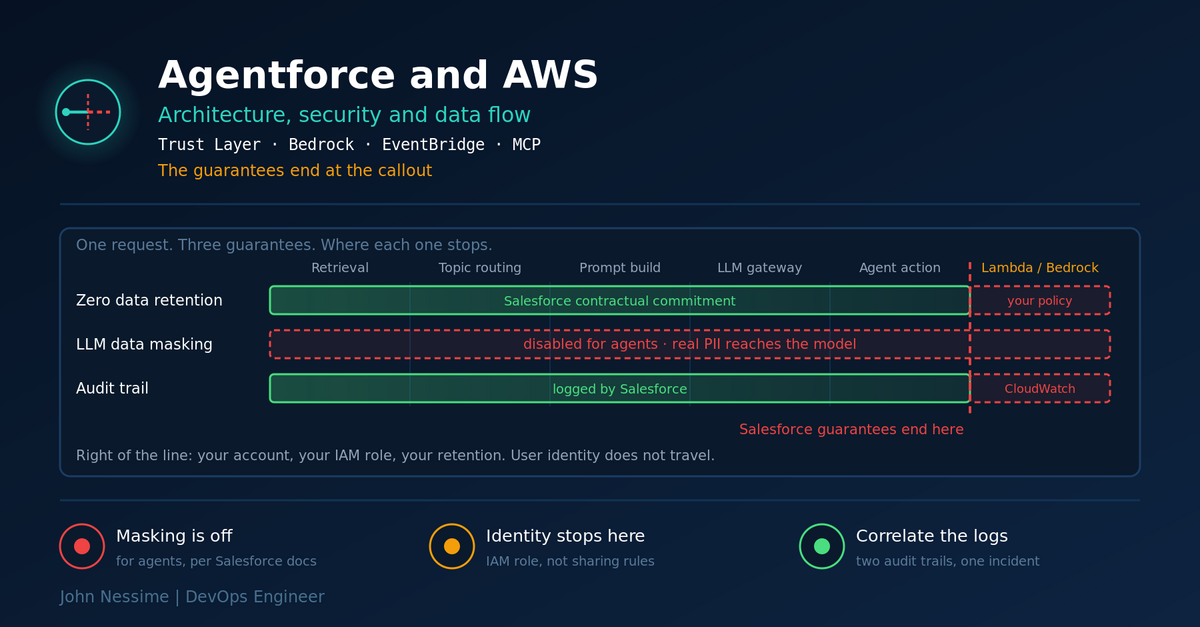
Steps one to three happen inside Salesforce’s trust boundary, and the Einstein Trust Layer applies. Step four does not, and it doesn’t. That sentence is the whole post, but the detail matters.
Retrieval: the part that’s better than you’d expect
Grounding is where Agentforce gets its context, and the architecturally interesting decision is that vector search lives inside Data Cloud rather than in a separate vector database. Structured records and unstructured content are retrieved from the same layer, which removes a whole class of sync problem you would otherwise be building.
The security-relevant property is that retrieval is permission-aware. The agent retrieves as the running user, so sharing rules and field-level security apply. If a rep cannot see an opportunity, the agent acting on their behalf should not be able to summarise it either.
Two caveats worth putting in your notes. First, this only holds while retrieval goes through Salesforce; the moment you ground from an external source, you are enforcing access control yourself. Second, if your CRM sharing model is loose, the agent inherits that looseness and makes it much easier to exploit, because a model will cheerfully summarise a thousand records a human would never have opened one by one. Agentforce does not create the over-permissioning problem, it just removes the friction that was hiding it.
Where AWS shows up here: if your analytical data lives in Redshift, an Iceberg lake or Databricks, zero-copy federation lets Data Cloud register those tables and query them in place rather than replicating them. Good for cost and duplication, and it moves an access-control decision into the federation configuration, which is a place people forget to audit.
The Trust Layer, and the default nobody expects
The Einstein Trust Layer sits between every Salesforce-originated prompt and the model. Its components are well documented: secure grounding, data masking, system policies against prompt injection, the LLM gateway, zero data retention agreements with model providers, toxicity checks on the way back, and an audit trail of the whole journey.
Here is the part that gets misreported constantly, including in a lot of otherwise decent write-ups: LLM data masking is disabled for agents. Salesforce says so plainly in its own documentation on the Trust Layer architecture and repeats it in the Trailhead module on masking. Masking remains available and configurable for embedded generative features like service replies and work summaries. For Agentforce agents, it is off.
The reason is not hard to work out once you think about what an agent does. Masking swaps real values for placeholders. An agent that has to actually perform an action needs the real record ID, the real amount, the real email address, because those become tool arguments. You cannot pass <Person_0> to a Flow and expect it to update a contact. Masking and acting are in genuine tension, and Salesforce resolved it in favour of acting.
What this changes in practice:
- Real PII reaches the model provider. The zero data retention commitment is what protects it, not de-identification. Those are different controls with different failure modes: masking is technical and verifiable, a retention agreement is contractual.
- If your compliance position was “no personal data leaves our boundary in identifiable form,” Agentforce does not satisfy it the way you may have assumed, and this is worth raising before your security review rather than during it.
- Controlling exposure moves upstream. What the model sees is now decided by what you ground on and what your sharing model permits, not by a masking filter downstream.
None of this makes the Trust Layer weak. Zero retention, the gateway, system policies and the audit trail all still apply to agent traffic, and the Trust Layer typically runs several times in a single user turn, once for topic classification and again for generation. It is a real control plane. Just know which control is doing the work.
Connecting Agentforce and AWS: four patterns
There are four ways these two systems talk, and they have different latency, failure and security characteristics.
Synchronous outbound: agent action calls AWS
A custom agent action, implemented via External Services with an OpenAPI schema, an Apex invocable method, or a Flow, calls an endpoint you own. Behind it sits API Gateway and Lambda, and often a Bedrock agent or knowledge base.
Authentication uses named credentials, which keep the secret out of your Apex and centralise the auth config. Use them; hardcoding a key into an Apex class is the version of this that ends up in a git history.
The trade-off is that you have put a network call and a second model invocation inside a conversational turn. Users notice. Budget for it, and set the timeout deliberately rather than inheriting a default.
Asynchronous outbound: Event Relay to EventBridge
Salesforce Event Relay delivers platform events from the Salesforce event bus to Amazon EventBridge without code, and EventBridge routes onward to Lambda, S3, Step Functions or a Bedrock agent.
This is the right pattern for anything that does not need to complete inside the conversation: enrichment, downstream processing, long-running work. It also fails better, because a retry is a queue concern rather than a user watching a spinner.
Inbound: AWS calls Agentforce
The Agent API lets something on the AWS side invoke an Agentforce agent, typically through EventBridge API destinations. That gives you bidirectional multi-agent flows: a Bedrock agent that detects a problem can open a case through Agentforce rather than writing to the Salesforce API directly and bypassing the agent’s own logic.
Worth being deliberate here. An inbound path means an AWS workload can trigger agent reasoning, which means anything that can inject content into that workload can influence a prompt. Treat the payload as untrusted input, because it is.
MCP: tools rather than integrations
Agentforce has a native MCP client, so an agent can connect to any MCP-compliant server without a bespoke integration, alongside a server registry intended to let admins govern which agents connect to which tools under central policy.
This is the pattern that will cause the most trouble over the next couple of years, and not because the protocol is bad. It is because MCP makes adding a tool trivial, and every tool is a new path by which text from somewhere else reaches your agent’s context and by which your agent’s decisions reach someone else’s system. The registry exists precisely so that “which tools can this agent reach” is an administered answer rather than an emergent one. Use it as a control, not a catalogue.
Keeping the traffic private
By default these callouts traverse the public internet with TLS. Salesforce Private Connect uses AWS PrivateLink to give you a private path to your own AWS endpoints instead. Whether that is required is a policy question rather than a technical one, but it is much easier to set up at design time than to retrofit after an auditor asks.
What changes the moment you cross into AWS
This is the seam, and it is where most real incidents will come from. Four things stop being true simultaneously.
- Zero retention becomes your policy, not Salesforce’s. If your Lambda logs its input at INFO, you now have customer PII in CloudWatch Logs with whatever retention that log group happens to have, which by default is forever. Your own debug logging is the single most likely leak path in this entire architecture, and it will not show up in any Salesforce audit report.
- The audit trail splits. Salesforce logs the prompt journey. AWS logs the invocation. Nothing correlates them unless you pass a request identifier through the callout and log it on both sides. Do that from day one; reconstructing an incident across two disconnected audit systems is genuinely unpleasant.
- User identity does not travel. This is the important one. Inside Salesforce the agent acts as the running user and sharing rules apply. Your Lambda runs under an IAM execution role with fixed permissions and no idea who asked. If that role can read a whole DynamoDB table, then every user of the agent can effectively read the whole table through it, regardless of their CRM permissions. That is a classic confused deputy, and it is easy to build without noticing. If the action needs to be scoped per user, pass the identity explicitly and enforce it in your own code.
- Model governance forks. A Bedrock model you invoke from your own Lambda is outside the Trust Layer. Its guardrails, logging and retention are configured in your account and are yours to get right. If you want prompt filtering or PII detection on that leg, you are building or buying it.
Note the difference between two things people conflate. Salesforce running on Hyperforce, which is built on public cloud infrastructure including AWS, means Salesforce’s own workloads run there under Salesforce’s controls. It does not mean your Salesforce data sits in your AWS account. When an agent action calls your Lambda, that is the first moment data lands in infrastructure you control and are responsible for.
Common mistakes
- Assuming masking protects agent traffic to the model. It does not; check the current documentation yourself rather than taking a blog’s word for it, including this one.
- Logging full request payloads in Lambda during development and never turning it off.
- Giving the Lambda execution role broad data access because “the agent is trusted,” when the agent is a proxy for every user who can talk to it.
- Putting a slow AWS call inside a synchronous agent action when the work did not need to be synchronous.
- Not passing a correlation identifier across the boundary, so Salesforce and CloudWatch tell two unlinked stories.
- Treating content returned from an external tool or MCP server as trusted context rather than as untrusted input that will be read by a model.
- Deploying agents against a permissive sharing model and discovering the blast radius later.
Frequently asked questions
Does Agentforce data get used to train models?
Not on the Salesforce leg. Salesforce’s zero data retention arrangements with model providers mean prompts and responses are not stored or used for training. That commitment covers traffic going through the LLM gateway. It says nothing about a model you invoke yourself from your own AWS account, where the retention and logging configuration is entirely yours.
Can I use my own Bedrock model inside Agentforce?
There are two distinct things here. Bedrock-hosted models can be brought into Salesforce through the Einstein and Bedrock integration, in which case they sit behind the Trust Layer. Separately, you can call a Bedrock model or agent from a custom agent action, in which case you are outside the Trust Layer and own the controls. Be clear which one you are building, because they have completely different compliance stories.
Sync or async for AWS integrations?
Default to async through Event Relay and EventBridge unless the agent genuinely needs the result to continue the conversation. Synchronous callouts put a network round trip and often a second inference call inside a user’s turn, and they fail in front of the user rather than into a retry queue.
How do I stop the agent seeing data a user shouldn’t?
Inside Salesforce, fix the sharing model, because retrieval respects it and inherits its flaws. Outside Salesforce, sharing rules do not apply at all: pass the user identity through the callout and enforce authorisation in your own code, or scope the integration to data that is safe for every user of that agent.
Do I need PrivateLink for this?
Technically no; callouts work over TLS on the public internet. Practically it depends on your regulatory position and whether your AWS endpoints should be publicly reachable at all. If they should not be, Private Connect over PrivateLink is the supported path and is far cheaper to design in than to add later.
What should I log, and where?
On the AWS side, log the correlation identifier, the action name, the outcome and the timing. Do not log the payload. If you need payload-level debugging, gate it behind a flag that is off in production and set an explicit short retention on the log group. Ship the operational metrics somewhere you already watch, whether that is CloudWatch alarms, Grafana or Datadog, because an agent action that silently starts failing looks like nothing at all from the Salesforce side.
The one thing to take away
Wiring up Agentforce and AWS is not hard. The patterns are documented, the connectors exist, and a working proof of concept is a day’s work.
What is hard is knowing precisely where Salesforce’s guarantees end. They end at the callout. Everything before it is covered by the Trust Layer, with the significant exception that masking is off for agents, so what reaches the model is real data protected by a retention agreement rather than by de-identification. Everything after it is yours: your retention, your audit trail, your authorisation, your logs.
Draw that line on your architecture diagram before the security review, not during it.
Need help designing or reviewing this?
I work on the AWS side of Salesforce integrations, which is usually the side nobody owns. Things I can help with:
- Threat-modelling the seam between Agentforce and your AWS account, and writing down what each side actually guarantees.
- Building agent actions on API Gateway and Lambda with named credentials, sane timeouts and no payload logging.
- Event-driven integration via Event Relay and EventBridge, including retry, dead-letter and replay design.
- Scoping IAM execution roles so an agent action cannot become a confused deputy for every user who can reach it.
- Correlated observability across Salesforce and CloudWatch so an incident can be reconstructed in one timeline.
- Private Connect and PrivateLink setup where callouts should not touch the public internet.
If you have an integration already built, send me the agent action definition and the Lambda’s IAM policy. Those two together usually tell the whole story.