Someone tidies up a namespace that has not been used in a while. A few PVCs go with it. Nobody thinks twice, because a PersistentVolumeClaim sounds like bookkeeping: a claim, a request, a bit of Kubernetes paperwork.
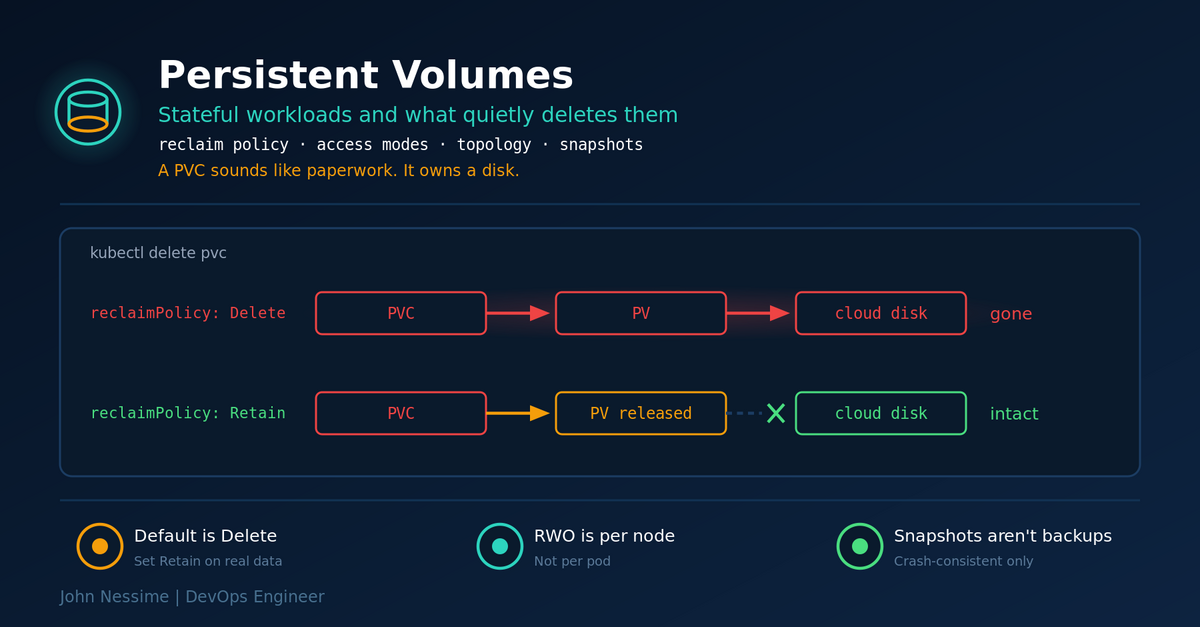
Twenty seconds later the underlying disk no longer exists in AWS. Not detached. Deleted. The reclaim policy on the StorageClass was Delete, which is the default on essentially every managed cluster, and deleting the claim cascaded straight through to the volume.
That is the sharp edge of Kubernetes persistent volumes, and it is a naming problem as much as a technical one. Three objects sit between your pod and a real disk, the relationships between them are not obvious from the names, and the defaults are tuned for ephemeral test clusters rather than for anything holding data you care about.
This is short and covers the parts that bite: reclaim policies, what access modes actually mean, why volumes pin pods to a zone, and the difference between a StatefulSet and a Deployment that matters in practice.
Three objects, one disk
The mental model that prevents most of this:
- StorageClass is the recipe. It says which driver provisions volumes and what the defaults are.
- PersistentVolume is the actual piece of storage in the cluster. Usually created for you rather than by you.
- PersistentVolumeClaim is the request a pod makes, and the thing that binds one-to-one with a PV.
The PVC is the object your team touches, and it is the one whose name most understates its power. Deleting a PVC can delete a disk. That behaviour comes from the StorageClass, so check what yours says before you need to know:
# Read the RECLAIMPOLICY column. On managed clusters it usually
# says Delete, and nothing anywhere warns you about that.
kubectl get storageclass
For anything holding real data, define your own class with Retain and use it deliberately:
apiVersion: storage.k8s.io/v1
kind: StorageClass
metadata:
  name: gp3-retain
provisioner: ebs.csi.aws.com
reclaimPolicy: Retain              # PV outlives the PVC
volumeBindingMode: WaitForFirstConsumer
allowVolumeExpansion: true
parameters:
  type: gp3
The trade-off is real and worth stating: Retain means orphaned volumes accumulate and quietly cost money, and a released PV will not automatically rebind to a new claim. You are choosing a cleanup chore over a data loss risk. That is the right trade for a database and the wrong one for a scratch cache.
Existing volumes keep whatever policy they were created with, so changing the class does nothing retroactively. Patch them individually:
kubectl patch pv "$PV_NAME"
  -p '{"spec":{"persistentVolumeReclaimPolicy":"Retain"}}'
ReadWriteOnce does not mean one pod
It means one node. Multiple pods scheduled onto the same node can mount the same ReadWriteOnce volume and write to it simultaneously. The Kubernetes documentation says this explicitly, and almost everyone reads the name and assumes otherwise.
For a database, two writers on one filesystem is corruption. If you need genuine exclusivity, there is an access mode for it, stable since Kubernetes 1.29 and available on CSI volumes:
spec:
  accessModes:
    - ReadWriteOncePod        # enforced by the scheduler
The same access mode causes a second, more visible problem. Put a ReadWriteOnce volume on a Deployment with the default rolling update strategy and you get a deadlock: the new pod cannot start because the volume is still attached to the old pod’s node, and the old pod will not terminate until the new one is ready. The rollout sits there until it times out.
spec:
  strategy:
    type: Recreate            # old pod goes first, then the new one
That buys you downtime on every deploy, which is the honest cost of a single-writer volume behind a Deployment. If you cannot accept the downtime, you need either shared storage that supports ReadWriteMany or an application that handles its own replication, which is usually a StatefulSet.
Volumes pin pods to a zone
Block storage from a cloud provider lives in one availability zone. A pod using it can only ever be scheduled onto a node in that zone. Nothing in your Deployment spec says so, and the symptom is a pod stuck in Pending after a node replacement or a scale-up that happened to land elsewhere.
kubectl describe pod tells you, in among the scheduler events, that no node matched the volume’s node affinity. It is easy to miss if you are scanning for something more dramatic.
The preventive setting is volumeBindingMode: WaitForFirstConsumer, which is in the StorageClass above. It delays provisioning until a pod is actually scheduled, so the volume gets created in a zone where the pod can run rather than the other way round. Set it on every class you create. The immediate-binding alternative provisions a volume somewhere convenient and then constrains your scheduler forever.
StatefulSet or Deployment
The practical difference is not ordering guarantees or DNS names, useful as those are. It is that a StatefulSet gives each replica its own volume, created from a template, with a stable name that survives rescheduling. A Deployment with a PVC gives every replica the same volume, which is only correct when you have one replica.
So: one instance with a disk can be a Deployment with Recreate. Anything that scales and keeps per-replica state should be a StatefulSet.
StatefulSet PVCs historically survived everything, including deleting the StatefulSet, which is safe and leaves litter. Since Kubernetes 1.32 you can state the policy explicitly, and both fields still default to Retain:
spec:
  persistentVolumeClaimRetentionPolicy:
    whenDeleted: Retain       # deleting the StatefulSet keeps the data
    whenScaled: Delete        # scaling down cleans up the extra replicas
That pairing is the sensible default for most workloads. Be careful with whenScaled: Delete on anything where you scale down temporarily and expect the data back when you scale up again.
Two one-way doors
Volumes grow, they do not shrink. Expansion is stable and works by editing the claim’s requested size, provided the StorageClass allows it and the driver supports it. There is no supported path back. Over-provisioning a PVC is a permanent decision until you migrate the data to a smaller one by hand.
A volume snapshot is not a database backup. Snapshotting a running database’s disk gives you a crash-consistent image: the equivalent of pulling the power cable. Most engines recover from that, and “most” is not a word you want in a recovery plan. Use the database’s own backup mechanism for the database, and treat volume snapshots as infrastructure convenience rather than your restore path. Whichever you choose, restore one before you need to.
Troubleshooting
Pod stuck in Pending. Read the events at the bottom of kubectl describe pod. Volume node affinity conflict means a zone mismatch. No storage class means the cluster has no default and the claim did not name one.
PVC stuck in Pending. kubectl describe pvc names the provisioner error. With WaitForFirstConsumer this is normal until a pod is scheduled, so check whether anything is actually trying to consume it before debugging the driver.
Rollout hangs forever on a stateful app. ReadWriteOnce plus rolling update. Switch to Recreate.
PVC will not delete. A finalizer is holding it because something still mounts it. Find the consuming pod rather than removing the finalizer by hand, which is how you end up with a PV bound to a claim that no longer exists.
Volume is full but the PVC says it has room. You expanded the PVC and the filesystem did not follow. Most CSI drivers resize the filesystem on the next pod restart; if yours has not, restart the pod and check again.
Common mistakes
- Running production data on the default StorageClass without checking its reclaim policy.
- Assuming ReadWriteOnce prevents two pods from writing.
- A ReadWriteOnce volume on a Deployment with rolling updates.
- Scaling a Deployment with a PVC past one replica.
- Leaving
volumeBindingMode: Immediate, then debugging Pending pods for an hour. - Treating volume snapshots as database backups.
- Over-sizing a PVC on the assumption you can shrink it later.
- Removing a stuck finalizer instead of finding what is holding the volume.
- Deleting a namespace without checking what claims live in it.
Best practices
- Your own StorageClass with
Retainfor anything you would miss, and the default for everything else. WaitForFirstConsumeron every class you define.allowVolumeExpansion: truefrom the start, because adding it later does not help existing volumes.- ReadWriteOncePod where exactly one writer is a correctness requirement.
- StatefulSets for per-replica state, single-replica Deployments with
Recreatefor everything else. - An explicit
persistentVolumeClaimRetentionPolicyrather than relying on the default. - Application-level backups for databases, tested by restoring one.
- Alerts on volume capacity, because a full disk is the most predictable outage there is.
FAQ
Does deleting a PVC delete my data?
If the reclaim policy is Delete, yes, and that is the default nearly everywhere. Run kubectl get storageclass and read the RECLAIMPOLICY column before you assume otherwise.
Can two pods share a ReadWriteOnce volume?
Yes, if they are on the same node. ReadWriteOnce restricts access to one node, not one pod. Use ReadWriteOncePod when you need a single writer enforced.
Why is my pod Pending with a bound PVC?
Almost always zone affinity: the volume is in one availability zone and no schedulable node is there. The events in kubectl describe pod say so. WaitForFirstConsumer prevents it happening again.
Should I run databases in Kubernetes at all?
You can, with a mature operator that handles failover, backups and upgrades. Whether you should depends on whether your team wants to operate a database platform or just use a database. A managed service is often the better answer and there is no shame in it.
Can I shrink a PersistentVolumeClaim?
No. Expansion is supported, reduction is not. The only route down is a new smaller volume and a data migration.
The one thing to remember
Kubernetes storage defaults assume your cluster is disposable. Reclaim policies delete disks, access modes permit more sharing than their names suggest, and volumes constrain scheduling in ways nothing surfaces until a pod will not start.
Go and run kubectl get storageclass on your production cluster now. If the reclaim policy on the class holding your database says Delete, you have found something worth fixing before lunch.
Need a hand with stateful workloads?
Storage is where most Kubernetes migrations get uncomfortable, and it is usually the last thing anyone designs. Work I take on:
- Auditing a cluster’s storage classes, reclaim policies and access modes, and telling you what a stray
kubectl deletewould actually destroy. - Moving stateful applications onto StatefulSets with sane retention, expansion and scheduling behaviour.
- Backup and restore design for data in Kubernetes, including an actual restore test rather than a documented intention.
- Diagnosing Pending pods, stuck rollouts and volumes that will not detach.
- CSI driver setup and storage class design on EKS and self-managed clusters.
- Capacity alerting so a full volume is a notification instead of an incident.
Send me the output of kubectl get storageclass and kubectl get pv, and I will tell you what stands out.