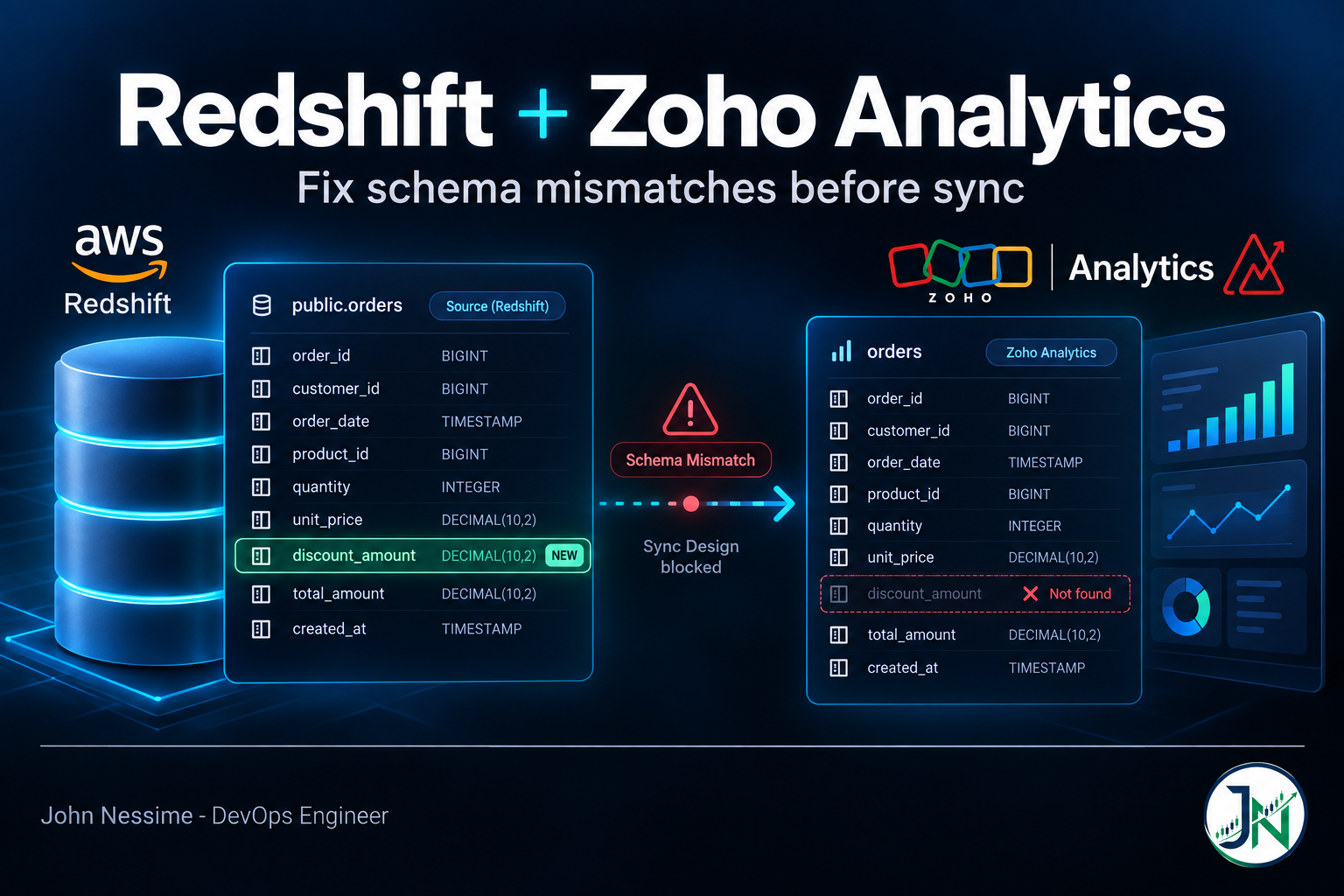
Someone from finance asks why discount_amount isn’t showing up in the dashboard. You added it to the Redshift table last week. You went into the connection settings, clicked Sync Design, waited, and it reported success. The column is still not there.
Nothing failed. Sync Design ran exactly as designed. What it did not do is fetch any new column information, because there is an unresolved mismatch sitting in the connection, on a different table, from a rename somebody did two months ago that nobody noticed. Until that is cleared, design sync will keep running and keep declining to pick up anything new.
That behaviour is documented, not a bug, and it is the single most useful thing to know about a Zoho Analytics Redshift schema mismatch. Mismatches are not independent little problems you can leave lying around. One of them jams the mechanism for all of them.
This walks through the three families these problems come in, names, types and time, the fix for each, and the structural change that stops them recurring: stop pointing the BI tool at your base tables.
First: work out which mode you are actually in
Zoho Analytics connects to Redshift two completely different ways, and half the confusion in this area comes from people reading advice written for the other one. Whoever set the connection up may have left, so check rather than assume.
Data Import copies the data into Zoho Analytics on a schedule. Reports are fast because they run against Zoho’s own storage. In this mode:
- Column additions and deletions are synchronised automatically.
- You can change a column’s data type inside Zoho Analytics, but the type has to stay compatible with the Redshift column or subsequent syncs fail. Zoho’s own guidance is to change it in both places, which is worth taking literally.
- You can create query tables, and import a filtered subset using a custom query.
Live Connect keeps nothing locally and queries Redshift when a report loads. It is available on the paid tiers only. In this mode:
- Column additions, deletions and renames are not synchronised automatically. You have to trigger Sync Design from the Edit Redshift Settings page.
- You cannot change a column’s data type in Zoho Analytics at all. Whatever Redshift says, that is what you get.
- No query tables, and you cannot pull other data sources into that workspace.
- Foreign keys defined in Redshift become lookup relationships automatically, which is a genuine advantage over Data Import, where you build those by hand.
- Report loading time is your Redshift cluster’s problem now.
The practical consequence: in Live Connect, every schema fix has to happen in Redshift. There is no BI-side escape hatch. That constraint sounds annoying and is actually the thing that pushes you toward the right architecture, which is the last section of this post.
Family 1: names
Zoho keeps its own copy of the table and column names it expects. When Redshift’s names drift away from that copy, the difference shows up in the Mismatch tab of the connection settings, and the two most common causes are both silent.
Case folding
Redshift lowercases unquoted identifiers. Somebody writes what looks like a camel-case column name, Redshift stores something else, and the BI tool is now looking for a column that does not exist under that name.
-- These two do NOT create the same column.
ALTER TABLE analytics.orders ADD COLUMN DiscountAmount DECIMAL(12,2);
-- ...stored as: discountamount

ALTER TABLE analytics.orders ADD COLUMN "DiscountAmount" DECIMAL(12,2);
-- ...stored as: DiscountAmount
Pick one convention, lowercase with underscores, and enforce it. Mixed quoting across a schema means some columns are case-sensitive and some are not, and you will spend an afternoon working out which.
See what Redshift actually has
Before touching anything in Zoho, get the ground truth. Use SVV_COLUMNS rather than PG_TABLE_DEF, because the latter only returns rows for schemas that happen to be in your search_path and silently returns nothing otherwise, which has wasted a lot of people’s time.
SELECT table_name,
       column_name,
       ordinal_position,
       data_type,
       character_maximum_length,
       numeric_precision,
       numeric_scale
FROM svv_columns
WHERE table_schema = 'analytics'
ORDER BY table_name, ordinal_position;
Export that, put it next to the Mismatch tab, and work down the list. Guessing from memory is how you resolve four mismatches and leave the fifth.
Renames and drops
A rename upstream reads to Zoho as one column disappearing and an unrelated one appearing. If a report or formula referenced the old name, you will also see the alert about a view that cannot be accessed because of changes made to the table. The fix there is to re-synchronise the table from the connection settings, but re-syncing will not help while the Mismatch tab still has entries.
So the order is fixed: clear every mismatch first, then Sync Design, then fix reports. Doing it in any other order produces the “I clicked sync and nothing happened” experience.
Family 2: types
Redshift has a rich type system. A BI tool has maybe a dozen column types. The mapping is lossy in places, and the losses are quiet.
TEXT and BPCHAR are not what they look like
This one catches people migrating from PostgreSQL, where TEXT is unbounded. In Redshift it is an alias that becomes VARCHAR(256), and BPCHAR becomes CHAR(256). Longer values get rejected or truncated depending on how they arrive, and the column reaching Zoho is a 256-character string rather than the free text you thought you had.
-- Looks unbounded. Is not.
CREATE TABLE staging.notes (body TEXT);        -- VARCHAR(256)

-- Say what you mean. 65535 bytes is the VARCHAR maximum.
CREATE TABLE staging.notes (body VARCHAR(65535));
VARCHAR length is measured in bytes
Not characters. An accented Latin character costs two bytes, most CJK characters three, an emoji four. A VARCHAR(50) holds fifty English letters or twelve emoji. Names, addresses and free-text fields with international data hit this constantly, and the symptom in the dashboard is a truncated string rather than an error.
-- LENGTH counts characters, OCTET_LENGTH counts bytes.
-- The second number is the one that has to fit.
SELECT MAX(LENGTH(customer_name))       AS max_chars,
       MAX(OCTET_LENGTH(customer_name)) AS max_bytes
FROM analytics.customers;
Widening a VARCHAR is one of the few in-place alterations Redshift allows. Narrowing one, or changing a column’s type outright, generally means rebuilding the table, so size these deliberately at creation rather than planning to fix them later.
Numbers and precision
A DECIMAL(38,10) is a perfectly reasonable warehouse column and an awkward BI column. Currency stored as a float is worse, because you get rounding that appears only in the total row and only sometimes, which is a genuinely unpleasant thing to debug in front of a finance team.
Cast money to a fixed scale before it leaves Redshift. Two decimal places, DECIMAL not FLOAT, decided once in the warehouse rather than per-report in the BI tool.
SUPER, and anything else with no BI equivalent
Semi-structured SUPER columns, VARBYTE, GEOMETRY, HLLSKETCH: there is no sensible column type on the other side. Do not expose them. Flatten what you need into typed scalar columns in a view and leave the rest in the warehouse.
If you are in Data Import mode
You have the option of overriding a column’s type on the Zoho side. Use it sparingly. Zoho’s requirement is that the type stays compatible with Redshift’s, and “compatible” is doing quiet work in that sentence: an override that works today breaks the next sync when a value arrives that the Zoho type cannot hold. Changing it in both places, as Zoho recommends, is the version that keeps working.
Family 3: time
This one does not appear as a mismatch anywhere. It appears as a reconciliation problem, which is worse, because you spend the first hour looking for missing rows.
Redshift has TIMESTAMP, which carries no timezone and means whatever the writer intended, and TIMESTAMPTZ, which is stored in UTC. A BI tool has a timezone setting of its own. Between those, a row written at 23:40 local time can be counted on a different day at each end.
The tell is specific and worth memorising: daily totals match, monthly totals do not. Nothing is missing. A few hours’ worth of rows at each month boundary are being attributed to the neighbouring month.
-- Run the dashboard's aggregate directly against Redshift and
-- compare. Relative bounds so this keeps working next month.
SELECT DATE_TRUNC('day', created_at) AS day,
       COUNT(*)                      AS orders,
       SUM(total_amount)             AS revenue
FROM analytics.orders
WHERE created_at >= DATEADD(month, -1, DATE_TRUNC('month', GETDATE()))
  AND created_at <  DATE_TRUNC('month', GETDATE())
GROUP BY 1
ORDER BY 1;
The fix is to stop making the BI tool guess. Convert in Redshift, expose both the UTC instant and a pre-computed local date, and build every report on the pre-computed one:
-- CONVERT_TIMEZONE is the Redshift idiom. Doing this once here
-- beats doing it in every report and getting it right in most.
SELECT
    created_at                                            AS created_at_utc,
    CONVERT_TIMEZONE('UTC', 'Europe/London', created_at)  AS created_at_local,
    CAST(CONVERT_TIMEZONE('UTC', 'Europe/London', created_at) AS DATE)
                                                          AS order_date_local
FROM analytics.orders;
Named zones rather than fixed offsets, so daylight saving is handled for you. A hardcoded offset is correct for roughly half the year.
The structural fix: give Zoho a contract, not your tables
Everything above is treatment. This is prevention, and it is the part worth doing even if nothing is currently broken.
Pointing a BI tool at base tables means every upstream change is a potential BI incident. Someone widening a column, renaming a field, or adding a SUPER column for a new feature has no idea a dashboard depends on it. Put a view layer in between and that stops being true: the view is the interface, the tables underneath are free to change, and you decide when the interface changes.
CREATE OR REPLACE VIEW analytics.v_orders_bi AS
SELECT
    -- Explicit casts pin the types Zoho will see, so an upstream
    -- change cannot quietly alter the shape of the report.
    CAST(o.order_id      AS BIGINT)         AS order_id,
    CAST(o.order_status  AS VARCHAR(64))    AS order_status,
    CAST(o.total_amount  AS DECIMAL(18,2))  AS total_amount,

    o.created_at                            AS created_at_utc,
    CAST(CONVERT_TIMEZONE('UTC','Europe/London', o.created_at) AS DATE)
                                            AS order_date_local,

    -- SUPER flattened to something a BI column can hold.
    CAST(o.attributes.channel AS VARCHAR(64)) AS channel
FROM analytics.orders o
WITH NO SCHEMA BINDING;
WITH NO SCHEMA BINDING creates a late-binding view: it does not hold a dependency on the underlying table, so you can drop and recreate analytics.orders without Redshift refusing or the view vanishing. For a warehouse where tables get rebuilt by a nightly load, that is the difference between a maintenance window and a broken dashboard.
List columns explicitly. Never SELECT * in a view a BI tool depends on, because then any upstream column addition changes the contract without anybody deciding to.
Give the connection its own read-only Redshift user, granted access to the views and nothing else. That also means the credentials in the BI tool cannot read tables you did not intend to publish:
CREATE USER zoho_reader PASSWORD 'use-a-generated-one';
GRANT USAGE ON SCHEMA analytics TO zoho_reader;
GRANT SELECT ON analytics.v_orders_bi TO zoho_reader;
The honest cost: a view layer is a thing to maintain, and adding a column now means editing the view as well as the table. That is the point. The friction is the control. If your views are getting numerous, managing them with dbt or an equivalent gives you version control and review on what is otherwise a pile of undocumented SQL.
A repeatable resolution procedure
- Get ground truth from Redshift. Run the
SVV_COLUMNSquery and save the output. - Open the Mismatch tab in the connection settings and list every entry, including ones on tables nobody reports on.
- Resolve every mismatch. All of them. A single leftover blocks design sync for everything else.
- Trigger Sync Design and confirm the new columns actually appear before moving on.
- Check types, not just names. A column can sync successfully and still be the wrong type. Spot-check the ones carrying money and dates.
- Reconcile a known number. Run the same aggregate in both places for a closed period. Daily and monthly. If daily matches and monthly does not, go back to the timezone section.
- Fix broken reports last, once the data underneath them is right.
Troubleshooting
Sync Design runs but the new column never appears
An unresolved mismatch is blocking it, almost certainly on a table you were not looking at. Clear the Mismatch tab completely, then sync again.
“This view cannot be accessed due to some changes made in the table”
Something the report depends on was renamed or deleted in Redshift. Re-synchronise that table from the connection settings. If it recurs after every deployment, that is the argument for the view layer.
The connection failed entirely
Check three things in order: whether the Redshift database was renamed or dropped, whether Zoho’s IP addresses are still allowlisted in your security group, and whether the credentials still work. A renamed database needs the connection edited; a dropped one means starting over.
Reports show old data after a schema fix
In Live Connect, caching can be enabled per workspace with its own refresh interval, and it applies to reports rather than tables. If the numbers look stale after you fixed something, check that setting before you conclude the fix did not work.
Text is truncated in the dashboard but complete in Redshift
Byte-length truncation on multi-byte characters, or a TEXT column that quietly became VARCHAR(256). Compare LENGTH against OCTET_LENGTH and widen the column.
Totals are close but not equal
Timezone if the gap sits at period boundaries. Precision if it is a consistent tiny drift across everything. Filters that differ between the report and your reconciliation query if it is neither. Check them in that order, because the first two are far more common than a genuinely missing row.
Common mistakes
- Fixing one mismatch, running Sync Design, and assuming the rest can wait.
- Not knowing whether the connection is Data Import or Live Connect, and applying advice for the wrong one.
- Overriding a column type in Zoho without changing it in Redshift, so the next sync fails.
- Using
TEXTin Redshift and expecting PostgreSQL behaviour. - Sizing
VARCHARby character count when the limit is in bytes. - Storing currency as a float.
- Mixing quoted and unquoted identifiers, so some column names are case-sensitive and some are not.
- Letting reports use raw timestamps and setting the timezone per report.
- Using a fixed UTC offset instead of a named timezone.
- Pointing the BI tool at base tables that a nightly job rebuilds.
SELECT *in a view that a dashboard depends on.- Connecting with an admin-level Redshift user because it was quicker.
- Declaring the fix done without reconciling a number against the warehouse.
Best practices
- Expose late-binding views to the BI tool, never base tables.
- Cast every column explicitly in the view so the types are decided, not inferred.
- Do timezone conversion in Redshift and publish a pre-computed local date.
- Lowercase, underscore-separated identifiers everywhere, unquoted.
- Fixed-scale
DECIMALfor money, never floating point. - Size
VARCHARagainstOCTET_LENGTHof real data, with headroom. - A dedicated read-only Redshift user granted access only to the reporting views.
- Treat the Mismatch tab as a queue to empty, not a list to triage.
- Reconcile at least one aggregate against the warehouse after every schema change.
- Version-control the view definitions, with dbt or just a repository of SQL files.
- Tell whoever owns the upstream tables that a view depends on them.
FAQ
What exactly is a mismatch in Zoho Analytics?
A disagreement between the table and column names Zoho Analytics expects and the ones Redshift currently has. They are listed in the Mismatch tab of the Redshift connection settings. The important property is that leaving one unresolved stops Sync Design from fetching new column information at all.
Why does Sync Design not pick up my new column?
Because there is at least one mismatch outstanding. Clear the Mismatch tab entirely and run it again. It is not a caching issue and re-running it more times will not help.
Should I use Data Import or Live Connect?
Data Import when you want fast dashboards, query tables, and the ability to blend data, and can accept the data being as fresh as the last sync. Live Connect when the numbers must be current and you would rather not duplicate the data, accepting that report speed becomes a Redshift performance question and every schema change needs a manual sync.
Can I change a column’s data type in Zoho Analytics?
In Data Import, yes, provided it stays compatible with the Redshift type. In Live Connect, no. Either way the durable fix is to cast the column correctly in a view on the Redshift side, so both ends agree without anyone having to remember an override exists.
Why do my dashboard totals not match the warehouse?
If daily figures agree and monthly ones do not, it is timezone handling at period boundaries. If everything is off by a tiny consistent amount, it is numeric precision. Genuinely missing rows are the least likely of the three and the one people check first.
How do I handle SUPER columns?
Do not expose them. Extract the specific fields you report on, cast them to scalar types in a view, and let the rest stay in the warehouse. A BI tool has nowhere to put a nested document.
Will a view layer slow down Live Connect reports?
A little, since the casts and conversions run per query. In practice the dominant cost is how much data the query scans, so sort keys and distribution keys on the underlying tables matter far more than the view. Measure before optimising, and if a particular view is genuinely expensive, materialise it as a table refreshed by your load job.
The one thing to remember
A Zoho Analytics Redshift schema mismatch is not a small isolated problem you can leave in the queue. One unresolved entry stops new columns arriving at all, which is why the symptom people report is almost never “there’s a mismatch” and almost always “I added a column and nothing happened”.
Clear them all, then sync, then reconcile a real number rather than trusting that it worked. And once it is working, spend the afternoon putting a view layer in between, because the alternative is having this conversation again the next time someone upstream renames a field they had no idea you were reading.
Need this sorted out properly?
Warehouse-to-BI connections tend to be set up once, by someone who has since moved on, and then quietly degrade. Work I take on:
- Auditing an existing Redshift to Zoho Analytics connection and clearing the mismatch backlog properly.
- Building a reporting view layer in Redshift with explicit casts, timezone handling and late binding, so upstream changes stop breaking dashboards.
- Reconciling dashboard figures against the warehouse and finding where the difference comes from.
- Redshift schema work: type corrections, column sizing, flattening
SUPERdata into reportable columns. - Least-privilege database users and network access for BI tools, including security group and allowlist configuration.
- Putting the view definitions under version control with dbt so schema changes get reviewed instead of discovered.
Send me the output of the SVV_COLUMNS query above and a screenshot of your Mismatch tab, and I will tell you what is actually wrong.