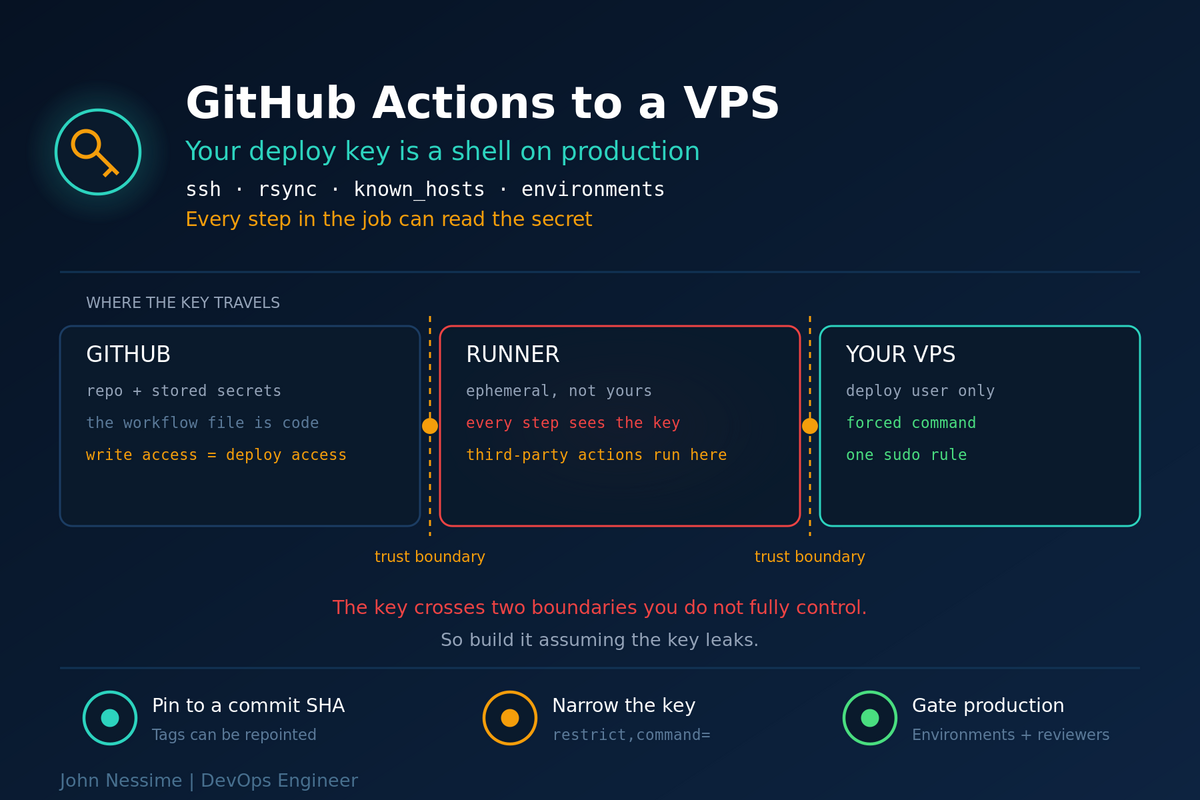
Stop and look at what you are about to build. A private SSH key that can log into your production server, pasted into a text box on github.com, handed to a container you do not control, which then runs code from repositories maintained by people you have never met.
That is not hypothetical caution. In March 2025 a widely used third-party action was compromised: the attacker got hold of a maintainer’s token, pushed a malicious commit, and then retroactively repointed every version tag at it. Repositories that referenced the action by tag, which is nearly all of them, picked up the payload automatically. It dumped the runner’s secrets into the build log. On public repositories, those logs are readable by anyone.
Nobody’s workflow file changed. Nobody clicked anything. The pipeline just quietly handed out its credentials one Friday.
A GitHub Actions VPS deployment is fundamentally a credential handoff, and most guides on the topic skip straight to the YAML. This post covers the YAML too, but the useful part is what surrounds it: how to narrow the key so it cannot do much, how to verify you are talking to the right server, how to stop an unreviewed commit reaching production, and which of the failures here are silent.
Who can actually reach that key
Worth being explicit, because it is a longer list than people expect:
- Anyone with write access to the repository. A workflow file is code. Push a branch with a step that prints the key somewhere, trigger it, done. Write access to the repo is effectively access to the server.
- Every action in the job. Secrets are exposed to the whole job, not just the step that references them. A compromised action anywhere in that job can read the environment.
- Anyone who can influence what runs. This is why
pull_request_targetcombined with checking out the pull request’s own code is such a well-known foot-gun: it runs the fork’s code with the base repository’s secrets in scope.
The goal is not to make the key unreachable. It is to make a stolen key not worth much.
Decide how the runner authenticates
Three options, and the right one depends on what you already run.
- A dedicated SSH key in repository secrets. The default. Simple, works everywhere, and it is a long-lived credential sitting in a place several people can reach. Acceptable when the key is narrowed properly, which is most of the rest of this post.
- An overlay network. Put the runner and the server on a private network with Tailscale or WireGuard for the duration of the job, using an ephemeral auth key, and close SSH to the public internet entirely. More moving parts, and it removes port 22 from the internet rather than defending it. If you already run an overlay for other reasons, this is clearly better.
- A self-hosted runner on the server. No inbound SSH at all, since the runner polls outward. The trade-off is real and often understated: you have just installed a general-purpose code execution service on your production box, and for a public repository that is close to indefensible. On a private repository with a trusted team it is reasonable.
One thing that sounds appealing and is not practical: allowlisting GitHub’s runner IP ranges at your firewall. The ranges are published through GitHub’s meta API, but they are enormous and they change, and every other GitHub customer’s job runs from inside them. It buys you very little for a lot of maintenance.
Narrow the key until it is boring
Assume the key leaks. What can the holder do? Work backwards from there.
Give it its own user. A deploy account that owns the application directory and nothing else. Not your admin account, not root, and definitely not a key you also use from your laptop.
Restrict the key in authorized_keys. SSH lets you attach options to an individual key, and they apply regardless of what the client asks for:
# ~deploy/.ssh/authorized_keys
#
# restrict = no port forwarding, no agent forwarding, no X11,
#            no PTY, no user rc file. Deny everything, then
#            re-enable only what you need.
# command  = ignore whatever the client asked to run and run
#            this instead. The client's command is available
#            to the script as $SSH_ORIGINAL_COMMAND.

restrict,command="/usr/local/bin/deploy-guard" ssh-ed25519 AAAA...  deploy@github-actions
The guard script decides what the key is allowed to do. Keep it short enough to read in one go:
#!/usr/bin/env bash
# /usr/local/bin/deploy-guard
set -euo pipefail

case "${SSH_ORIGINAL_COMMAND:-}" in
  # rsync sends its own server-side invocation. Match it loosely
  # enough to work, tightly enough to pin the destination.
  "rsync --server "*" /var/www/app/")
    exec $SSH_ORIGINAL_COMMAND
    ;;
  "deploy:reload")
    exec sudo /bin/systemctl reload nginx
    ;;
  *)
    echo "refused: $SSH_ORIGINAL_COMMAND" >&2
    exit 1
    ;;
esac
Now a stolen key can write to one directory and reload one service. It cannot open a shell, cannot forward a port into your private network, and cannot read anything else on the box.
Scope the sudo entry too. The deploy user needs to reload a service, not run arbitrary commands as root:
# visudo -f /etc/sudoers.d/deploy
# One command, no password, no wildcards. A wildcard here
# often turns back into a general-purpose root shell.
deploy ALL=(root) NOPASSWD: /bin/systemctl reload nginx
Be honest about the cost: the guard script is one more thing to maintain, and the day you add a new deploy step it will refuse it and you will spend ten minutes confused. That is the trade you are making, and on anything handling customer data it is worth it. On a hobby project, a plain unrestricted deploy user with no sudo is a reasonable stopping point.
Verify the server, not just the key
Almost every tutorial on this topic contains StrictHostKeyChecking=no, which turns off the check that stops you handing your credentials to whatever machine answered. It is there because the alternative is mildly annoying, and the alternative takes one command.
# Run this once, from a machine you trust, and compare the
# fingerprint against what the server reports locally.
ssh-keyscan -t ed25519 example.com
Store that output as a repository variable, not a secret. It is public information, and keeping it visible means you can actually see it when it changes, which matters because it will change the first time you rebuild the server.
The workflow
name: Deploy

on:
  push:
    tags: ['v*']          # production ships from tags, not branches

# This job reads code and talks to a server. It has no business
# writing to the repository, so take that away.
permissions:
  contents: read

concurrency:
  group: deploy-production
  # Deliberately NOT cancel-in-progress. Killing a deploy halfway
  # leaves the server in a state nobody designed.
  cancel-in-progress: false

jobs:
  deploy:
    runs-on: ubuntu-latest
    timeout-minutes: 15
    environment:
      name: production      # scoped secrets and required reviewers live here
      url: https://example.com

    steps:
      # Pin every action to a full 40-character commit SHA, with the
      # version in a trailing comment so Dependabot can still bump it.
      # Get the SHA from the action's releases page.
      - uses: actions/checkout@PUT_THE_FULL_COMMIT_SHA_HERE  # pinned

      - name: Build
        run: |
          npm ci
          npm run build

      - name: Configure SSH
        # Pass secrets through env, never interpolate ${{ }} directly
        # into a run block. Interpolation happens before the shell
        # sees the script, so a value with the wrong characters
        # either breaks the script or becomes part of it.
        env:
          DEPLOY_KEY: ${{ secrets.DEPLOY_SSH_KEY }}
          KNOWN_HOSTS: ${{ vars.DEPLOY_KNOWN_HOSTS }}
        run: |
          install -m 700 -d ~/.ssh
          printf '%sn' "$DEPLOY_KEY" > ~/.ssh/id_ed25519
          chmod 600 ~/.ssh/id_ed25519
          printf '%sn' "$KNOWN_HOSTS" > ~/.ssh/known_hosts

      - name: Ship
        run: |
          rsync -az --delete --exclude-from=.deployignore
            -e "ssh -o BatchMode=yes"
            ./dist/ deploy@example.com:/var/www/app/

      - name: Reload and verify
        run: |
          ssh -o BatchMode=yes deploy@example.com 'deploy:reload'
          curl --fail --silent --show-error https://example.com/healthz > /dev/null
Three details in there worth calling out, because they are the ones people leave out.
-o BatchMode=yes stops SSH prompting for anything. Without it, a missing key or an unknown host produces a prompt that nobody is there to answer, and the job hangs until the timeout instead of failing in three seconds.
--delete is what makes the target match the source, which is the point of a deploy, and also what will erase your uploads directory if .deployignore is wrong. Run it once with --dry-run against staging and read the list before you point it at production.
The final curl --fail is the difference between “the files copied” and “the site works”. Files landing on disk is not a successful deploy, and a job that goes green while the site returns 502 is worse than one that fails.
Third-party actions
There are convenient actions that wrap SSH deployment, and they save maybe eight lines. In the one job on your account that holds a production credential, eight lines is a bad trade for another maintainer in your trust chain. The workflow above uses plain ssh and rsync for that reason.
Where you do use third-party actions, pin them to a full commit SHA. A tag is a pointer and pointers can be moved, which is precisely what happened in the incident at the top of this post. A SHA is content-addressed: it cannot be repointed at different code.
Two things make this sustainable rather than miserable. Dependabot understands SHA pins with a version comment and will open pull requests to bump them. And you can restrict which actions are allowed to run at all, in the repository or organisation settings, which is worth doing once and forgetting about.
Gate production properly
The environment: key in that workflow is doing more work than it appears to. Environments give you three things you cannot get from repository secrets alone:
- Scoped secrets. The production key is only available to jobs that declare the production environment. A branch that adds a job without it gets nothing.
- Required reviewers. The job pauses and waits for a named human to approve it. This is the single control that turns “anyone with write access can deploy” into “anyone with write access can request a deploy”.
- Deployment branch and tag rules. Restrict the environment so only protected tags or a specific branch can use it, so a feature branch cannot reach production even with the right job definition.
Deploying from tags rather than branch pushes is worth the small friction. It makes a release a deliberate act, and it gives you an obvious rollback: redeploy the previous tag.
For anything with real traffic, put the files somewhere new and switch atomically rather than rsyncing over a live directory. Copy into a timestamped release directory, then move a symlink. The site changes version instantly instead of spending several seconds as a mix of old and new files, and rollback becomes a symlink change rather than a redeploy.
Troubleshooting
Permission denied (publickey)
The most common cause by far is a missing trailing newline. Private keys must end with one, and pasting into a web form frequently drops it. That is why the workflow uses printf '%sn' rather than echo: it guarantees the newline regardless of what got stored.
After that, check permissions on the server: ~/.ssh must be 700 and authorized_keys 600, owned by the deploy user, and the home directory must not be group-writable. Add -vvv to the ssh command to see how far the handshake gets, and read journalctl -u ssh on the server for the reason, since the client is deliberately vague.
Host key verification failed
Either the known_hosts variable is empty, or the server’s host key genuinely changed. If you rebuilt the server, regenerate it with ssh-keyscan and update the variable. If you did not rebuild the server, stop and find out why the key changed before you update anything.
The job hangs until the timeout
SSH is waiting on a prompt nobody will answer. Add -o BatchMode=yes and it fails immediately with a readable reason instead.
rsync works from my laptop, fails from the runner
If you set a forced command, it is rejecting the invocation. The refusal message goes to stderr on the server side, so add a log line to the guard script that records $SSH_ORIGINAL_COMMAND, run the job once, and read what rsync actually sent.
Works on push, fails on pull requests
Working as intended. Secrets are not exposed to workflows triggered by pull requests from forks. Do not reach for pull_request_target to work around it. Split the workflow so that pull requests build and test without secrets, and only pushes or tags deploy.
A secret appeared in the logs
Masking matches the exact stored string. Transform it in any way and the mask stops working: base64-encoded, JSON-escaped, split across lines, or with whitespace trimmed. Do not treat masking as a control. Rotate the key, delete the run logs, and remove whatever produced the output.
Common mistakes
- Using an existing personal SSH key instead of generating a dedicated one for the runner.
- Giving the deploy user full sudo, or a sudo rule with a wildcard in it.
- Disabling host key checking with
StrictHostKeyChecking=no. - Referencing third-party actions by tag in the job that holds your production key.
- Interpolating
${{ secrets.X }}directly into arun:script instead of passing it throughenv:. - Leaving default write permissions on a job that only needs to read.
- Using
cancel-in-progress: trueon a deploy, so a second push interrupts the first mid-copy. - Running
rsync --deleteat production without testing the exclude list. - Treating “the files copied” as a successful deploy, with no health check.
- Deploying straight from branch pushes with no approval step.
- Relying on log masking to keep a leaked secret out of the output.
- Never rotating the deploy key, including after someone leaves the team.
Best practices
- Dedicated deploy user, dedicated key, used for nothing else.
- Restrict the key in
authorized_keyswithrestrictand a forced command. - Scope sudo to the exact commands the deploy needs.
- Pin every action to a full commit SHA and let Dependabot bump them.
- Keep the deploy job small: fewer steps means fewer things that can read the secret.
- Set
permissions:explicitly, defaulting to read-only. - Verify host keys from a stored
known_hostsvalue. - Use environments with required reviewers and deployment rules for production.
- Deploy from tags, and make rollback a redeploy of the previous tag or a symlink swap.
- End every deploy with a real HTTP request against the public URL.
- Rotate the deploy key on a schedule and whenever someone leaves.
FAQ
Is it safe to store an SSH private key in GitHub secrets?
Safe enough, if the key is worth little on its own. Secrets are encrypted at rest and masked in logs, but they are readable by any job that references them and by anyone who can modify a workflow. Assume it can leak and make sure a leaked key only grants write access to one directory and one service reload.
Should I use a ready-made SSH deploy action?
They work and they are convenient. My preference is plain ssh and rsync in the job that touches production, because it removes a maintainer from the trust chain for very little added effort. If you do use one, pin it to a SHA like anything else.
Can I use OIDC instead of a stored key?
Not directly against sshd, which has no concept of an OIDC token. OIDC removes long-lived secrets when the target is a cloud provider that can verify GitHub’s token. To get the same benefit for a plain VPS you need something in between that trades the token for short-lived access: a secrets manager, a bastion that supports it, or an overlay network with ephemeral auth keys.
Should I allowlist GitHub’s IP ranges on my firewall?
Generally not worth it. The published ranges are large and change over time, so you are signing up for ongoing maintenance, and every other GitHub customer’s runners share those ranges. Narrowing what the key can do achieves more.
Self-hosted runner or hosted runner?
Hosted for public repositories, without exception, because a self-hosted runner will execute code from pull requests. Self-hosted is reasonable on a private repository with a trusted team, and it removes inbound SSH entirely. Just be clear that you have moved the risk rather than removed it.
How do I roll back a bad deploy?
Redeploy the previous tag, or swap the symlink back if you use atomic releases. The part that does not roll back is the database, so if a release ran a migration, know what it did before you revert the files. Files going backwards while the schema stays forwards is often worse than the bug you were fixing.
How often should the deploy key be rotated?
On a schedule you will actually keep, and immediately whenever someone with repository access leaves or a run log looks suspicious. Rotation is two steps, adding the new public key to authorized_keys and updating the secret, so there is no good reason for it to be a project.
The one thing to remember
The YAML is the easy half. A working GitHub Actions VPS deployment takes an afternoon; the part that decides whether it is a good idea is what that key can do once it is out of your hands, and it will eventually be out of your hands.
So build it assuming the key leaks. Dedicated user, forced command, scoped sudo, pinned actions, an approval gate on production. Then the worst case is an inconvenient rotation rather than an incident, and you will not be reading a build log at midnight trying to work out what a stranger’s code did with your credentials.
Want this built or reviewed?
Most deploy pipelines I get asked to look at work fine and hand out far more access than they need. Work I take on:
- Building a GitHub Actions deploy to a VPS end to end: build, ship, reload, health check, rollback path.
- Auditing an existing pipeline for what a leaked runner secret would actually grant, and closing the gap.
- Locking down the server side: deploy user, forced commands, scoped sudo, atomic release directories.
- Moving SSH off the public internet onto an overlay network, or setting up a self-hosted runner safely.
- Pinning and auditing third-party actions, plus repository settings that limit what can run.
- Environments, required reviewers and tag-based releases for teams that currently deploy on every push to main.
Send me your workflow file and the output of ssh deploy@yourhost 'id', and I will tell you what a stolen key would get.