The question that kills a delay analysis is never about methodology. It is five words from the other side’s expert: “which update did that come from?”
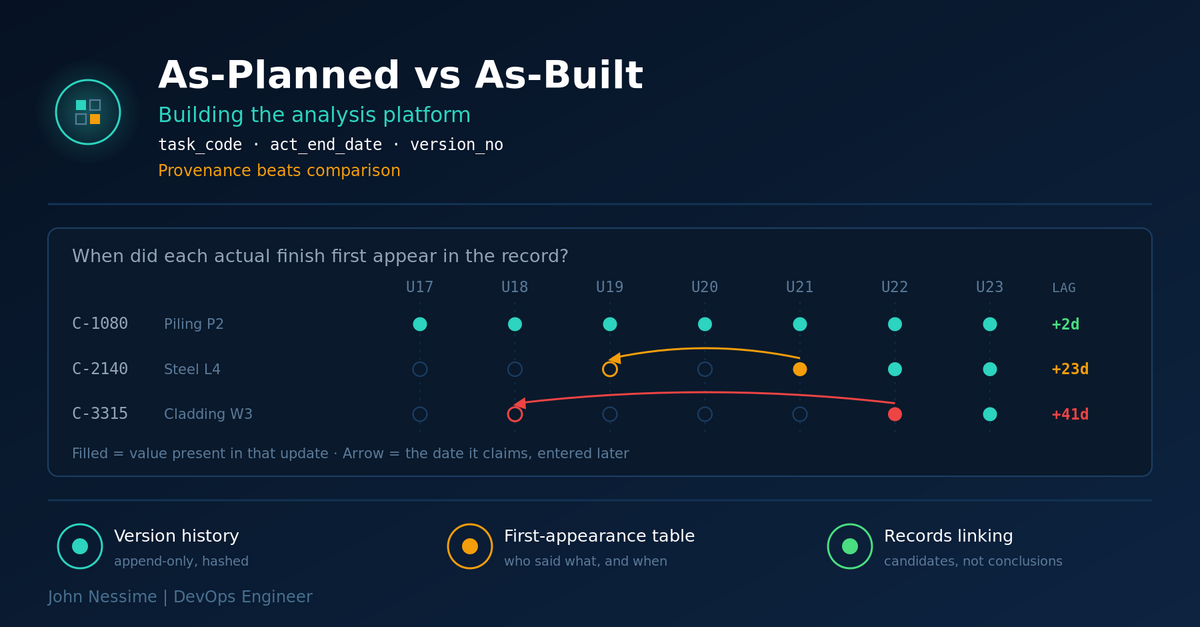
Picture the experts’ meeting. Your exhibit shows activity C-2140, structural steel erection to level four, finishing well behind where the baseline put it. He has the same XER files you do. He opens update 19 and points out that C-2140 carries no actual finish. Same in update 20. In update 21 an actual finish appears, and the date on it sits three weeks in the past, inside the window you already closed out.
So which file is the record? And if one activity was back-filled a month after the fact, what does that say about the other four thousand?
That is the failure an as-planned vs as-built analysis has to survive, and no amount of care inside the Excel workbook fixes it. It is a data problem before it is a scheduling problem. This post covers the platform underneath the analysis: how to ingest a long series of Primavera P6 updates, how to prove where every actual date came from, and how to produce output a tribunal can audit instead of having to trust.
The as-built is not a file, and treating it as one is the invisible failure
Almost every quick as-planned vs as-built comparison does the same thing: take the approved baseline, take the last update in the sequence, join on activity ID, subtract the dates, sort by variance. It produces a clean-looking table in an afternoon.
It is also the weakest possible construction of an as-built, for three reasons that never show up in the output.
- A P6 update is a forecast document. It was produced to tell the employer when the job would finish, not to record what happened. Actual dates are a by-product of that exercise, entered by a planner working to a monthly deadline.
- The last update has been edited the most. By the end of a long job it has usually been re-baselined, partially renumbered, had calendars swapped, had activities merged or deleted. Every one of those edits is invisible in a two-file comparison.
- Actual dates get back-filled. A date typed in month 21 describing month 19 is not contemporaneous evidence in the same sense as a date typed in month 19. It might still be right. It is a different quality of record, and the difference is exactly what gets probed in cross-examination.
AACE International’s Recommended Practice 29R-03 places the as-planned versus as-built family in its observational, static group: you compare a planned network against an as-built without inserting or removing delay events. The SCL Delay and Disruption Protocol, second edition, is blunter about what makes any of it work, pushing hard on agreeing a record-keeping regime up front and never overwriting a programme version. Both point at the same requirement. You need the whole sequence of updates, intact, and you need to know which one told you what.
The platform’s whole job is to make that sequence queryable.
A worked example: what thirty-four updates actually look like
Take a job shaped like this. Three years of monthly updates, call it thirty-four XER exports. Around four thousand activities in the current programme. Three baseline revisions, two agreed and one submitted but never accepted. Somewhere near month fourteen the contractor moved most trades from a five-day to a six-day calendar to recover. The numbers are illustrative rather than from any particular project, but the shape is ordinary.
Run the naive comparison and you get a variance table. Run the sequence properly and four separate questions fall out, none of which the variance table can answer:
- Which activities existed in the baseline, disappeared mid-job, and came back under a different activity ID?
- For each actual date in the final update, in which update did that value first appear, and how far behind the event was it?
- When float moved, was it because work moved, or because someone changed a calendar or a duration?
- What contemporaneous record sits underneath each actual date, and does it agree?
Those four questions are the platform. Everything below is how to answer each one without hand-checking four thousand rows thirty-four times.
Failure family one: activity identity across versions
An XER file is tab-delimited text. It opens in a text editor. The structure is a header line beginning ERMHDR, then a run of tables, each introduced by %T with the table name, a %F line carrying the field names, and %R lines carrying rows, closed by %E. The tables you care about first are PROJECT, TASK, TASKPRED and CALENDAR.
ERMHDR	19.12	2026-01-15	Project	admin	Admin User	dbxDatabaseNoName	Project Management	USD
%T	TASK
%F	task_id	proj_id	wbs_id	clndr_id	task_code	task_name	status_code	act_start_date	act_end_date	target_start_date	target_end_date	total_float_hr_cnt
%R	1001	100	200	1	C-2140	Structural Steel Erection L4	TK_Complete	...
%E
Here is the trap. task_id is the primary key of the P6 database the file was exported from. It is not a stable identifier for an activity across time. If the project was ever copied between databases, restored, or exported from a different P6 instance, the same physical activity can carry a different task_id. Worse, two XERs from different sources can reuse the same task_id for completely unrelated activities.
task_code is the Activity ID a human sees, and it is stable right up until someone renumbers. Neither field alone gives you identity. So do not pick one. Build an identity resolution layer and keep the evidence for every decision it makes:
- Use
(proj_id, task_code)as the working join key, scoped to a single source database. - Store
task_id,task_nameandwbs_idon every snapshot row so a rename or a WBS move is detectable after the fact. - Emit an explicit unresolved record when an activity vanishes or appears mid-sequence. Do not guess.
That last point is the one people get wrong. When C-2140 disappears in update 22 and an activity with the same name but the ID C-2140A appears in update 23, there are three candidate explanations: deletion and replacement, renumbering, or a split. The platform cannot know which. A tool that silently picks one is worse than a tool that flags it, because the analyst never learns there was a question. Surface it, hand it to a human, record the decision and the reason.
Failure family two: date provenance, and the table that makes the whole thing worth building
If you build one thing, build this. For every activity and every date field, record the first update in which that value appeared, and every subsequent change to it.
Assume a snapshot table with one row per activity per update, appended and never modified. A window function does the work:
-- First appearance of each distinct actual finish value,
-- and how far the reported date lags the update that reported it.
WITH changes AS (
  SELECT
    task_code,
    version_no,
    data_date,
    act_end_date,
    LAG(act_end_date) OVER (
      PARTITION BY task_code ORDER BY version_no
    ) AS prev_act_end
  FROM activity_snapshot
)
SELECT
  task_code,
  version_no          AS first_reported_in_update,
  act_end_date        AS reported_actual_finish,
  data_date           AS update_data_date,
  data_date::date - act_end_date::date AS reporting_lag_days
FROM changes
WHERE act_end_date IS NOT NULL
  AND (prev_act_end IS NULL OR prev_act_end <> act_end_date)
ORDER BY reporting_lag_days DESC;
Three things arrive at once. You can answer the question that opened this post, for any activity, in a second: C-2140’s actual finish first appeared in update 21, carrying a date twenty-three days behind that update’s data date.
The distribution of that lag column is then a finding in its own right. If most activities report within days and one subcontractor’s work consistently reports a month late, that is not a rounding artefact, it is a records issue you can evidence. And any actual date that changes after it was first stated deserves a hard look. Actuals are supposed to lock. A value that moves has either been corrected, which should have a paper trail, or overwritten, which should not have happened.
P6 ships a Schedule Comparison tool, the one that used to be called Claim Digger and now lives inside Visualizer. It does a field-by-field diff and dumps a large HTML table, which is genuinely useful for checking one submitted update against the last. That is what it was built for. It was not built to reason across thirty-four files at once, and pushing its output into Excel does not change that. Deltek’s Acumen Fuse and Steelray’s Delay Analyzer go further, with what the vendors describe as half-step analysis, separating progress from scope revisions across successive versions. If your instruction allows the licence and the timetable allows the learning curve, look at them seriously before writing any code. Neither is priced publicly, both target enterprise project controls teams, and neither does the records-linking work in the last section for you.
Failure family three: calendars, and float that quietly means nothing
Durations and float in an XER are stored in hours. total_float_hr_cnt holds hours, not days. A value of 40 is five days only if the activity runs an eight-hour calendar. Divide everything by eight and a job with mixed shift patterns produces float numbers that are confidently wrong.
The calendar itself lives in the CALENDAR table, in a clndr_data field holding a proprietary parenthesised blob describing work weeks, exceptions and holidays. It is the hardest part of the format to parse correctly, and getting it wrong produces durations and dates that look plausible and are not.
Two rules follow, and both are about the read path, not the maths.
- Store float and durations in hours exactly as exported. Convert at presentation time, using that activity’s own calendar, and print the calendar name next to the number. If you cannot resolve the calendar, print hours and say so.
- Track calendar assignment as a versioned attribute, the same as any date. A change from a five-day to a six-day calendar changes every float figure downstream of it, with no change to logic and no change to progress. An activity can go from critical to non-critical because of an administrative edit, and a variance table will attribute that shift to the works.
This is also why an as-built critical path is not simply the chain with zero float in the last update. Retrospective longest path and as-planned versus as-built windows analysis exist as separate methods precisely because the float figures in a progressed programme are a function of how the programme was maintained.
Failure family four: separating movement from editing
Every delta between two consecutive updates falls into one of a small number of categories, and collapsing them into a single “variance” number is where analyses lose their defensibility. Classify each change explicitly:
- Progress: an actual start or finish appeared, or remaining duration reduced consistent with work done.
- Duration change: original or remaining duration edited without corresponding progress.
- Logic change: a relationship added, removed, retyped, or its lag altered.
- Calendar change: activity reassigned, or the calendar definition itself edited.
- Constraint change: a date constraint applied, moved or removed.
- Scope change: activity added or deleted.
Six buckets, one row per change, with the before value, the after value and the version pair. Once that table exists, a lot of the argument stops being an argument. “The completion date moved out eighteen days in window 12” becomes “of which fourteen days sit with progress on the critical chain and four with two logic edits applied in the same submission.” The second version is the one that gets tested and holds.
Logic changes deserve their own view. Pull TASKPRED for every version, key each relationship on the predecessor and successor activity codes plus the relationship type, and diff the sets. Relationships that appear late in a job, on activities that are already in progress, are worth reading one by one.
Failure family five: joining the schedule to the records
The schedule tells you when. It never tells you why. Cause comes from daily reports, site instructions, RFIs, correspondence, minutes, inspection records, weather data, and delivery notes. That material arrives as scanned PDFs and email exports, and it does not carry activity IDs. Nobody has ever written “C-2140” on a site diary.
So the join key is not the activity ID. It is a fuzzy composite of date, location or area, and trade or discipline. The practical approach:
- Extract structured fields from each record: document date, report date, area, trade, headcount if present, and the narrative text. Text extraction plus a layout-aware OCR pass handles most of it. Handwriting on older site diaries will not fully automate, and you should budget for that.
- Normalise area and trade against the schedule’s own coding. Activity codes and WBS paths are usually the best available crosswalk, since they encode area and discipline already.
- Generate candidate links: for each activity’s as-built window, every record whose date falls inside it and whose area or trade matches.
- Have a human confirm, reject or annotate each candidate. Store who decided and when.
Step four is not optional and it is not a nicety. A machine-proposed link is a search result. Causation is an opinion, and the expert has to own it. Build the tool so it accelerates the search and refuses to state the conclusion, and you get the productivity without handing opposing counsel an argument about black boxes.
The data model, in about six tables
The grain that makes everything else easy: one immutable row per activity per schedule version. Nothing is ever updated in place.
CREATE TABLE schedule_version (
  version_id     bigserial PRIMARY KEY,
  version_no     integer     NOT NULL,   -- ordinal in the sequence
  source_file    text        NOT NULL,
  file_sha256    char(64)    NOT NULL,   -- proves the file was not altered
  p6_export_ts   timestamptz,            -- from the ERMHDR line
  data_date      timestamptz NOT NULL,
  ingested_at    timestamptz NOT NULL DEFAULT now(),
  notes          text
);

CREATE TABLE activity_snapshot (
  version_id           bigint  NOT NULL REFERENCES schedule_version,
  task_code            text    NOT NULL,
  task_id              bigint  NOT NULL,
  task_name            text,
  wbs_path             text,
  clndr_id             bigint,
  status_code          text,
  target_start_date    timestamptz,
  target_end_date      timestamptz,
  act_start_date       timestamptz,
  act_end_date         timestamptz,
  total_float_hr_cnt   numeric,
  PRIMARY KEY (version_id, task_code)
);
Add relationship_snapshot keyed on (version_id, pred_task_code, succ_task_code, rel_type), a calendar_snapshot holding the raw clndr_data alongside your parsed working pattern, a record_document table for the contemporaneous material, and a record_link table carrying the human decision on each candidate link.
Thirty-four updates at four thousand activities is under a hundred and fifty thousand rows. This is not a big-data problem and it should not be built like one. PostgreSQL on a single machine, with the parsing done in Python, will run every query in this post fast enough that you stop thinking about it.
On the parsing side, an XER is simple enough to read with the standard library, and there are open-source parsers such as PyP6Xer if you would rather not write the tokeniser yourself. Whichever route you take, keep the raw file. Hash it on ingest, store the hash in schedule_version, and never write to the original. Chain of custody over the source files is the cheapest credibility you will ever buy.
Where to run it, and the confidentiality problem nobody budgets for
A modest VPS is plenty. Contabo and InterServer both sell machines with more than enough memory and disk for a job this size, and the specification matters far less than the question you should ask first: does your confidentiality undertaking actually permit the disclosure material to sit on that machine, in that jurisdiction? Often the answer is no, and the analysis has to run on a workstation inside the client’s own environment. Find that out before you build anything.
Three practical points that follow from the material being privileged rather than ordinary project data:
- Full-disk encryption on anything that holds the files, including the laptop you take to the hearing. This is table stakes and it is still routinely skipped.
- A VPN for untrusted networks. You will open the data room from a hotel or an airport at some point. NordVPN and Surfshark both handle that case. It protects the transport; it does nothing about where the data comes to rest, so do not let it substitute for the jurisdiction question above.
- A disposal plan. Undertakings usually require destruction or return at the close of the engagement, and deleting a file does not destroy it. Overwrite-based tools such as O&O SafeErase cover the workstation case. If the volume was encrypted from the start, destroying the key is faster and cleaner than overwriting the data, and easier to certify.
If cloud storage is permitted, write-once object storage with a retention lock suits the ingested originals well. It gives you an immutability story that does not rest on your own discipline.
Troubleshooting the ingest
- The parser dies on a decode error. XER files are not reliably UTF-8, particularly when they came from a database with a non-English locale. Try a single-byte fallback encoding before assuming the file is corrupt, and log which encoding succeeded against the version record.
- Row and field counts do not match. Activity names can contain characters that confuse a naive split, and some exports wrap fields inconsistently. Parse defensively on field count per
%Fline rather than assuming. - Duplicate
task_codein one file. One XER can carry several projects plus the shared global data they depend on. Always scope byproj_idand confirm you have the right project before anything else. - Activity counts drop between updates for no reason. Check whether the export was filtered or taken at a WBS level rather than the full project. A partial export looks exactly like a deletion event in your diff.
- Dates shift by a few hours. P6 stores times, not just dates, and calendar start hours vary. Normalise to the activity calendar’s working day before comparing, or every finish looks a shift early.
- Float figures look wrong across the board. Check the hours-versus-days conversion and the calendar assignment before checking anything else. It is almost always one of those two.
Common mistakes
- Treating the final update as the as-built without stating that assumption anywhere in the report.
- Joining on
task_idbecause it is the primary key, and inheriting whatever database history came with the file. - Letting the platform resolve an ambiguous activity match silently, so the analyst never sees the ambiguity existed.
- Converting float to days with a fixed divisor, then reporting a single variance figure that mixes progress with programme edits.
- Automating the record-to-activity link all the way to a stated cause, which turns an evidence tool into a target.
- Modifying source XERs in place, then having no way to demonstrate they are as received.
Best practices worth the effort
- Hash every source file on ingest and record the hash next to the version. It takes one line and it answers a question you will otherwise answer badly.
- Make every table append-only. Corrections become new rows with a reason, never overwrites.
- Build the first-appearance view early. It reframes the analysis from “what do the files say” to “when did the files start saying it”, which is the more defensible question.
- Make every exhibit reproducible from one query, so a challenged figure traces back to a file and a row rather than a spreadsheet cell.
- Keep a written record of every judgement call the platform surfaced and a human resolved. That log is often more useful in the hearing than the analysis itself.
- Validate against the commercial tools where you can. If Acumen Fuse or Schedule Comparison disagrees with your diff on a given version pair, one of you is wrong and you want to know which before the report goes out.
Frequently asked questions
Is as-planned vs as-built analysis still accepted in construction disputes?
Yes, as one of a recognised family of methods. AACE Recommended Practice 29R-03 includes it in its taxonomy as an observational method, and the SCL Protocol’s second edition deliberately stopped naming a single preferred technique for retrospective analysis, setting out selection factors instead. Acceptance in a given dispute turns on the records available, the contract and the forum, not on the method’s reputation in the abstract.
How many schedule updates do I need before building a platform is worth it?
Roughly: below about eight updates, a careful analyst with a workbook is faster. Above twenty, manual comparison stops being reliable, not because people are careless but because the number of pairwise comparisons grows past what anyone can hold. The crossover in practice sits somewhere in the low teens, and it moves earlier if there are multiple baselines or a renumbering event.
Can I do as-planned vs as-built analysis without a Primavera P6 licence?
For the data work, yes. An XER is plain text and parses without P6 installed, and browser-based and open-source viewers exist. You will still want licensed access somewhere in the engagement for anything that requires recalculating the network, because reproducing P6’s scheduling engine faithfully is not a project you want inside a disputes timetable.
What is the difference between as-planned vs as-built and a windows analysis?
The simple form of as-planned versus as-built compares planned dates against actual dates observationally, without necessarily using network logic. A windows analysis divides the project into periods, usually monthly, and examines the contemporaneous critical path and the critical delay in each period before investigating the cause. Windows demands more of the records and generally carries more weight where the programme was maintained properly. This platform supports both, because both need the same version history underneath.
What do I do when the contractor’s updates were not maintained properly?
State it, quantify it, and let it drive method selection. That is exactly what the first-appearance table is for: reporting lag, actuals that moved after being stated, out-of-sequence progress and unexplained logic edits are all measurable. Recommended practice treats recreating a schedule from records as a last resort, used when contemporaneous data is unavailable, and recreated schedules carry less evidential weight. Showing the deficiency with numbers is stronger than asserting it.
Should I build this or buy commercial delay analysis software?
Buy for schedule diagnostics and version comparison. That problem is well solved and the established tools have years of edge cases behind them. Build for the parts specific to your instruction: the record linking, the exhibit generation in your house format, and the audit trail. The hybrid is usually right, and the deciding factor is more often the licence and the timescale than the technical fit.
Does the platform need to reproduce P6’s critical path calculation?
No, and it should not try. Read the float and date values P6 already calculated and stored in each export, and treat them as evidence of what the programme said at that moment. Anywhere you genuinely need a recalculated network, do it in the scheduling tool so the result is reproducible by anyone with the same file.
The one thing to take away
A credible as-planned vs as-built analysis is not a better comparison between two files. It is a complete, immutable, queryable history of what every schedule update said and when it started saying it. Build the version history and the first-appearance table first, and the exhibits fall out of it. Build the exhibits first and you will spend the hearing defending a spreadsheet whose provenance you cannot reconstruct.
The scheduling judgement stays with the expert. The platform’s job is narrower and duller: make sure that when someone asks where a date came from, the answer takes one query and not one week.
Need the data side of this built?
I build the engineering layer underneath delay and quantum work, so the expert spends their time on opinion rather than on data wrangling. That usually looks like:
- Ingesting a full sequence of P6 XER or XML updates into a versioned, append-only PostgreSQL model with hashing and chain of custody on every source file.
- Building the first-appearance and reporting-lag views that show when each actual date entered the record, and flagging actuals that moved after being stated.
- Classifying every between-update change into progress, duration, logic, calendar, constraint or scope, with before and after values on each row.
- Extracting structured fields from daily reports, RFIs and correspondence with OCR and document processing, then generating candidate activity links for an analyst to confirm or reject.
- Producing exhibit-grade output in Power BI or as static deliverables, where every figure traces back to a query, a file and a row.
- Standing it up on infrastructure that fits the confidentiality regime you work under, whether that is a locked-down VPS or a machine inside the client’s own environment.
If you have a stack of XERs and a deadline, send me two consecutive updates and whatever the record-keeping looked like, and I will tell you what the sequence can and cannot support.