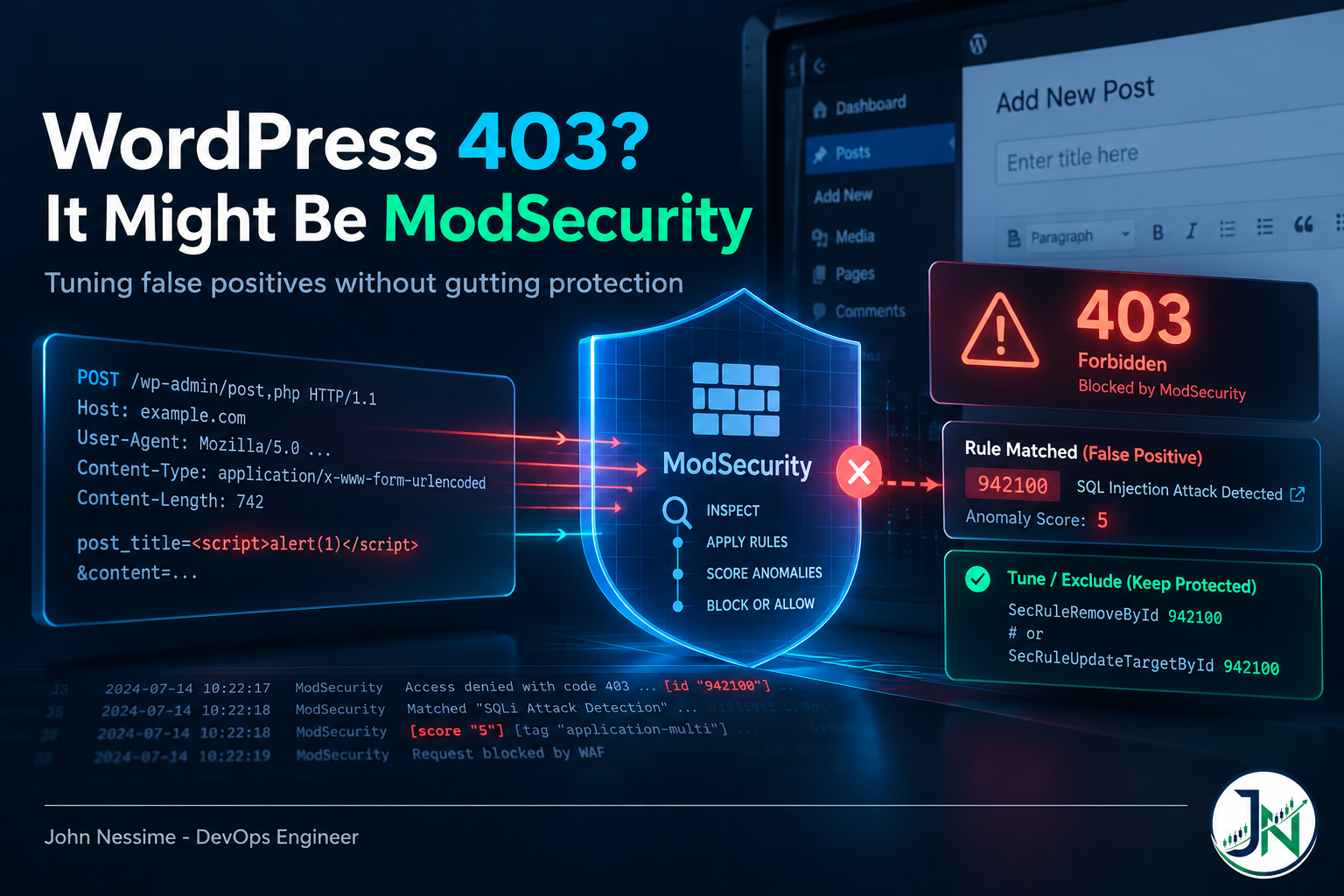
The ticket almost always reads the same way. Someone spent twenty minutes writing a post, hit Update, and got a bare 403 Forbidden. Nothing in the WordPress debug log. Nothing in the PHP error log. The plugin they blame was not updated. The post they wrote yesterday saved fine.
Then you open the ModSecurity audit log and find eleven rule matches on a single request, none of them obviously the culprit.
Dealing with ModSecurity false positives on WordPress is not hard once you understand how the OWASP Core Rule Set decides to block. It is very hard if you go looking for “the rule that blocked me,” because under the default configuration that rule does not exist. This post covers reading the log, choosing the right exclusion mechanism, the WordPress failure families that generate most of the noise, and the tuning knobs that quietly gut your coverage.
The invisible part: no single rule blocked the request
The Core Rule Set runs in anomaly scoring mode by default. Individual detection rules do not deny anything. They match, they log, and they add to a running score with setvar. At the end of the request phase, a separate blocking evaluation rule compares the accumulated score against a threshold and returns the 403.
Scores come from rule severity. A CRITICAL match adds 5, ERROR adds 4, WARNING adds 3, NOTICE adds 2. The inbound threshold ships at 5 and the outbound threshold at 4. So one critical match is enough on its own, and so are two notices plus a warning.
That is the failure mode nobody warns you about. The log line that produced your 403 lives in REQUEST-949-BLOCKING-EVALUATION.conf and it says the inbound anomaly score was exceeded. It does not name what matched. Take that ID and disable it and you have not fixed a false positive, you have turned off blocking for the whole site while leaving every detection rule running and logging. The site will look fixed. It is not protected.
First rule of tuning, then: the blocking rule is a symptom. Read backwards from it.
Read the log before you touch a rule
Every alert carries a unique_id. That value ties the error log line to the full audit log record for the same transaction, and it is the only reliable way to see every rule that fired on one request instead of a scattering of lines from different visitors.
# Paths vary by build. Check SecAuditLog in modsecurity.conf for yours.
tail -n 200 /var/log/httpd/error_log | grep -i modsecurity

# Then pull the whole transaction using the unique_id from that output
grep -F 'Zm9vYmFyCg' /var/log/httpd/modsec_audit.log
From each match, four fields matter and the rest is noise:
- The rule ID, as
[id "941320"]. This is what you exclude. - The matched variable, at the end of the pattern-match message as something like
at ARGS:content. This is what you exclude it from. - The URI, which tells you how narrowly you can scope the exclusion.
- The paranoia level tag, as
[tag "paranoia-level/2"]. If every alert is tagged level 2 or higher, the real fix may be a paranoia level change rather than an exclusion.
One warning most guides skip: audit logs of false positives contain the payload that triggered them. If a user’s password happens to look like a shell command, it lands in your log in plaintext. Treat these files as sensitive, rotate them, and redact before pasting anything into a public bug report.
Pick the right exclusion mechanism
ModSecurity gives you four ways to write an exclusion, differing on two axes: applied once at startup or evaluated per request, and removing the whole rule or just one variable from it.
SecRuleRemoveByIdandSecRuleRemoveByTagdelete a rule or a whole tagged category at configure time. Blunt, cheap, global.SecRuleUpdateTargetByIdandSecRuleUpdateTargetByTagstrip one variable from a rule at configure time, leaving the rule live for everything else.ctl:ruleRemoveByIdandctl:ruleRemoveByTagdo the same removal, but only for transactions matching a condition you write.ctl:ruleRemoveTargetByIdandctl:ruleRemoveTargetByTagstrip one variable, conditionally. This is the surgical option and the one to reach for first.
Runtime exclusions cost a little, since each is an extra rule evaluated on every request. That overhead is small next to the regex work the rule set already does, and the precision is worth it.
Placement decides whether an exclusion works at all
This is where most people lose an afternoon. The two types go in opposite places, for mechanical reasons rather than arbitrary ones.
- Configure-time exclusions go after the CRS include. They remove rules, and a rule has to exist before you can remove it.
- Runtime exclusions go before the CRS include. They change how rules behave for this transaction, and changing a rule after it has already run does nothing.
The Core Rule Set ships two files for exactly this, both with an .example suffix you drop before they load. REQUEST-900-EXCLUSION-RULES-BEFORE-CRS.conf holds runtime exclusions, and RESPONSE-999-EXCLUSION-RULES-AFTER-CRS.conf holds configure-time ones. Use them. Local files that survive a rule set update are the entire point.
Five failure families behind most ModSecurity false positives
Almost everything you will hit on WordPress falls into one of these. Recognizing the family tells you the shape of the fix before you read a single log line.
1. Post content that legitimately contains markup
WordPress lets editors put HTML in posts. It maintains its own allowed-tag list, sanitizes server side, and that mechanism has been reviewed hard over the years. The Core Rule Set knows none of this. It sees an <h1> or an inline style attribute in a POST parameter and matches an XSS rule.
This produces the “it saved yesterday” ticket, because it is content-dependent. Plain paragraphs pass. A pasted table with attributes does not. The fix is a target exclusion scoped to the save endpoint and the specific parameter, never a global rule removal:
# Runtime exclusion. Goes in REQUEST-900-EXCLUSION-RULES-BEFORE-CRS.conf
# Replace 941320 and the parameter with what your audit log actually shows.
SecRule REQUEST_URI "@beginsWith /wp-admin/post.php"
    "id:1000,
    phase:1,
    pass,
    t:none,
    nolog,
    ctl:ruleRemoveTargetById=941320;ARGS:content"
Pick your own IDs from a range CRS will never use. Reusing an existing ID is a startup error rather than a silent one, which is the good kind of mistake.
2. REST and admin-ajax calls that fail with no visible error
This family is nastier, because there is no error page. The browser hits /wp-json/ or /wp-admin/admin-ajax.php, gets a 403, and the JavaScript either swallows it or shows a generic “updating failed” toast. Autosave stops. An editor panel stays empty. A form plugin silently drops submissions. Users report this as flakiness rather than a security block, so it sits unfixed for months. When someone says the editor is “just slow sometimes,” open the browser network tab and look for 403s before going anywhere near PHP.
Scoping differs here. REST routes are structured, so use @rx against REQUEST_FILENAME to hit a route family rather than one path. For admin-ajax.php, the useful discriminator is usually the action parameter, since that one endpoint multiplexes dozens of unrelated plugin handlers.
3. Media uploads that break at a size boundary
Multipart uploads have two independent failure paths that look identical from the browser. The first is a genuine rule match on the multipart structure, or on binary content containing a byte sequence some rule dislikes. That shows up with a rule ID and you tune it normally.
The second is an engine limit, not a rule. SecRequestBodyLimit caps the total body ModSecurity will buffer, SecRequestBodyNoFilesLimit caps the non-file portion, and SecRequestBodyLimitAction decides whether an oversized body is rejected outright or inspected partially. If uploads fail above a consistent size and no CRS rule ID appears anywhere in the log, stop tuning rules. That is a limit, and the fix is in engine config.
Raising them costs memory per concurrent request, and partial inspection leaves part of the body unscanned. Decide which trade you are making rather than bumping the number until the ticket closes.
4. Cookies with dynamic names
WordPress authentication cookies carry a hash in the name, so a literal exclusion is impossible. Configure-time directives accept a regular expression in the target if you wrap it in forward slashes:
# Configure-time exclusion. Goes in RESPONSE-999-EXCLUSION-RULES-AFTER-CRS.conf
SecRuleUpdateTargetById 942440 "!REQUEST_COOKIES:/^wordpress_logged_in_.*/"
The catch is significant: the ctl action supports no regular expressions at all. If you need a pattern match on a variable name, you are forced into the configure-time form, which applies site-wide rather than to one path. That single constraint drives more design decisions than people expect.
5. Chained rules that refuse to be tuned
Some rules are written as a chain of conditions. Target exclusions only apply to the first rule in the chain, so if the variable you want to strip is referenced further down, nothing you write has any effect and you will burn an hour convincing yourself the config file is not loading.
When a target exclusion visibly does nothing on a rule you can watch matching, check whether it is chained. If it is, your only option is removing the whole rule under a narrow condition. Accept the wider blast radius, or change the request instead.
Install the WordPress plugin before writing anything custom
The Core Rule Set maintains a WordPress rule exclusions package. In CRS 3 it was built in and switched on with a variable in crs-setup.conf. In CRS 4 it moved out into a separate plugin published in the CRS plugin registry, and it is not installed by default.
That catches people upgrading. Exclusions that used to work vanish, WordPress starts throwing 403s again, and the setup variable they remember is gone from the config file. The reasoning behind the split is sound: fewer rules loaded means less code that can carry a bug, and one of the old exclusion packages did carry a bypass.
Plugins load through wildcard includes in a specific order. Get the order wrong and the plugin silently does nothing:
Include /path/to/crs/crs-setup.conf

Include /path/to/crs/plugins/*-config.conf
Include /path/to/crs/plugins/*-before.conf

Include /path/to/crs/rules/*.conf

Include /path/to/crs/plugins/*-after.conf
Two limits before you lean on it. The plugin covers vanilla WordPress only, so false positives from third-party plugins, page builders and form plugins are still yours to tune. And the comment field is deliberately left out of the exclusions, because comment forms have a long history as a real attack surface. If your comment form throws false positives, that is a decision the maintainers made on purpose, and overriding it is a genuine risk trade rather than a gap in their package.
On a server hosting more than one application, scope the plugin to the WordPress vhost using WebAppID or a Host header condition. WordPress exclusions applied to your unrelated API are a hole you did not mean to open.
The knobs that look like a fix and are not
When exclusions get tedious, two shortcuts start looking attractive. Both cost more than they appear to.
Raising the anomaly threshold. Going from 5 to 20 makes most false positives vanish, and it also means any attack category that scores low can never trigger a block. Detections that only ever produce a single critical match become unblockable. The CRS documentation is direct here: keep the threshold at the default and change the paranoia level instead. Raising it is a temporary tuning aid, not a configuration.
Dropping the paranoia level. Legitimate, but often applied backwards. Level 1 is designed to produce few false positives. Levels 2 and up add progressively more aggressive rules and progressively more tuning work. If your alerts are all tagged level 2, dropping to level 1 is the correct fix and it is honest about what you gave up.
The better tool for moving up is the split between blocking and detection paranoia levels. Set tx.blocking_paranoia_level to what you actually enforce and tx.detection_paranoia_level higher. Rules from the higher level execute and log, but only rules up to the blocking level count toward the score. You get to see what level 2 would have caught, in production, on real traffic, without anyone getting blocked. Then you tune, then you promote. The performance cost lands as soon as you raise the detection level, though, since those rules run either way.
Two smaller settings help here. tx.sampling_percentage sends only a fraction of requests into the rule set, a gentler introduction for a busy site than blocking everything on day one. And tx.reporting_level can log requests that would have been blocked at a higher paranoia level, which is exactly the signal you want while climbing.
Troubleshooting
The exclusion has no effect. Check placement first. A runtime exclusion loaded after the rules, or a configure-time exclusion loaded before them, fails silently. Then check for a chained rule. Then confirm the file is being included at all by breaking it deliberately with a syntax error and seeing whether the server refuses to start.
It works on one site and not another. Different vhosts load different config. On control panels, per-domain overrides usually sit in a separate file from the global rule set.
It worked and then stopped. Something updated the rule set. If you edited CRS rule files directly, your edits are gone, which is the whole argument against editing them.
Nothing appears in the log at all. Confirm the rule engine is on, and that auditing is enabled with enough log parts to include the request body. An engine in detection only mode logs without blocking, which is confusing if you did not know you were in it.
You are on shared hosting and cannot edit any of this. Some hosts expose a per-domain exclusion box, some let you disable rule IDs, some give you nothing. That is a real ceiling. Providers that hand you root, such as InterServer or Contabo, let you own the rule set and its update cadence, which on a site with genuine tuning needs beats the panel convenience you trade away.
Common mistakes
- Disabling the blocking evaluation rule because it showed up in the log. It reports the score, it detects nothing, and removing it disables blocking site-wide.
- Editing CRS rule files directly. Every update reverts you, and you now maintain a fork by hand.
- Excluding by message rather than by ID. Messages carry dynamic data and special characters, so the match is fragile.
- Removing an entire attack tag because two rules misfired.
SecRuleRemoveByTag attack-sqliis defensible when nothing behind the WAF touches SQL. On WordPress it is not. - Excluding
/wp-admin/wholesale, or stacking multiple rule set vendors. Admin is where a compromised session does the most damage, and overlapping rule sets make attribution guesswork. - Leaving known false positives in place. Real attacks get lost in the noise, and the logs accumulate user data you never intended to collect.
Best practices
- Start in detection only. Collect real traffic, tune what you find, then enable blocking. Enforcing first is how you learn about broken checkout at two in the morning.
- Install the WordPress exclusions plugin before writing custom rules. Do not hand-write what upstream already maintains.
- Write the narrowest exclusion that resolves the alert: one rule, one variable, one path. Comment it with the rule ID, the endpoint, and why you judged it safe. Six months later that comment is the only thing between you and a blind revert.
- Keep exclusion files in version control and deploy them with the rest of your config. Test rule set updates on staging, since new signatures land regularly.
- Ship audit logs somewhere queryable. Grepping a growing text file stops scaling fast, and a platform like Grafana Cloud turns “which rule fires most” into a query instead of an afternoon.
- If an edge WAF such as Cloudflare sits in front of the origin, decide deliberately which layer owns which rule. Two WAFs scanning the same body doubles your false positive surface for no extra coverage.
Frequently asked questions
How do I find which ModSecurity rule blocked my WordPress request?
Take the unique_id from the 403 entry in the error log and grep the audit log for it. That gives you every rule that fired on the transaction. The blocking evaluation rule is what returned the 403, but the detection rules listed alongside it are what you tune.
Should I disable ModSecurity for WordPress instead of tuning it?
It is a defensible choice if the alternative is blocking mode with unresolved false positives, since a WAF everyone has learned to route around is worse than none. But detection only mode gives you the logs with none of the breakage, and that is almost always the better middle ground while you work through the tuning.
Is the WordPress rule exclusions plugin enough on its own?
For a stock install on a standard theme, usually. It covers vanilla WordPress and both block-based and classic themes. It does not cover third-party plugins, page builders, or theme frameworks, and those generate most of the false positives on a real site.
Why do false positives come back after a rule set update?
Either you edited rule files directly and the update overwrote them, or the update shipped new signatures your existing exclusions do not cover. The first is avoidable by keeping every change in the exclusion files. The second is the cost of running a maintained rule set, and it is why updates belong on staging first.
Does ModSecurity slow WordPress down?
It adds per-request work, mostly regular expression evaluation against request data, and the cost scales with paranoia level and body size. The settings that matter are the paranoia level, the request body limits, and whether response body inspection is on. Measure on your own traffic rather than trusting someone else’s benchmark.
Is ModSecurity still maintained?
The engine moved to the OWASP Foundation after Trustwave stepped back from commercial support, and it still receives fixes, though feature work is slower than it once was. The Core Rule Set is a separate project on its own cadence and is actively developed. Coraza is a compatible engine running the same rule language, worth evaluating for new deployments.
Wrapping up
The thing to hold on to about ModSecurity false positives on WordPress is that the rule which returned your 403 is almost never the rule you need to change. Anomaly scoring separates detection from blocking on purpose, and reading the log backwards from the blocking decision to the detection rules that fed it is the whole skill.
Everything else follows. Install the maintained WordPress exclusions instead of reinventing them. Write the narrowest exclusion you can, in the file that survives updates. Move the paranoia level, not the threshold.
Need help tuning your WAF?
Most of the WAF work I take on is untangling exactly this: a rule set that is technically installed and practically ignored, because nobody had time to work through the false positives. I can help with:
- Triaging your audit logs and mapping every recurring false positive to the rule, variable and endpoint that produced it
- Writing scoped exclusion sets for WooCommerce, form plugins, page builders and custom REST routes that upstream packages do not cover
- Moving a site off direct rule file edits and onto exclusion files that survive rule set updates
- Planning a CRS 3 to CRS 4 migration, including the exclusion package to plugin transition and the paranoia level variable renames
- Running a staged rollout from detection only to blocking, with the reporting and sampling settings that make it safe
- Shipping ModSecurity audit logs into a queryable log platform so rule tuning becomes a dashboard instead of a grep
If you have a blocked request you cannot explain, send me the audit log entry and your exclusion file and I will tell you what is firing and why.