The message usually arrives on the third or fourth of the month, and it is never phrased as a question. Someone from finance pastes a screenshot of the AWS bill into a channel, adds a number and a percentage, and waits. Nobody says “please cause an outage.” What they say is “can we get this down.”
That is where most cost work goes wrong. The pressure is on the total, so people attack the biggest line item first. The biggest line item is almost always compute, and compute is the one place where a wrong guess shows up as latency at peak. Three weeks later the bill is lower and the p99 is worse, and nobody connects the two, because the change that caused it was a Tuesday afternoon instance swap that “went fine.”
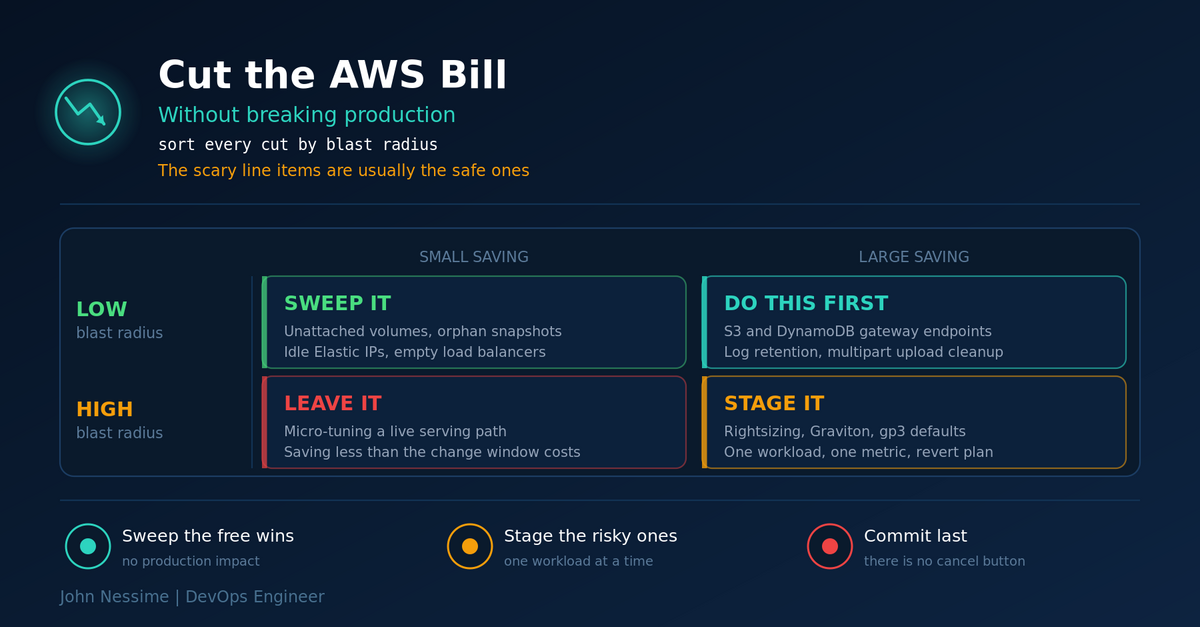
This post is about how to cut AWS costs without breaking production by ordering the work differently: not by how much each change saves, but by how far the damage travels if the change is wrong. I will go through the levers in that order, with the traps in each one, the commands I use to find the waste, and the handful of cuts that look harmless and are not.
The cuts that break production are rarely the ones you fear
The line items that look most alarming on a bill are usually networking and storage overhead: NAT Gateway processing, public IPv4 hours, log ingestion, snapshots nobody owns. They feel dangerous to touch because they sit in the middle of the VPC. In practice, almost all of them can be removed or rerouted with zero behavioural change to your application. A gateway endpoint for S3 does not alter a single byte your code sees. Deleting an Elastic IP associated with nothing cannot affect anything, by definition.
The changes that feel safe are the ones with real blast radius. Dropping an instance one size. Switching a volume type. Moving objects to a colder storage class. Each is a single API call, reversible on paper, and each quietly narrows a performance envelope you were relying on without knowing it. The failure does not show up at deploy time. It shows up the next time you hit the load level that used to fit inside the old headroom.
So the rule I work by: sequence cost work by blast radius, not by savings size. Take everything production cannot possibly notice first. Then the things that move a performance envelope, one workload at a time, with a metric to watch. Then, last, the financial commitments, which cannot break your uptime at all but can lock you into paying for architecture you are about to throw away.
First, find out what you are actually paying for
The default Cost Explorer view groups by service, which is close to useless here. “EC2 – Other” is not a thing you can act on. It is a bucket holding EBS volumes, snapshots, NAT Gateway hours, NAT Gateway data processing, data transfer and public IPv4 charges, all mixed together.
Group by usage type instead
Usage type names the actual mechanism being billed. Strings like NatGateway-Bytes, NatGateway-Hours, PublicIPv4:InUseAddress and EBS:VolumeUsage.gp2 tell you what to go fix. This pulls last month’s usage types sorted by cost:
aws ce get-cost-and-usage
  --time-period Start=$(date -d '1 month ago' +%Y-%m-01),End=$(date +%Y-%m-01)
  --granularity MONTHLY
  --metrics UnblendedCost
  --group-by Type=DIMENSION,Key=USAGE_TYPE
  --output json
  | jq -r '.ResultsByTime[0].Groups[] | [.Keys[0], .Metrics.UnblendedCost.Amount] | @tsv'
  | sort -k2 -gr | head -30
That uses GNU date, so run it on Linux unless you have coreutils on macOS. Cost Explorer API calls are themselves billed per request, which surprises people the first time they wrap this in a cron job.
Billing data cannot tell you where your bytes went
This is the most useful thing to internalise about networking spend. Cost data knows how many gigabytes crossed the NAT Gateway. It has no idea whether they were headed to S3, to ECR, to CloudWatch or to a third-party API. There is no destination breakdown in billing data.
VPC Flow Logs are the missing half. Turn them on for the private subnets, then query them grouped by destination address with Athena or CloudWatch Logs Insights and map the ranges back to AWS services. Now you have the split: this much to S3, this much to ECR, this much genuinely to the internet. That is what tells you which endpoint is worth adding. Flow Logs cost money to ingest, so scope them tightly and turn them off once you have the answer. A week on the right subnets is enough.
Tier zero: savings production cannot notice
Everything in this tier changes billing without changing behaviour. Do all of it before you touch a single instance type.
The orphan sweep
AWS charges for allocated resources, not used ones. A volume attached to nothing bills at full rate. An Elastic IP attached to nothing bills by the hour, and has done ever since AWS began charging for public IPv4 addresses whether or not they are in use.
# Elastic IPs associated with nothing
aws ec2 describe-addresses
  --query 'Addresses[?AssociationId==`null`].[PublicIp,AllocationId]'
  --output text

# EBS volumes in the "available" state, meaning attached to no instance
aws ec2 describe-volumes --filters Name=status,Values=available
  --query 'Volumes[].[VolumeId,Size,VolumeType,CreateTime]'
  --output text
Run the same pass over load balancers with no healthy targets, snapshots whose source volume is gone, and old AMIs still holding snapshots behind them. Snapshot a volume before deleting it. The snapshot costs a fraction of the volume and buys you a rollback if something did care after all.
NAT Gateway is usually the largest risk-free win
A NAT Gateway bills three separate ways: an hourly charge for existing, a per-gigabyte charge for every byte it processes, and then whatever data transfer applies to where that traffic actually went. Teams look at the hourly rate, decide it is a rounding error, and never look at the processing line. The processing line is the one that grows with traffic.
The part that stings: traffic from a private subnet to S3 or DynamoDB in the same region is charged NAT processing even though it never leaves the AWS network. Gateway endpoints for those two services are free, with no hourly and no per-gigabyte charge. If your private subnets talk to S3 through a NAT Gateway, this is the best ratio of saving to risk available anywhere on the platform.
aws ec2 create-vpc-endpoint
  --vpc-id vpc-0123456789abcdef0
  --service-name com.amazonaws.eu-west-1.s3
  --vpc-endpoint-type Gateway
  --route-table-ids rtb-0123456789abcdef0
A gateway endpoint works by adding a prefix-list route to the route tables you name, so the main failure mode is naming the wrong tables and leaving traffic on the old path. Nothing breaks; you just do not save anything. The real caveat is policy: if you have bucket policies or endpoint policies that restrict access by source, check them first, because requests arriving through an endpoint present differently.
Interface endpoints for other services (ECR, CloudWatch Logs, Secrets Manager, SSM) are a different calculation. They charge per hour per availability zone plus per gigabyte, so they only pay off above a certain volume for that one service. Use the Flow Logs breakdown to decide. Pulling container images from ECR through NAT on every scale-out is the case that usually justifies one.
Log groups that never expire
CloudWatch Logs bills mostly on ingestion and secondarily on stored volume. A log group created without an explicit retention setting keeps data forever, so every debug group someone created during an incident years ago is still accruing storage.
# Log groups with no retention policy set
aws logs describe-log-groups
  --query 'logGroups[?!retentionInDays].[logGroupName,storedBytes]'
  --output text

aws logs put-retention-policy
  --log-group-name /aws/lambda/my-function
  --retention-in-days 30
Retention is the safe half. Reducing ingestion is a tier-one change, because you are removing evidence you might need during an incident. If you need a long retention window cheaply, exporting to S3 with a lifecycle rule beats paying CloudWatch storage rates indefinitely, and a log platform like Grafana Loki or a hosted equivalent gives you a cheaper long tail while CloudWatch keeps the recent window.
Incomplete multipart uploads
Failed large uploads leave parts behind in S3. Those parts are billed as storage and do not appear in a normal object listing, which is why some buckets bill for far more than they seem to contain. One lifecycle rule ends it:
{
  "Rules": [
    {
      "ID": "abort-incomplete-multipart",
      "Status": "Enabled",
      "Filter": {},
      "AbortIncompleteMultipartUpload": { "DaysAfterInitiation": 7 }
    }
  ]
}
Apply it with aws s3api put-bucket-lifecycle-configuration. That call replaces the entire lifecycle configuration on the bucket, so fetch the existing one and merge rather than overwrite.
Tier one: savings that move a performance envelope
Now a wrong call has consequences. Everything here goes one workload at a time, with a named metric you watch for at least a full traffic cycle afterwards.
gp2 to gp3, and the throughput trap
This is presented everywhere as a free win, and for most volumes it is. gp3 costs less per gibibyte and gives every volume a baseline of 3,000 IOPS regardless of size, where gp2 scales at 3 IOPS per GiB and only reaches 3,000 sustained at 1 TiB. For a small database volume quietly burning through burst credits, gp3 is a straight upgrade in both cost and stability.
The trap is throughput, not IOPS. gp3’s baseline throughput is 125 MiB/s. A large gp2 volume can deliver up to 250 MiB/s. Migrate a big sequential-read volume to gp3 with the defaults and you halve its throughput ceiling while the cost report still shows a saving. Log processing, backup jobs and analytics scratch space are exactly the workloads that hit this, and exactly the ones where the symptom is “the nightly job got slower” rather than an alert.
Check VolumeReadBytes and VolumeWriteBytes in CloudWatch first, and provision throughput explicitly where the volume needs it:
aws ec2 modify-volume --volume-id vol-0123456789abcdef0
  --volume-type gp3 --iops 3000 --throughput 250

aws ec2 describe-volumes-modifications --volume-id vol-0123456789abcdef0
  --query 'VolumesModifications[].[ModificationState,Progress]'
  --output text
Elastic Volumes changes the type in place with the instance running, so there is no downtime. Two things to watch anyway. If the root volume is declared inline in a CloudFormation block device mapping, changing its type there can replace the instance rather than modify the volume; modify through the EC2 API instead. And there is a cooldown before a volume can be modified again, so plan on getting it right rather than iterating. On RDS the same change also runs without downtime, but the instance then enters a storage optimization state during which further storage changes are blocked.
Rightsizing without guessing
AWS Compute Optimizer reads CloudWatch metrics and returns recommendations with a confidence rating. Better than eyeballing CPU graphs, with one important gap: without the CloudWatch agent installed it cannot see memory. A JVM service sitting at 12% CPU and 88% heap looks like an obvious downsize candidate and is not.
aws compute-optimizer get-ec2-instance-recommendations
  --query 'instanceRecommendations[?finding==`OVER_PROVISIONED`].[instanceArn,currentInstanceType]'
  --output text
My working rules:
- Look at a window that includes your worst week, not a rolling average. Averages hide the peak that justifies the size.
- Change one dimension at a time, family or size, so you know what caused any regression.
- Treat burstable families as a separate decision. A T-family instance that exhausts CPU credits under sustained load either throttles or silently bills you for unlimited mode. Neither is what you wanted.
- Moving to Graviton usually saves more than downsizing x86, but it is an architecture change. Images need to be multi-arch and every compiled dependency needs to build. That belongs in a sprint, not in a cost-cutting afternoon.
- Write down the metric you expect to move and the threshold at which you revert, before you make the change.
S3 storage classes and the small-object trap
Intelligent-Tiering is the low-thought option and it works well for what it was designed for: objects of meaningful size with access patterns you cannot predict. It charges a small per-object monitoring fee, moves objects between tiers automatically, and applies no retrieval fee on the automatic access tiers.
Where it fails is object count. Objects below the eligibility threshold of 128 KB are not auto-tiered at all. They sit in the frequent access tier permanently while still paying monitoring. A bucket holding hundreds of millions of thumbnails, metadata records or small JSON documents can pay for monitoring that produces no saving whatsoever. Check average object size first, from S3 Storage Lens or an inventory report: total bytes divided by object count.
Lifecycle transitions have their own trap, since each transition is a billed request. Moving a billion small objects to a colder class can cost more in transition requests than the storage saving returns in a year. Transitions pay off on size, not on count. Expiry is the exception: deleting costs nothing and removes the storage entirely. While you are in there, check non-current versions in versioned buckets, which accumulate invisibly and need their own rule. And if your workload is genuinely egress-heavy, an object store with no egress charge such as Cloudflare R2 changes the arithmetic enough to model, in exchange for cross-provider latency and an operational split.
Tier two: commitments, which break budgets rather than uptime
Savings Plans and Reserved Instances cannot cause an outage. They are billing constructs. What they can do is hold you to a spend rate for one or three years after the architecture that justified it has changed. What I would want anyone to know before signing:
- Savings Plans cannot be cancelled during the term; AWS documentation is explicit. There is a limited return path with eligibility conditions and quotas per billing family, but plan as though there is no exit.
- Standard Reserved Instances can be listed on the Reserved Instance Marketplace, which is a real exit but not a guaranteed one, since somebody has to buy. Convertible RIs cannot be sold, only exchanged for a different configuration.
- Commit after rightsizing, never before. A plan applied to an oversized fleet locks in the waste and removes the incentive to fix it.
- Savings Plans do not reserve capacity. If you need a guarantee that instances will be available in a specific zone, that is an On-Demand Capacity Reservation, a separate mechanism the discount can then apply to.
- Savings Plans do not apply to Spot usage or to usage already covered by an RI. If much of your fleet is Spot, your committable baseline is smaller than the bill suggests.
- Compute Savings Plans survive architectural drift: family changes, size changes and moves between EC2, Fargate and Lambda stay covered. EC2 Instance Savings Plans and Standard RIs discount more deeply and tolerate drift poorly. Choose based on how stable your architecture actually is, not how stable you would like it to be.
Most teams land on a layered shape: commit at the baseline you are confident will still exist in a year, leave the variable top of the curve on demand or on Spot. Flat usage and a frozen architecture justify deeper, longer commitments. Mid-migration, mid-container-adoption or mid-anything, take the smaller discount for the shorter term.
One honest question worth asking here: does the workload need to be on AWS at all? Steady, non-elastic things like build runners, staging environments and internal tooling are often cheaper on a plain VPS from a provider such as Contabo or InterServer, while genuinely elastic workloads are often cheaper on AWS. The trade is operational, because you take back patching, backups and capacity planning that AWS was doing for you.
Troubleshooting: the bill went down and something broke
The hard part of diagnosing a cost regression is the delay. The change lands on Tuesday, the symptom appears at month-end batch time, and by then three other things have shipped. Work backwards from the symptom:
- Latency got worse but CPU is fine. Look at storage.
VolumeQueueLengthclimbing with throughput flat at a round number means you are sitting on a provisioned ceiling, which is the gp3 default-throughput signature. On gp2, a fallingBurstBalanceis the tell, and it usually starts hours before anything is user-visible. - Intermittent timeouts after rightsizing. Check whether the new instance type has lower network or EBS bandwidth, not just fewer vCPUs. Baseline bandwidth scales with size, and smaller sizes burst their network the way T instances burst CPU.
- Something stopped reaching a service. If you added VPC endpoints, check whether an endpoint policy is denying it. Interface endpoints also need the endpoint’s own security group to allow inbound from your workload, which is the most common reason a new endpoint appears to break connectivity.
- Objects are slow or missing from an application path. Check whether a lifecycle rule moved them into a class with retrieval latency. The Glacier tiers inside Intelligent-Tiering are opt-in for exactly this reason, and enabling them turns instant reads into restore requests.
Keep a change log for cost work specifically: a dated line per change, what you expected to save, what metric you were watching. Five minutes each, and it is the difference between diagnosing this in an hour and in a week.
Common mistakes
- Starting with the biggest number. Compute is the biggest line and the riskiest to touch. It is the last tier, not the first.
- Committing before rightsizing. This locks in the exact waste you were trying to remove, for years.
- Accepting gp3 defaults on high-throughput volumes. Cheaper storage, halved throughput ceiling, no alert.
- Enabling Intelligent-Tiering on buckets full of tiny objects. Monitoring fees on objects that will never move a tier.
- Turning off monitoring to save on monitoring. Understandable at 2am on a budget deadline, indefensible during the next incident. Cut cardinality and retention, not coverage.
- Doing it once. Cost drifts back within two quarters unless something structural stops it.
Best practices that make the savings stick
- Make cost visible before it is a crisis. AWS Budgets with alerts at a percentage of forecast, plus Cost Anomaly Detection, catch the runaway job on day two rather than on the invoice. Platforms like Vantage, CloudZero or Kubecost for per-namespace Kubernetes attribution earn their place once several teams share an account structure.
- Tag at creation, in the IaC. Tags applied afterwards do not backfill historical cost data. If it was not tagged when it was created, that spend is unattributable forever.
- Put non-production on a schedule. Dev and staging running nights and weekends is the most common waste in any account, and stopping them has no production blast radius at all.
- Make the cheap thing the default in the module. gp3, sensible log retention, gateway endpoints and lifecycle rules belong in your Terraform or OpenTofu modules, so the next environment is born correct rather than remediated later.
- Review commitment coverage on a schedule. Coverage and utilisation are different numbers and both matter. High coverage with low utilisation means you over-committed.
Frequently asked questions
What is the fastest way to cut AWS costs without breaking production?
Add gateway endpoints for S3 and DynamoDB, delete unassociated Elastic IPs and unattached EBS volumes, and set retention on log groups that have none. All four are billing-only changes with no behavioural effect on your application, and together they often account for a large share of the surprise on a bill.
Why is my “EC2 – Other” line item so large?
It is a mixed bucket: EBS volumes and snapshots, NAT Gateway hours and data processing, data transfer, and public IPv4 address charges. Regroup Cost Explorer by usage type rather than by service to see which of those is driving it.
Is migrating from gp2 to gp3 always cheaper?
No. gp3 has a lower per-gibibyte price, but IOPS above the included baseline and throughput above the included baseline are billed separately. A volume needing high provisioned throughput can cost more on gp3 than it did on gp2. Model the volumes that genuinely need extra performance instead of assuming a flat saving across the fleet.
Can I cancel a Savings Plan if my usage drops?
Assume no. AWS documents Savings Plans as non-cancellable for the term. There is a limited return mechanism with eligibility rules and quotas, and no secondary marketplace of the kind that exists for Standard Reserved Instances. Size the commitment to the baseline you are confident about, not the peak you hope for.
Should I use Spot Instances to cut costs?
For fault-tolerant, interruptible work such as CI runners, batch jobs and stateless workers behind a queue, the discount is hard to ignore. For anything holding state in memory or serving a request that cannot be retried, the interruption notice is short and the failure is abrupt. Spot is an architecture decision, not a billing toggle.
How do I find out where my NAT Gateway traffic is going?
Billing data cannot tell you. Enable VPC Flow Logs on the relevant subnets, query them with Athena or CloudWatch Logs Insights grouped by destination address, and map the results back to AWS service ranges. That gives you the split between S3, ECR, other AWS services and the genuine internet, which is what determines whether an endpoint pays for itself.
The one thing worth remembering
If you take one idea from this, take the ordering. You cut AWS costs without breaking production by sorting the work by blast radius rather than by savings size, and by accepting that the frightening-looking networking and storage line items are usually the safe ones, while the innocuous single-API-call changes are the ones that bite.
Do the tier-zero sweep first and completely. It is free, it is fast, and it buys you the standing to say “not yet” when someone asks you to shrink a production database on a Thursday. Then move one performance envelope at a time, with a metric and a revert threshold. Commit last, at the baseline you actually believe in.
Need a second pair of eyes on your AWS bill?
This is work I do regularly, and it goes faster with someone who has no attachment to how the account got this way. Things I can help with:
- A usage-type level breakdown of your bill, with savings ranked by blast radius, so you know what is safe this week and what needs a change window.
- NAT Gateway and data transfer analysis from VPC Flow Logs, ending in a specific list of which endpoints to add and what each is worth.
- EBS and S3 review: gp3 candidates with throughput checked properly, lifecycle rules, version cleanup, and storage class decisions based on your real object size distribution.
- CloudWatch and logging spend reduction that keeps the signal you need during incidents, including moving long-tail retention off CloudWatch storage rates.
- Savings Plan and Reserved Instance modelling against your actual baseline, including what happens to coverage if the migration you are planning goes ahead.
- Guardrails so it stays fixed: Budgets, anomaly alerting, tagging enforced in Terraform or OpenTofu, and cheap defaults baked into your modules.
If you want a concrete starting point, send me a Cost Explorer export grouped by usage type, or the output of the orphan sweep commands above, and I will tell you what I would touch first and what I would leave alone.