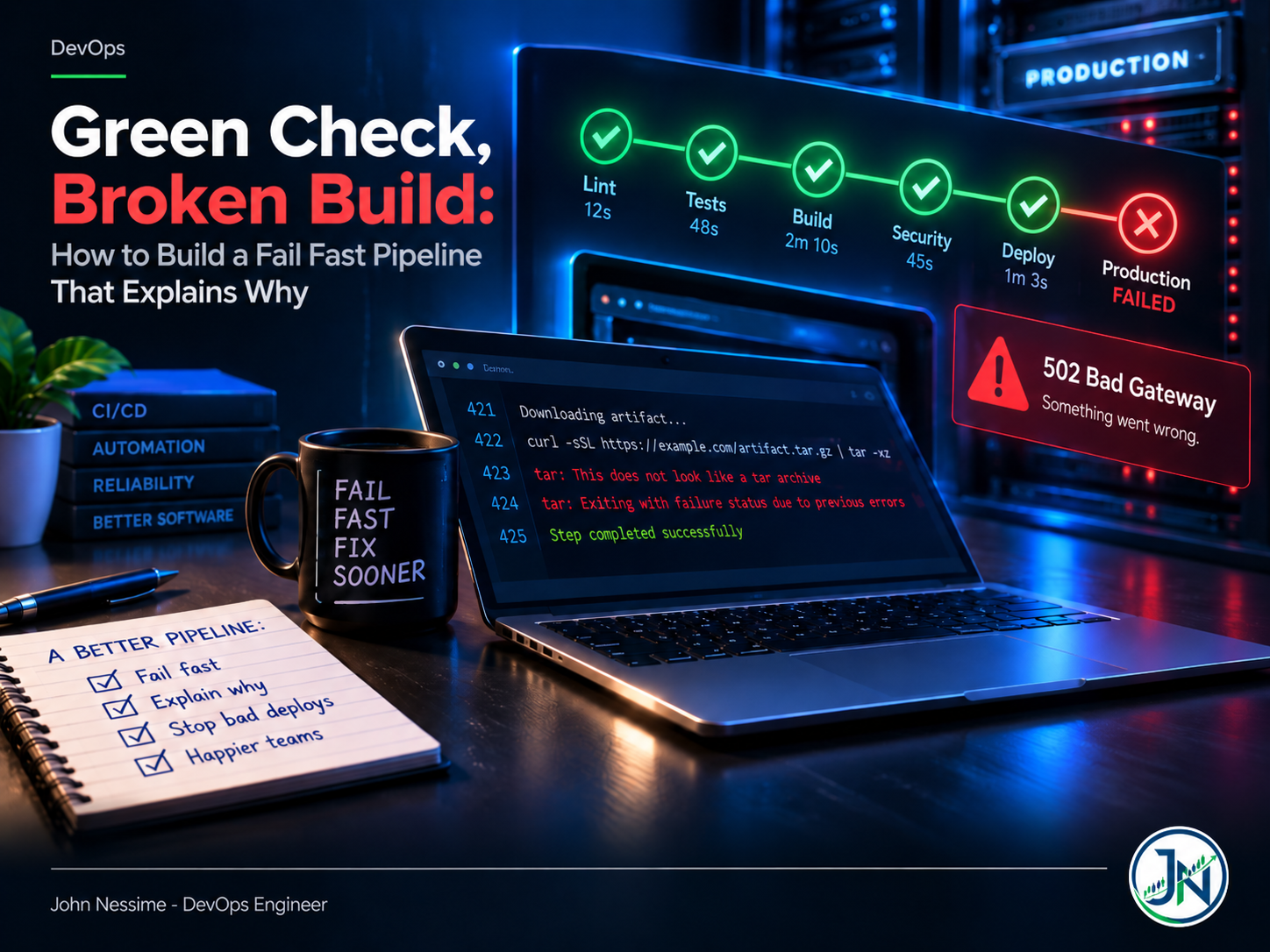
The deploy went out at the end of the day. Pipeline green, every stage a tick, nobody thought about it again. Twenty minutes later support asks why checkout is returning 502.
You go back through the logs and there it is, four hundred lines up, in a step that reported success: a download that returned an HTML error page, got piped into tar, and produced an archive containing nothing useful. The shell reported the exit status of tar, not of curl. The build carried on. The pipeline was never lying on purpose. It just never asked the right question.
Two things go wrong with pipelines, and only one of them gets talked about. The famous one is slow feedback: thirty-four minutes of build and integration tests before a linter tells you a file is missing a trailing newline. The expensive one is a pipeline that passes when it should have stopped. A fail fast pipeline fixes the first problem. Making it explain itself fixes the second, and that is the half most teams skip.
This post covers both: how to order stages so real failures surface in seconds, how to stop the shell from hiding non-zero exits, how to design failure output that hands the next engineer the fix, and the troubleshooting steps for when a pipeline stubbornly refuses to fail at the right moment.
The failure that actually bites: a pipeline that lies
Start here, because everything else is optimisation on top. A slow pipeline wastes your afternoon. A silently passing pipeline ships a broken artifact and burns a day of debugging in production, usually while somebody is on a call with a customer.
The shell is where most of this happens. Bash gives you three defaults that are wrong for CI, and one line fixes all three.
#!/usr/bin/env bash
set -euo pipefail

# Without pipefail this line exits 0 even when curl fails,
# because the shell reports the status of the LAST command
# in the pipe, which is tar.
curl -sSL https://example.com/artifact.tar.gz | tar -xz
What each flag actually protects
-estops the script when a command exits non-zero. Without it, a failed database migration is followed by a successfulecho, and the script exits 0 because the last command succeeded.-uturns an unset variable into an error. This is the one that saves you fromrm -rf "$PREFIX/build"expanding torm -rf "/build"when someone renames an environment variable in the pipeline settings and forgets the script.-o pipefailmakes a pipeline return the first non-zero status instead of the last one. Everycurl | tar,cat | jq, anddocker logs | grepin your scripts is currently reporting only the exit code of the thing on the right.
The exit status is only half the story though. Plenty of tools return 0 while doing something useless, and curl is the classic offender.
# curl exits 0 here even when the server returns 500,
# and you end up untarring an HTML error page.
curl -sSL "$ARTIFACT_URL" | tar -xz

# --fail          makes curl exit non-zero on 4xx and 5xx
# --show-error    keeps the reason visible even with --silent
# --location      follows redirects instead of saving a 302 body
curl --fail --silent --show-error --location "$ARTIFACT_URL" | tar -xz
Now the download failing stops the build, and pipefail makes sure that failure propagates past the pipe. The first fixes the check, the second makes sure the check is heard.
Where set -e quietly gives up
This trips people up constantly. set -e is suspended whenever a command’s exit status is being consumed by something else. It is not a safety net, it is a default.
set -e

# -e does NOT stop the script here.
# The if statement consumes the exit status.
if grep -q "TODO" src/main.go; then
  echo "found"
fi

# -e does NOT stop the script here either.
# The left side of || is explicitly allowed to fail.
run_migrations || echo "migrations failed, continuing anyway"

# -e DOES stop the script here.
run_migrations
The same trap applies inside containers. On Debian-based images /bin/sh is dash, which has no pipefail option at all, so putting set -o pipefail inside a RUN line fails outright. Set the shell at the top of the Dockerfile instead. Hadolint flags this as DL4006 and it is worth wiring into your static stage.
# Set this before any RUN instruction that contains a pipe.
SHELL ["/bin/bash", "-o", "pipefail", "-c"]

RUN curl --fail --silent --show-error --location
      https://example.com/tool.tar.gz | tar -xz -C /usr/local/bin
Order stages by cost, not by category
Most pipelines are laid out the way the team thinks about work: tests, then build, then security, then deploy. That grouping is comfortable and it is the wrong axis. Order by two things instead, cost and failure probability.
The rule I use: every stage should be cheaper than the one after it and more likely to fail than the one after it. If a check catches ten percent of your broken commits and takes fifteen seconds, it goes in front of the check that catches two percent and takes nine minutes. That is the whole design principle behind a fail fast pipeline.
- Syntax and static analysis.
shellcheck,hadolint,yamllint,terraform validate,tflint, formatter checks, type checks. Seconds, no dependencies, no network. This stage catches an embarrassing share of broken pushes. - Unit tests. No database, no containers, no network. If they need any of those, they are integration tests and belong further down.
- Secrets and dependency scanning. Fast, and a leaked credential is worth stopping before you build an image around it.
- Build. This is where you start spending real minutes and cache space.
- Integration and end-to-end. Slow, flaky, expensive to run. Everything above should have already caught the boring failures.
- Deploy and post-deploy verification.
A note on the trade-off, because this ordering costs something. Splitting the fast checks into their own stage adds a checkout and a container pull before your unit tests even start. On a busy shared runner that overhead is real. If your static stage takes twelve seconds of work and forty seconds of setup, merge it into the test job and run it as the first step instead. The principle is failure order, not job count.
The other thing that keeps the fast lane fast is caching, and it is the piece people get wrong in the opposite direction: they cache so aggressively that a stale dependency tree hides a genuine break. Cache the package manager’s download directory, not the resolved dependency tree, and key the cache on the lockfile hash.
Let the platform kill work you already know is doomed
Ordering stages is only useful if the platform actually stops when something breaks. Three settings do most of the work, and they exist under different names on every runner.
GitHub Actions
concurrency:
  # A new push to the same branch cancels the run that is
  # already in flight. Nobody needs results for a commit
  # that has been superseded.
  group: ci-${{ github.ref }}
  cancel-in-progress: true

jobs:
  static:
    runs-on: ubuntu-latest
    timeout-minutes: 5          # a hung job is worse than a failed one
    steps:
      - uses: actions/checkout@v4   # pin to a full commit SHA in production
      - run: shellcheck scripts/*.sh
      - run: hadolint Dockerfile

  test:
    needs: static               # will not start until static passes
    runs-on: ubuntu-latest
    timeout-minutes: 15
    strategy:
      fail-fast: false          # see note below
      matrix:
        suite: [unit, contract]
    steps:
      - uses: actions/checkout@v4
      - run: make test-${{ matrix.suite }}
That fail-fast: false looks like it contradicts the whole post, so it is worth explaining. Matrix fail-fast defaults to true: one leg fails, the rest get cancelled. That is right when the legs are redundant and you only need to know that something broke. It is wrong when the legs tell you different things. If your matrix is three runtime versions and only one fails, cancelling the others hides whether this is a version-specific problem or a general one, and you will burn a rerun finding out. Fail fast on the pipeline, not on the diagnosis.
timeout-minutes is the setting people skip and regret. A job waiting on an interactive prompt, a dead package mirror, or a container that never becomes healthy will sit there consuming a runner until someone notices. Set a timeout on every job, generous enough that a slow day does not trip it and tight enough that a hang gets caught inside one coffee break.
GitLab CI
stages: [static, test, build, deploy]

default:
  interruptible: true     # allows auto-cancel when a newer pipeline starts
  retry:
    max: 2                # capped at 2 by GitLab, so 3 attempts total
    when:
      # Retry only on infrastructure problems.
      # Never retry script_failure: that is your code failing,
      # and retrying it just hides a flaky test.
      - runner_system_failure
      - stuck_or_timeout_failure
      - api_failure

lint:
  stage: static
  timeout: 5m
  script:
    - shellcheck scripts/*.sh

integration:
  stage: test
  needs: [lint]           # DAG: starts as soon as lint passes
  script:
    - make integration
The retry: when list is the important bit and it is the one people get lazy about. A bare retry: 2 retries on everything including a genuine test failure, which converts an intermittent bug into an invisible one. Scope retries to the failure classes that are genuinely the infrastructure’s fault. Jenkins has failFast true for parallel stages, Buildkite and CircleCI have their own equivalents, and the reasoning transfers cleanly.
A failure should hand you the answer, not the search
Here is the test I apply to a pipeline failure. Can someone who did not write the change, at an inconvenient hour, fix it from the failure output alone without opening the source? If not, the failure message is incomplete.
Four things need to be in there:
- What failed, named precisely. Not “build failed” but the command and its exit code.
- Why, in terms of the input rather than the internals. “lockfile is out of date with package.json”, not “npm ci exited 1”.
- Where, meaning the file, the line, or the config key that caused it.
- What to do next. One concrete action, even if it is just a runbook link.
In shell, a small helper plus an ERR trap gets you most of the way there.
#!/usr/bin/env bash
set -euo pipefail

fail() {
  echo "ERROR: $1" >&2
  echo "  fix: $2" >&2
  exit 1
}

# Catches anything you did not write an explicit check for,
# and tells you the line and the command that blew up.
trap 'echo "FAILED at line $LINENO: $BASH_COMMAND" >&2' ERR

[[ -f config/app.yaml ]] || fail
  "config/app.yaml is missing"
  "copy config/app.yaml.example and set DATABASE_URL"

[[ -n "${IMAGE_TAG:-}" ]] || fail
  "IMAGE_TAG is empty"
  "check the tag job output; it sets IMAGE_TAG from the git SHA"
Note ${IMAGE_TAG:-} rather than $IMAGE_TAG. Under set -u the bare form aborts with a shell error before your nice message ever prints, which is technically correct and practically useless.
On GitHub Actions you can go one step further and attach the error to the file and line, so it shows up as an annotation on the pull request instead of something to be dug out of a log.
# Renders as a red annotation on that exact line in the diff view.
echo "::error file=deploy/values.yaml,line=42::image tag is empty"

# Visible, but does not fail the job.
echo "::warning file=Dockerfile,line=7::apt cache not cleaned"
Two more habits worth building. Upload logs, test reports, and screenshots as artifacts on failure, conditionally, so the evidence survives the job that produced it. And emit test results as JUnit XML so the platform renders a list of failed test names instead of asking people to scroll. Both are cheap and both cut the time between “it broke” and “I know why” more than any clever retry logic will.
Exit codes are a contract, so use more than one
Most scripts have two states: 0 and “something went wrong”. That collapses distinctions the pipeline needs. Terraform gets this right and it is a good model to copy.
# -detailed-exitcode changes the meaning of the exit code:
#   0 = succeeded, no changes
#   1 = error
#   2 = succeeded, changes present
set +e
terraform plan -detailed-exitcode -out=tfplan
code=$?
set -e

case "$code" in
  0) echo "No drift. Skipping apply." ;;
  2) echo "Changes detected. Holding for approval." ;;
  *) echo "Plan failed. See log above." >&2; exit "$code" ;;
esac
The set +e around it is deliberate: with -e active, exit code 2 would kill the script before you got to interpret it. This is one of the few places where turning the flag off is the correct move, and it is worth a comment in the file explaining why so nobody “fixes” it later.
Do the same in your own scripts. Reserve a code for “the thing you asked for is not possible” versus “I could not reach the API” versus “your input is wrong”. The pipeline can then retry one and refuse to retry the others, which is the difference between a retry that absorbs a runner hiccup and a retry that hides a race condition for six months.
Gate on what you care about, not what is easy to check
This is the deploy-stage version of the same lie. Plenty of commands confirm that a request was accepted, not that the thing you wanted happened.
# Returns 0 the moment the API server accepts the manifest,
# even if every pod goes into CrashLoopBackOff a second later.
kubectl apply -f k8s/

# This is the step that actually waits for the rollout,
# and fails the job if it does not converge.
kubectl rollout status deployment/api --timeout=180s

# And this proves the application answers a request,
# not just that a pod reports Ready.
curl --fail --silent --show-error https://api.example.com/healthz
Run that last check against the public hostname, through your CDN, rather than against the pod directly. If you front the app with Cloudflare or similar, a smoke test that skips the edge will happily pass while real users hit a cached error page or a misrouted origin. Same reasoning applies to the origin host itself: if the app runs on a VPS from a provider like InterServer behind a reverse proxy, verify through the proxy, because that is the path traffic takes.
Then track how long each stage takes over time. Pipeline duration and failure rate per stage are perfectly ordinary metrics to ship into Prometheus and graph in Grafana, or into whatever platform you already use for application monitoring. When the fast lane creeps from forty seconds to four minutes, that is a slow regression nobody will notice from a single run.
Troubleshooting
The job passed but the artifact is wrong
Look for pipes first. Grep the scripts for | and check whether pipefail is set in that shell. Then check for tools that return 0 on failure: curl without --fail, docker run where the entrypoint swallows errors, anything wrapped in || true that somebody added during an incident and never removed.
set -e is set but the script keeps going
The failing command is almost certainly inside a condition, on the left of || or &&, or in a function that is itself being called from an if. Add set -x temporarily and read the trace to see exactly where control flow continued. Then use an explicit check with your fail helper rather than relying on -e at that point.
Works locally, fails in CI (or the reverse)
Usually a shell difference. Your terminal runs bash or zsh, the runner may execute the script with sh. Add an explicit shebang, and on GitHub Actions set the shell on the step or at the job level rather than assuming. Inside containers, remember dash has no pipefail and no [[ ]].
The job hangs until the platform kills it
Something is waiting on stdin. Package managers prompting for confirmation, ssh asking about a host key, a database client waiting for a password. Add the non-interactive flags, set CI=true where tools respect it, and put a timeout on the job so the next occurrence fails in ten minutes instead of sixty.
Fails on the first run, passes on rerun
Resist the retry. Log the failure with enough context to identify it later, quarantine the test into a non-blocking job if it is genuinely blocking the team, and give it an owner and a date. A blanket retry turns a flaky test into a permanent tax on everyone’s confidence in the pipeline.
The failure output is a wall of noise
Suppress progress bars and spinners in CI, they render as thousands of unreadable lines. Then print a short summary block at the very end of the job, after the noise, listing what failed and what to do. People read the bottom of a log first.
Common mistakes
- Writing
set -ewithout-o pipefailand assuming the script is covered. - Using
|| trueto silence a step that fails intermittently, instead of finding out why. - Running the slowest, flakiest checks before the ones that take fifteen seconds.
- Retrying on every failure class rather than only infrastructure faults.
- No job timeouts, so a hang consumes a runner until someone notices.
- Treating
kubectl applyor a deploy API call as proof the deploy worked. - Failure messages that name the internal function that threw, and nothing the reader can act on.
- Caching so aggressively that a stale dependency tree hides a real break.
- Discarding logs and test reports when the job fails, which is exactly when you need them.
- Turning off matrix fail-fast everywhere by reflex, so every broken commit costs the full matrix.
Best practices
- Put
set -euo pipefailat the top of every shell script the pipeline runs, and set the DockerfileSHELLbefore any pipedRUN. - Order stages so each one is cheaper and more likely to fail than the next.
- Give every job a timeout, and cancel superseded runs on the same branch.
- Use explicit checks with actionable messages instead of relying on
-eto catch everything. - Distinguish exit codes so the pipeline can react differently to different failures.
- Verify deploys with a rollout status check plus a real HTTP request through the public path.
- Upload artifacts and structured test reports on failure.
- Pin action and image references to immutable digests so a green pipeline stays reproducible.
- Track stage duration and failure rate over time, the same way you track application metrics.
- Fix the failure message the first time somebody has to ask what it means.
FAQ
What does “fail fast” actually mean in a CI/CD pipeline?
Two things. First, the pipeline stops as soon as it knows the result will be a failure, rather than finishing work whose outcome no longer matters. Second, the cheapest checks that are most likely to catch a problem run first, so the average failure surfaces in seconds. The second half is a design choice about ordering, not a platform setting.
Is set -e enough on its own?
No. It is suspended inside conditions, on the left side of && and ||, and after !. It also does nothing about pipes, which is why -o pipefail matters, or about commands that return 0 while failing, which is why explicit checks matter. Use it as a baseline, not as your only line of defence.
Should I disable matrix fail-fast?
Only when the legs give you different diagnostic information. If the matrix is runtime versions or operating systems and you need to know whether the break is universal or specific, let all legs run. If the legs are interchangeable shards of the same test suite, leave fail-fast on and save the compute.
How do I stop a pipeline from passing when a step really failed?
Work through three things in order. Set pipefail so pipes propagate failure. Add the flags that make tools return non-zero on failure, such as curl --fail. Then replace implicit trust with explicit assertions: after a deploy, check that the rollout converged and that the service answers a request. Most silent passes come from one of those three gaps.
Are automatic retries a good idea?
Only for failures that are the infrastructure’s fault: runner crashes, image pull errors, API timeouts from the CI platform itself. Never retry a script failure by default. And make retries visible, because a job that quietly succeeds on the third attempt is telling you something important that nobody sees.
How long should a fast feedback stage take?
Short enough that an engineer waits for it rather than switching context. Somewhere under a couple of minutes for the combined lint, format, and unit stage is a reasonable target for most codebases. Past that, people push and walk away, and you lose the benefit of fast feedback even though the pipeline is technically quick.
Does this apply to self-hosted runners too?
All of it, and timeouts matter more. On hosted runners a stuck job eventually hits the platform’s own ceiling. On your own machine it holds a slot until you intervene, so a hung job blocks the queue for everyone. Set explicit timeouts and make sure the runner cleans up its workspace between jobs.
The one thing to take away
Speed is the part everyone optimises and honesty is the part that actually costs money. A fail fast pipeline that finishes in ninety seconds is worth very little if one of those seconds contains a swallowed exit code. Fix the lying first: pipefail, tools that return non-zero when they fail, and assertions that check the outcome rather than the request. Then reorder for speed.
And judge every failure by one question. Could someone else fix this from the output alone, without reading the source? If the answer is no, the pipeline has not finished its job, no matter how quickly it went red.
Need help fixing a pipeline that lies to you?
If any of this sounds like your CI, this is the kind of work I take on. Typical engagements look like:
- Auditing an existing GitHub Actions, GitLab CI, or Jenkins pipeline for silently swallowed failures and false-green stages.
- Restructuring stage order and caching so the common failure surfaces in seconds instead of after the build.
- Hardening deploy verification: rollout gates, smoke tests through the real public path, and automatic rollback on a failed health check.
- Rewriting pipeline shell scripts with proper error handling, exit code contracts, and failure messages an on-call engineer can act on.
- Wiring pipeline duration and failure metrics into Prometheus and Grafana so regressions get caught early.
Send me the workflow file and a link to a failing run, and I will tell you what I would change first.