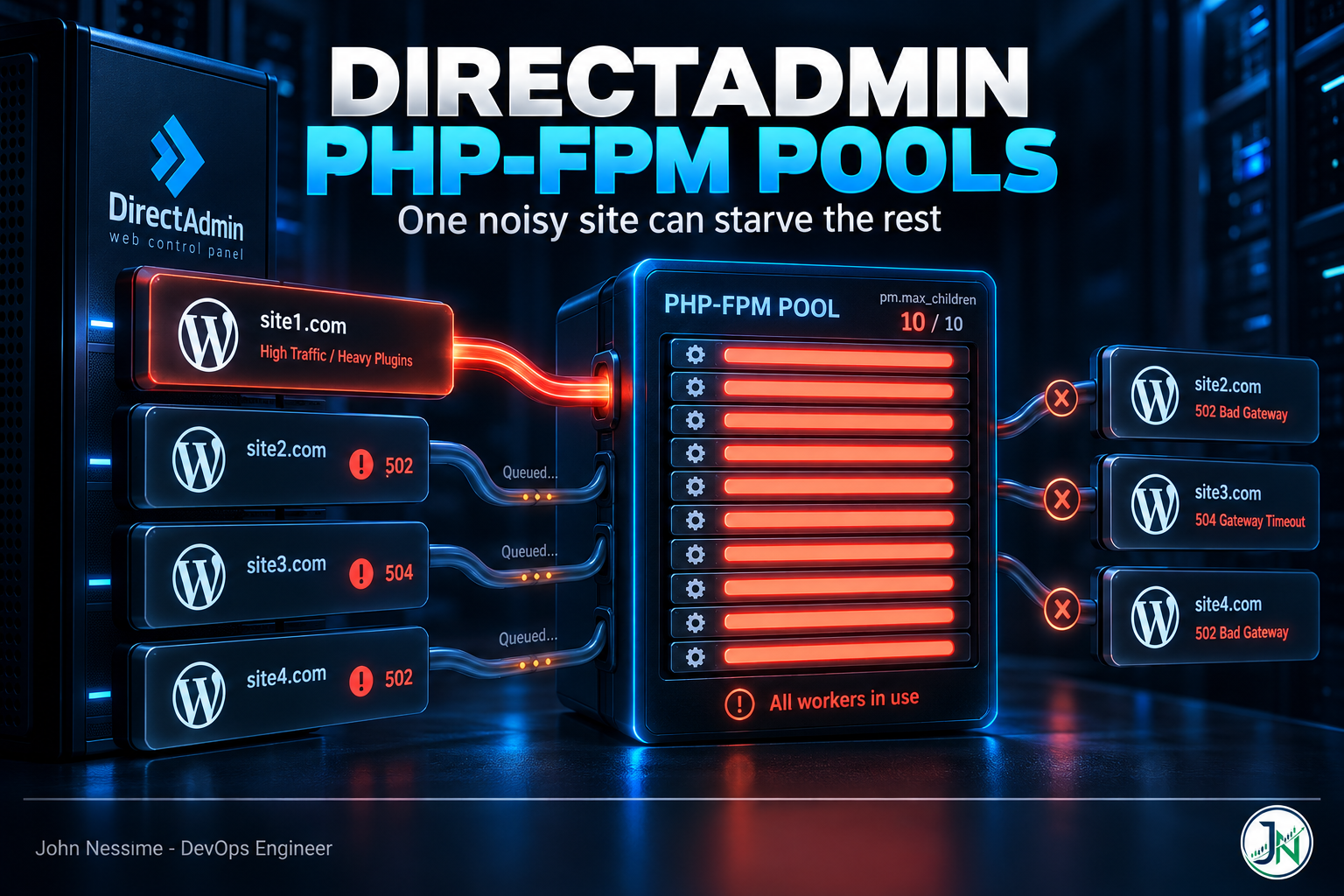
The ticket said “the shop is throwing 502s again.” The shop was fine. What was not fine was the half-forgotten news site sitting on the same DirectAdmin account, running a broken cron that fired an uncached admin-ajax call every few seconds. It had eaten every worker in the pool, and WooCommerce was queued behind it, waiting for a process that was never going to free up in time.
That is the thing about DirectAdmin PHP-FPM pools that catches people out. You think you are tuning a site. You are not. You are tuning a user, and every domain that user owns is sharing the same worker budget, the same queue, and the same memory ceiling.
This post covers where DirectAdmin actually keeps the pool config, how to size pm.max_children from numbers your server gives you rather than from a blog post’s magic value, which per-site PHP limits are worth setting and which are theatre, why OPcache does not behave the way you expect on a multi-tenant box, and how to make all of it survive the next CustomBuild run.
The design fact that explains most of your 502s
DirectAdmin generates one FPM pool per user account, per PHP version. The pool is named after the Linux user. It listens on a Unix socket named after the user. It runs as that user. Apache or Nginx hands PHP requests to that socket for every domain and subdomain in the account.
So if a reseller client has twelve domains under one username, those twelve sites share a single value of pm.max_children. There is no per-domain pool. This is a long-standing feature request rather than an oversight, and it has a real consequence: the noisiest site in an account sets the availability of every other site in that account.
Once you have internalised that, the fix for a lot of “mystery 502” tickets stops being a config tweak and starts being an account layout decision. If a site matters commercially, give it its own DirectAdmin user. That is the cleanest isolation the panel offers without going off-piste, and it costs you nothing but a bit of admin tidiness.
The alternative, if you have User jails enabled, is DirectAdmin’s isolated FPM mode. That runs a separate php-fpm master process per jailed user instead of a shared master with many pools:
da config-set isolated_fpm 1
systemctl restart directadmin
da taskq --run 'action=rewrite&value=httpd'
It only applies to users who already have Jailed enabled. The trade-off is memory: one master process per user, plus a separate OPcache region for each, adds up quickly. DirectAdmin mitigates that by letting idle per-user FPM instances exit after a period of inactivity, but on a box with sixty accounts you will feel it. I would reach for this on a server hosting a handful of paying clients, not on a general shared box.
Where the pool config actually lives
This trips up almost everyone the first time, because there are two files with nearly the same name and only one of them matters for user sites.
/usr/local/php83/etc/php-fpm.confis the master config for that PHP version. Editing it by hand is how you learn that CustomBuild overwrites it./usr/local/directadmin/data/users/USERNAME/php/php-fpm83.confis the generated per-user pool. This is the file that governs a customer’s sites./usr/local/directadmin/data/templates/php-fpm.confis the template those per-user files are rendered from.
Substitute your PHP version for 83 throughout. To see what every account is currently running:
ls /usr/local/directadmin/data/users/*/php/php-fpm*.conf

grep -H 'pm.max_children' /usr/local/directadmin/data/users/*/php/php-fpm*.conf
The second command is the one I run first on any server I have just inherited. It gives you the entire worker budget of the box on one screen, and it is usually the moment you discover that forty accounts are all sitting on the stock default.
The DirectAdmin template ships with pm = ondemand and a low default child count, driven by a MAX_CHILDREN token. Ondemand means no workers exist until a request arrives, and idle workers are reaped after a timeout. On a shared box with many mostly-idle accounts, that is the right default and I would leave it alone. On a server dedicated to one busy WordPress site, the spawn latency on the first request after an idle period is real and switching to dynamic is defensible. Most people who switch to dynamic on a shared server are trading memory they do not have for a latency win they will not notice.
Sizing pm.max_children without guessing
Every tuning guide gives you a formula. The formula is fine. The input everyone gets wrong is worker memory, because they use a number from someone else’s server instead of measuring their own. A lean WordPress install and the same install with a page builder, a security plugin and WooCommerce are not remotely the same workload.
Measure it. This averages the resident memory of the workers currently running in one pool:
ps -eo rss,args | grep '[p]hp-fpm: pool wpuser'
  | awk '{sum+=$1; n++} END {if (n) printf "%d workers, avg %.0f MBn", n, sum/n/1024}'
The bracket trick in the grep pattern stops grep matching its own process. rss is resident set size in kilobytes, which is why the awk divides twice. Run it during a busy period, not at three in the morning, and run it a few times.
Two honest caveats about RSS. It overstates real consumption, because workers forked from the same master share a lot of pages, including the OPcache region. And it understates your worst case, because a worker that has not yet hit a memory-hungry request looks cheap. Treat the average as a planning figure, not a guarantee, and leave headroom.
Then the arithmetic:
- Take total RAM and subtract what MySQL or MariaDB, the web server, mail, and the panel itself need. On a WordPress box the database is usually the second-largest consumer and it is not optional.
- Reserve a further slice for page cache and burst. I aim to leave a comfortable margin free rather than allocating to the last megabyte.
- Divide what is left by your measured per-worker figure. That is your ceiling for all pools combined.
- Split that ceiling across accounts by actual traffic, not evenly.
Step three is where people go wrong on cheap VPS plans. If you are running a dozen WordPress sites on one of the low-RAM tiers from a provider like Contabo or InterServer, the honest answer is often that you cannot give every account a generous pool and you need to either cut the site count or move up a tier. Setting pm.max_children to a number your RAM cannot back does not buy capacity. It buys the OOM killer, and the OOM killer usually takes the database with it, which turns a slow site into a broken one.
To raise the server-wide default:
da config-set php_fpm_max_children_default 30
systemctl restart directadmin
da build rewrite_confs
systemctl restart php-fpm83
For a single account, go to Admin Level → Custom HTTPD Configurations → domain.com and open the php-fpm entry for that PHP version. In the |CUSTOM1| textarea, set the token:
|?MAX_CHILDREN=40|That syntax is a template token override, not a config line. It tells the template renderer to use 40 instead of the default when it writes pm.max_children for that user. Writing pm.max_children = 40 in that box instead is the single most common mistake here, and it does something worse than nothing: the template still emits its own pm.max_children, you now have the directive twice in one pool, and FPM refuses to start. On a server where one broken pool file stops the whole master, that takes down every site on the box.
Rewrite and restart after any change, then confirm the value actually landed in the generated file rather than trusting the panel.
Per-site PHP limits, and the difference that matters
The |CUSTOM2| textarea on the same page is where PHP settings go. The syntax is FPM pool syntax, not php.ini syntax:
php_admin_value[memory_limit] = 512M
php_admin_value[max_execution_time] = 120
php_value[upload_max_filesize] = 64M
php_value[post_max_size] = 64M
php_value[max_input_vars] = 5000
The admin in php_admin_value is not decoration. Settings written with php_value can be raised at runtime by the application through ini_set(). Settings written with php_admin_value cannot. That distinction is the whole game on a multi-tenant server.
WordPress and a good number of plugins will happily try to raise memory_limit at runtime, and some optimisation plugins push it to values that would let one bad request consume a large slice of the machine. If you want a genuine ceiling, use php_admin_value. If you want a sensible starting point that a developer can raise for a legitimate import job, use php_value. I use admin for memory and execution time, plain for upload sizes, because upload sizes are a support-ticket generator and not a stability risk.
max_input_vars deserves its own note. It is the one that silently truncates a large WooCommerce product save or a menu with hundreds of items, with no error anywhere. The user reports “my changes did not save” and every log is clean. If you support content-heavy sites, raise it before someone asks.
Letting site owners set their own
Under FPM there is no .htaccess route for PHP settings, because FPM is a separate process and never sees the file. DirectAdmin enables the per-directory alternative by default: a .user.ini file in public_html, controlled by the user_ini.filename setting. It handles the PHP_INI_PERDIR and PHP_INI_USER class of settings only, so it will never override anything you set with php_admin_value. That is the point of it.
The WP-CLI gap
None of this applies to WP-CLI. Cron jobs and shell commands run through the CLI SAPI and read the CLI php.ini, not your pool. So a plugin update that works fine in the browser can die on memory in a cron-driven wp cron event run, and you will hunt through the pool config finding nothing wrong. Check the CLI limits separately when a scheduled task fails but the same action succeeds in wp-admin.
OPcache is shared, and that is the invisible one
OPcache allocates its shared memory region when the FPM master starts, before any pool exists. Every pool under that master inherits the same region. You cannot meaningfully give one account its own OPcache budget through a pool directive, because by the time the pool is read the memory has already been carved out.
Two consequences, and the second is the one nobody plans for.
First, capacity. The default OPcache size is comfortable for one application and thin for thirty WordPress installs, each with its own core, theme and plugin tree. When it fills, OPcache starts evicting and eventually restarts, and every site on the version gets slower at once with nothing in any error log to explain it. Watch the wasted-memory and restart counters rather than guessing.
Second, the sizing you actually need scales with the total number of PHP files across all accounts on that PHP version, not the biggest site. Consolidating everyone onto one PHP version looks tidy and quietly makes this worse. Spreading accounts across two or three PHP versions gives each master its own region, which is an underrated side effect of not forcing everyone to upgrade on the same day.
OPcache is configured through CustomBuild rather than the pool. Edit the customised copy under CustomBuild’s custom directory so your changes survive updates, then rebuild and restart the FPM master.
Making changes survive the next rebuild
Anything you type directly into a generated file is temporary. The next rewrite_confs, PHP update or panel update will flatten it, usually weeks later, and the regression will look like it came from nowhere.
There are three durable places to put changes, in increasing order of blast radius:
- Per user, all PHP versions.
/usr/local/directadmin/data/users/USERNAME/php/php-fpm.conf.custom1and.custom2. These feed the same CUSTOM tokens as the panel textareas, so the settings follow the account when the user switches PHP version in Domain Setup. This is the one I reach for first. - Server-wide, all users, all versions.
/usr/local/directadmin/data/templates/custom/php-fpm.conf.custom1and.custom2. If either exists, its contents are injected into every pool file DirectAdmin writes. Good for a baseline you want everywhere. - A full custom template. Copy
/usr/local/directadmin/data/templates/php-fpm.confto thecustomsubdirectory and edit it. This is the only route for pool directives that have no token, but you now own that file forever and stop receiving upstream template improvements. Use it when nothing else works, and leave a comment at the top saying why.
Global first, then per-user on top. Both land in the same token, so a per-user value does not replace a global one, it appends. For a directive that can only appear once in a pool, that is a duplicate and a failed restart.
Troubleshooting
“server reached max_children setting”
The pool name in that warning tells you which account, not which site. Find the log first rather than guessing at a path:
grep -i 'error_log' /usr/local/php83/etc/php-fpm.confBefore raising the limit, check whether the requests are legitimate. Cross-reference the timestamps against each domain’s access log in that account. Nine times out of ten it is one of three things: an uncached admin-ajax.php loop from a plugin, a bot crawling faceted search or filtered archive URLs that bypass page cache, or wp-cron.php firing on every request on a site with a heavy scheduled task. Raising pm.max_children to absorb bot traffic is paying for garbage with RAM.
502 or 504 with no PHP error
The request is dying at the FPM boundary rather than inside PHP. Usual causes are a worker killed by request_terminate_timeout, a full listen queue, or the master failing to start after a config change. Check the FPM service status before you check anything in WordPress. If FPM did not start at all, the panel will still show your settings saved and every site on that PHP version will be down.
Changes in the panel that do nothing
Read the generated per-user file after every change. If the value is not in there, the rewrite did not run or the token was wrong. If it is in there and PHP still reports something else, the master was not restarted, or something later in the pool is overriding it. A temporary phpinfo() file served by the site in question settles the argument in seconds. Delete it immediately afterwards.
Session or temp files that are not where you left them
If PHP writes to /tmp and you cannot see the files over SSH, that is systemd’s PrivateTmp giving the FPM service its own private namespace. Nothing is broken. The files exist, in a mount only that process can see.
disable_functions that will not budge
disable_functions is special. From a pool you can add to the list but not remove from it, because the php.ini value has already been applied. To allow a function for one account you have to stop setting it in php.ini at all and drive the whole thing from templates instead. DirectAdmin documents that pattern, and it is worth reading before you start rather than after you have half-done it, because the intermediate state removes protection server-wide.
Common mistakes
- Editing
/usr/local/phpXX/etc/php-fpm.confdirectly and being surprised when it reverts. - Writing
pm.max_children = 40into a CUSTOM box instead of the|?MAX_CHILDREN=40|token, producing a duplicate directive and a dead master. - Sizing workers from a memory figure found online rather than measured on the box.
- Using
php_valueformemory_limiton shared hosting, then wondering how a plugin raised it to 2G. - Assuming pool settings apply to WP-CLI and cron.
- Raising limits to absorb bot traffic instead of blocking or caching it upstream.
- Putting a client’s revenue site in the same account as their abandoned projects.
Best practices for tuning DirectAdmin PHP-FPM pools
- One DirectAdmin user per site that matters. Isolation you get for free beats isolation you have to engineer.
- Keep
ondemandon shared servers. Only move todynamicwhen a single busy site owns the box. - Set a global baseline in the custom template, then override per user. Do not hand-tune forty files.
- Use
php_admin_valuefor anything that protects the server andphp_valuefor anything that is only a convenience. - Cut PHP requests before you add workers. Full-page caching, a CDN in front, and Cloudflare or similar handling bots removes far more load than any pool setting.
- Disable WordPress’s request-triggered cron and drive it from a real system cron, so scheduled work stops competing with visitors for workers.
- Alert on saturation, not just uptime. Worker utilisation per pool and PHP-FPM error log entries are the signals worth having in Netdata, Prometheus, or whatever you already run. A site that is queueing looks perfectly healthy to an HTTP check.
- Re-measure after major plugin changes. A page builder or a new security plugin moves per-worker memory enough to invalidate your arithmetic.
Frequently asked questions
Can I create a separate PHP-FPM pool for each domain in DirectAdmin?
Not through the panel. Pools are generated per user, per PHP version, and every domain in the account shares one. The supported ways to get separation are to move the domain to its own DirectAdmin user, or to enable isolated FPM mode for jailed users, which gives each user their own master process. Anything else means custom systemd units you maintain yourself, outside the panel’s knowledge.
What is a good pm.max_children value for WordPress?
There is no portable number, because the input is your measured per-worker memory and your available RAM after the database. Measure the average resident size of your workers under real traffic, subtract everything else the server needs from total RAM, and divide. A lean brochure site and a WooCommerce store with thirty plugins can differ by a factor of three or more.
Where does DirectAdmin store PHP-FPM pool configuration?
Generated per-user pools live at /usr/local/directadmin/data/users/USERNAME/php/php-fpmXX.conf, rendered from the template at /usr/local/directadmin/data/templates/php-fpm.conf. Do not edit either directly. Put durable changes in the custom files under the user’s php directory or in the templates/custom directory.
Why do my PHP settings disappear after a CustomBuild update?
Because they were written into a generated file. CustomBuild and DirectAdmin regenerate those files on update and on any config rewrite. Only the custom template files and the CUSTOM token areas persist.
Does .htaccess work for PHP settings under PHP-FPM?
No. FPM is a separate process from the web server and never reads .htaccess. Use a .user.ini file in the web root for the settings PHP allows at that level, or set the rest in the pool.
Should I switch from ondemand to dynamic or static?
On a shared server, no. Ondemand exists precisely so that dozens of idle pools cost you nothing. On a server dedicated to one high-traffic site, dynamic removes cold-start latency and static gives the most predictable memory profile. The question to ask is whether your idle pools outnumber your busy ones.
Can I give one WordPress site its own OPcache?
Not from the pool config. OPcache’s shared memory is allocated by the FPM master at startup and shared by every pool under it. The practical routes are isolated FPM mode, which gives jailed users their own master, or moving the site to a different PHP version so it sits under a different master.
The one thing to take away
DirectAdmin PHP-FPM pools are a per-user boundary, not a per-site one. Every tuning decision that follows, how many workers to allow, whether a memory limit should be a suggestion or a wall, whether a client’s twelve domains belong in one account, comes out of that single fact.
Measure your workers before you size them, use the CUSTOM token files so your work survives the next rebuild, and watch pool saturation rather than waiting for the 502 ticket. The site that goes down is rarely the site that caused it.
Need a hand with a DirectAdmin server?
Most of the work I do on DirectAdmin boxes is this kind of thing: sites that are fine in isolation and fall over together. If that sounds familiar, I can help with:
- Auditing every pool on a server and producing a worker budget that matches the RAM you actually have
- Tracking down which domain in a shared account is saturating the pool, and why
- Building a global custom template so per-user tuning stops being forty hand-edited files
- Splitting a multi-site DirectAdmin account into isolated users without breaking mail, DNS or SSL
- OPcache and per-version sizing on servers hosting many WordPress installs
- Wiring up pool-level monitoring and alerts so saturation shows up before the ticket does
Send me a pool file, the output of that RSS command, or the last hour of your PHP-FPM error log, and I will tell you what I see.