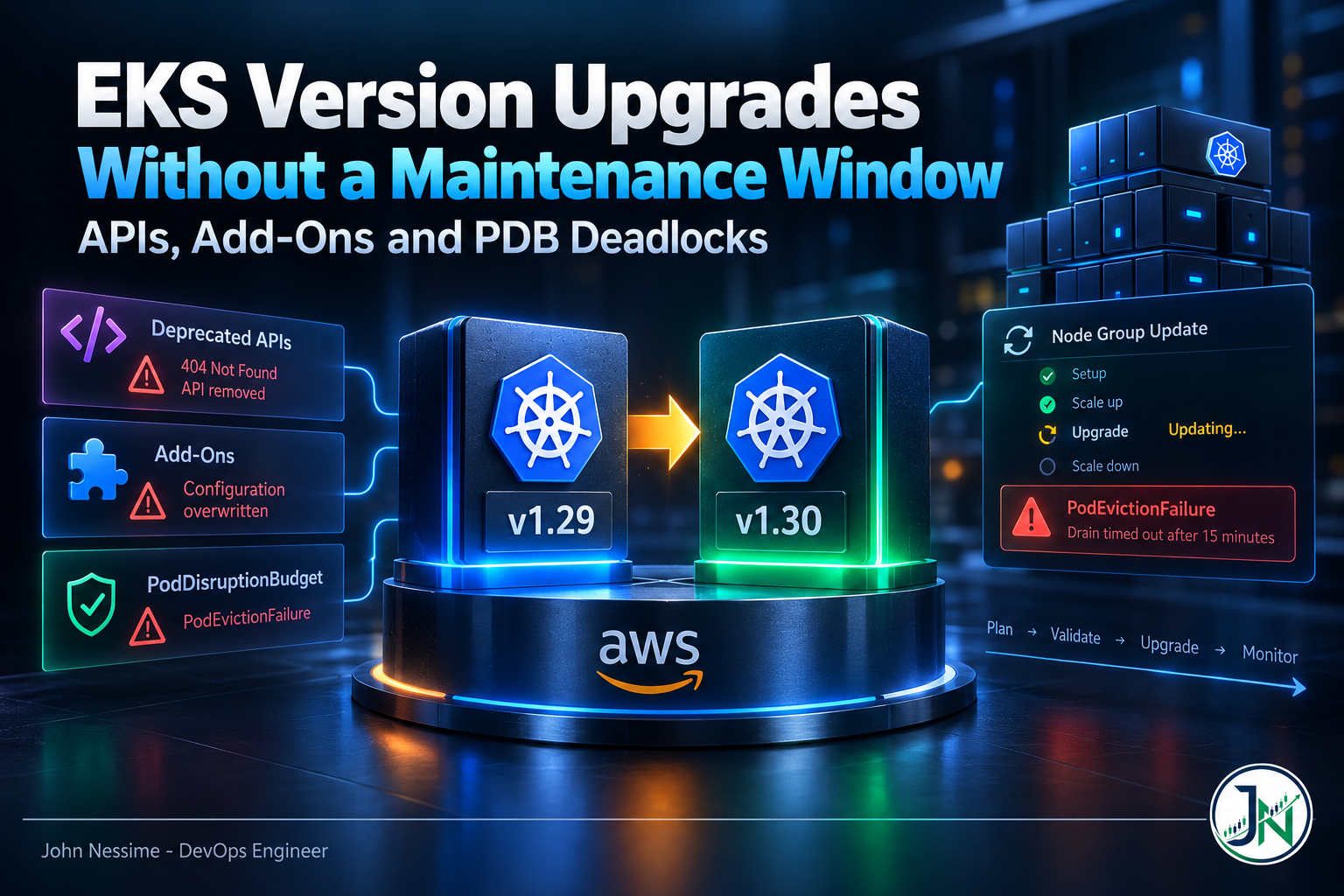
The control plane upgrade finished in about twenty minutes and nobody noticed. Then the managed node group update went to Updating, sat there, and came back with PodEvictionFailure. Half the group was on the new AMI and half on the old, and the thing blocking the drain was a PodDisruptionBudget somebody wrote eighteen months earlier for a two-replica deployment.
That is the shape of most EKS upgrade incidents. The part everyone books a maintenance window for, the control plane bump, is the part AWS handles and almost never goes wrong. The damage happens in the data plane rollout, because of decisions made months earlier that nobody connected to upgrades.
This post covers the three failure families that actually break EKS version upgrades: removed APIs you did not know you were calling, add-on updates that silently discard your configuration, and pod disruption budgets that deadlock the drain. For each one: what it looks like, how to catch it beforehand, and what the escape hatch costs.
Why the control plane is the easy half
An EKS cluster has two versions that must stay compatible. AWS manages the control plane; you manage the data plane, which in practice means the kubelet version on your nodes.
Two constraints shape everything else. In-place upgrades move one minor version at a time, so being three versions behind means three sequential upgrades and three data plane rollouts. And the kubelet cannot run ahead of the API server, so once the control plane moves, the clock starts on getting nodes to follow.
Failure one: the API calls you did not know you were making
Deprecation and removal are different events, and the gap between them is where people get comfortable. An API version gets deprecated, everything keeps working, the warning scrolls past in CI, and several releases later the version is gone and whatever depended on it starts getting 404s.
Your own manifests are usually fine; someone fixed those when the warning appeared. What breaks is the third-party agent nobody owns: a metrics collector, an ingress controller, a Datadog or New Relic agent installed by a Helm chart pinned two years ago. These call the API on a watch loop, so they hit removed APIs immediately, and they tend to fail quietly rather than crash-loop.
Cluster insights, and what it is actually reading
aws eks list-insights --cluster-name my-cluster

aws eks describe-insight
    --cluster-name my-cluster
    --id a1b2c3d4-5678-90ab-cdef-EXAMPLE11111
EKS runs upgrade readiness checks and exposes them through the insights API. The deprecated API check reads your control plane audit logs on a thirty-day rolling window, scanned about once a day. That has a consequence people trip over constantly: after you fix a deprecated call, the insight stays in ERROR until the last matching log entry ages out. The work is done, the check still fails, and if you gate automation on insight status your pipeline is blocked for weeks on a solved problem. Force a fresh scan rather than waiting for the daily one:
aws eks start-insights-refresh --cluster-name my-cluster
aws eks describe-insights-refresh --cluster-name my-cluster
The refresh re-reads the window; it does not shorten it. Audit-log detection also only sees APIs that were actually called, so a monthly CronJob or a chart sitting unapplied in a repo never appears. Insights tells you what your cluster did, not what it could do.
Ask the API server directly
The API server keeps its own counter, and it names the release that removes each API. Fastest check available:
kubectl get --raw /metrics | grep apiserver_requested_deprecated_apisRead the removed_release label first: it tells you whether this is urgent for the next upgrade or a warning for the one after. Scrape the metric into Prometheus, Grafana Cloud or Amazon Managed Grafana and you get a standing signal instead of a scramble.
For the callers, go to the audit logs. With control plane audit logging on, CloudWatch Logs Insights gives you the identity behind each deprecated call:
fields @message
| filter `annotations.k8s.io/deprecated` = "true"
The user.username field is what you need. It usually points at a service account in a namespace you did not install, which is your cue to find the chart’s owner. Static scanners like kubent and pluto cover the other half, the manifests that have not run recently. Use both.
Failure two: add-ons and the conflict resolution you picked once
Managed add-ons cover what a cluster cannot run without: the VPC CNI, CoreDNS, kube-proxy, the EBS CSI driver. They are version-pinned separately from the cluster, and their compatible ranges move with the Kubernetes version. The failure here is rarely the version, though. It is the conflict resolution mode.
When you update an add-on, EKS wants to apply its own field values. If you edited those fields in-cluster, that is a conflict, resolved by what you pass:
NONEleaves your value alone and the update may simply fail. Safe, loud, and it stops your upgrade.OVERWRITEreverts your customization to the EKS default. The update succeeds. Your custom Corefile, your CNI tuning, your tolerations, gone, with no error.PRESERVEkeeps your value through the update.
OVERWRITE is the one that hurts, because it is also the one people reach for when an update fails and they want it to stop failing. It is the standard fix when migrating a self-managed add-on to a managed one, so it gets learned there and carried into the update path, where it means something different. A CoreDNS update with OVERWRITE will replace a Corefile carrying your stub zones and forwarders, and resolution for those zones stops cluster-wide while every health check stays green.
aws eks update-addon
    --cluster-name my-cluster
    --addon-name coredns
    --addon-version <compatible-version>
    --resolve-conflicts PRESERVE
One more trap: the same value means different things on create and on update. On create, PRESERVE behaves close to NONE, leaving an existing self-managed add-on alone rather than adopting your settings. Check the operation, not the word.
The durable fix is to stop editing add-on resources with kubectl at all. Put customizations in the add-on’s configuration values so EKS owns them and there is nothing left to conflict over. An afternoon of work, and this failure family goes away permanently.
Failure three: PDB deadlocks and the fifteen-minute drain clock
This is the one that stalls upgrades halfway, and the mechanics matter because the fix depends on where you are stuck. A managed node group update runs in four phases: setup, scale up, upgrade, scale down. On the default strategy, scale up launches replacements before anything is terminated, which is what preserves capacity. Then the upgrade phase does this, per node:
- Pick a node to replace, up to the configured
maxUnavailable. - Cordon it once a new node reaches
Ready. - Drain the pods off it.
- Wait sixty seconds after eviction, then ask the Auto Scaling group to terminate it.
- Repeat until nothing is left on the old launch template version.
Step three has a fifteen minute budget. If pods have not left in that time and you did not pass the force flag, the whole update fails with PodEvictionFailure and you are left with a half-migrated node group.
The deadlock nobody sees coming
A PDB says how many pods must stay available during voluntary disruption, and eviction is voluntary disruption. So the arithmetic is simple and, once you see it, obvious: a deployment with two replicas and a budget requiring two available pods can never be evicted. Not slowly. Never. The drain retries until the clock runs out.
One replica with a one-pod minimum is the same deadlock in friendlier clothing, as is a percentage budget that rounds up to the full replica count. And if two PDBs select the same pod, the more restrictive one wins, producing deadlocks invisible in either manifest read alone. The pre-flight check is cheap, and I run it before every upgrade:
kubectl get pdb --all-namespacesRead the ALLOWED DISRUPTIONS column, not the configured minimum. Any budget sitting at zero is a drain that will hang. Fix those before touching the node group, by raising replicas or loosening the budget so at least one disruption is permitted.
There is a second cause of PodEvictionFailure with nothing to do with PDBs. The upgrade taints nodes as unschedulable, so after eviction the node should be empty. Anything tolerating every taint keeps it non-empty, and the drain never satisfies its exit condition. If your budgets look fine and eviction still stalls, look at what tolerates NoSchedule unconditionally.
What the force flag actually costs
aws eks update-nodegroup-version
    --cluster-name my-cluster
    --nodegroup-name my-nodegroup
    --force
Force does not negotiate with budgets. It deletes the pods and terminates the node regardless. For a stateless service behind a load balancer with several replicas, that is fine and the upgrade completes. For a quorum-based system it is a bad idea: if the budget in front of your etcd, Consul, Kafka or ZooKeeper pods is doing its job, forcing past it can take the cluster below quorum. The budget was the protection; force is the decision to ignore it.
My rule is that force is reasonable on a node group I know holds only stateless workloads, and never a first response on a mixed one. Reaching for it because you do not know what is on the node is the actual problem.
If you run Karpenter, the levers are different
Karpenter has no update phases. It detects drift when a NodePool or EC2NodeClass stops matching a node’s configuration, then replaces the drifted nodes. Disruption budgets control the pace and can be scheduled, which is how you build a maintenance window without booking one:
spec:
  disruption:
    budgets:
      - nodes: "0"
        reasons: ["Drifted"]
        schedule: "0 6 * * mon-fri"
        duration: 12h
Two things bite people. Schedules are evaluated in UTC, so a window that looks like business hours to you may not be. And any period not covered by a budget is unrestricted, so gaps are not “no disruption”, they are “unlimited disruption”.
The other lever, terminationGracePeriod on the NodePool, overrides everything. Once it elapses, remaining pods are force-deleted regardless of PDBs or the karpenter.sh/do-not-disrupt annotation. It is a deadlock breaker, not a safety setting, and if it is shorter than your budget schedule you can get forced terminations inside a window you thought was protected.
The rollback window changes the calculation
Upstream Kubernetes has no control plane rollback. That single fact is why so many teams built heavyweight approval processes around upgrades. EKS now supports reverting an in-place control plane upgrade to the previous minor version within a seven day window, preserving etcd data and running workloads. It covers in-place upgrades only, which makes sense: with blue/green the old cluster is still there and rollback is a DNS change.
What changes is the shape of the risk. An upgrade used to be a one-way door, so the rational response was exhaustive testing beforehand. Now the first week is the test, under real traffic, with a way back. That argues for upgrading more often on smaller jumps, and treating the week after as an active watch period rather than a closed ticket.
It is not a general undo. Once the window closes, or you upgrade again, the previous version is gone, and it does not roll back add-ons or application state. Blue/green still has a place when you are several versions behind, since sequential in-place hops multiply exposure. The cost is running two clusters during migration, worth modelling first in Cost Explorer with both tagged, or in a tool like Vantage or CloudZero if you already run one.
Troubleshooting a stalled or failed upgrade
When a node group update fails, the reason comes back as an error code. Start there rather than guessing:
aws eks describe-nodegroup
    --cluster-name my-cluster
--nodegroup-name my-nodegroup- PodEvictionFailure. A budget blocked the drain, or something tolerates all taints. Check
ALLOWED DISRUPTIONSfirst, then tolerations. - NodeCreationFailure in scale up. New nodes never reached
Ready. Usually no capacity for your instance type in an Availability Zone, an EC2 instance limit in the account, or custom user data breaking the bootstrap. - Slow bootstrap. A node has fifteen minutes to join, measured from when the Auto Scaling group size increases. Heavy user data, large images pulled at boot or a slow init path push past it.
- Pods stuck terminating with no budget in sight. Look for blocked I/O. A pod with an NFS mount whose server is unreachable will not terminate, and eviction pressure changes nothing.
- Insights still in ERROR after the fix. The thirty day audit window. Refresh, confirm another way, move on.
One structural note: if the Cluster Autoscaler scales the node group during the scale down phase, the upgrade workflow exits without restoring the group to its original size. Check your desired and max counts afterwards.
Common mistakes
- Treating insights as the only pre-flight check. It reads audit logs, so it cannot see code paths that have not run.
- Reaching for
OVERWRITEto make a failing add-on update succeed. It succeeds by discarding your configuration. - Upgrading add-ons and the control plane in one unbroken pipeline run, so you cannot tell which change broke things.
- Leaving
maxUnavailableat its default of one on a large node group, then wondering why the rollout takes hours. - Forgetting self-managed components. Cluster Autoscaler, the AWS Load Balancer Controller and metrics-server are versioned against Kubernetes too, and nothing reminds you.
How I sequence EKS version upgrades
- Read the release notes for the target version. Not the summary post, the removals section.
- Run all three deprecation checks: insights for what the cluster did, the API server metric for what it does now, a static scanner for what sits in the repo.
- Audit PDBs and fix every zero. Highest-value ten minutes in the process.
- Update add-ons with
PRESERVEto versions compatible with both the current and target Kubernetes version, so components talking to the API server are ready before it moves. - Upgrade the control plane and stop. Watch error rates and API server latency long enough to mean something.
- Roll the least critical node group. Confirm pods reschedule cleanly and nothing depended on a node label or an AMI-specific detail.
- Roll the rest, confirm every kubelet matches the control plane, then treat the following week as the real test. That is what the rollback window is for.
FAQ
Can you do EKS version upgrades with zero downtime?
For stateless workloads with sensible replica counts, spread across zones, with budgets allowing at least one disruption, yes. The default node group strategy launches replacements before terminating anything, so capacity holds throughout. Stateful workloads can too, but only if the application handles rolling leadership changes and the budget permits exactly one disruption at a time.
Why does the update fail with PodEvictionFailure when my PDBs look fine?
Two likely causes. Multiple budgets may select the same pod, in which case the most restrictive applies and neither manifest reveals it alone. Or something on the node tolerates every taint, so the node never becomes empty and the drain never completes. Check ALLOWED DISRUPTIONS across all namespaces, then check tolerations.
Is the force update option safe?
Safe for stateless workloads with multiple replicas. Not safe for quorum-based systems, because it deletes pods regardless of the budget protecting quorum. Use it when you know what is on the node group and the answer is nothing that minds being killed.
Does Karpenter make upgrades easier than managed node groups?
More automatic, which is not the same thing. Drift detection replaces outdated nodes without you running a command, but you inherit a different set of controls to get wrong: budgets evaluated in UTC, uncovered schedule gaps that mean unlimited disruption, and a grace period that overrides PDBs entirely. Neither is easier. They fail differently.
The one thing worth remembering
EKS version upgrades do not fail at the moment you run the command. They fail on decisions already sitting in the cluster: a budget written for a two-replica deployment, an add-on customized with kubectl rather than through its configuration values, a chart pinned before an API was removed.
Which means the pre-flight checks are the upgrade. Ten minutes reading ALLOWED DISRUPTIONS and the deprecated API metric tells you more about how tomorrow goes than any amount of care during the rollout. The rollback window gives you a second chance on the control plane. It will not un-delete a pod that force-eviction pulled out of a quorum.
Need a second pair of eyes on your upgrade path?
Most of this work is unglamorous and specific. What I would actually do on a cluster facing a version bump:
- Audit every PDB against its replica count and flag the ones that will deadlock a drain.
- Trace deprecated API calls back to the chart, controller or service account making them, from audit logs rather than guesswork.
- Move add-on customizations into managed configuration values, so conflict resolution stops being a decision made under pressure.
- Write a repeatable upgrade runbook: pre-flight checks, sequencing, and the rollback path for your specific workloads.
- Alert on the deprecated API metric and node group update events, so the next version is a scheduled task rather than an incident.
- Review Karpenter disruption budgets and grace periods for the gaps that turn into unplanned rollouts.
If you are staring at a failed node group update right now, send me the output of kubectl get pdb --all-namespaces and the error code from describe-nodegroup. That is usually enough to say what is holding the drain.