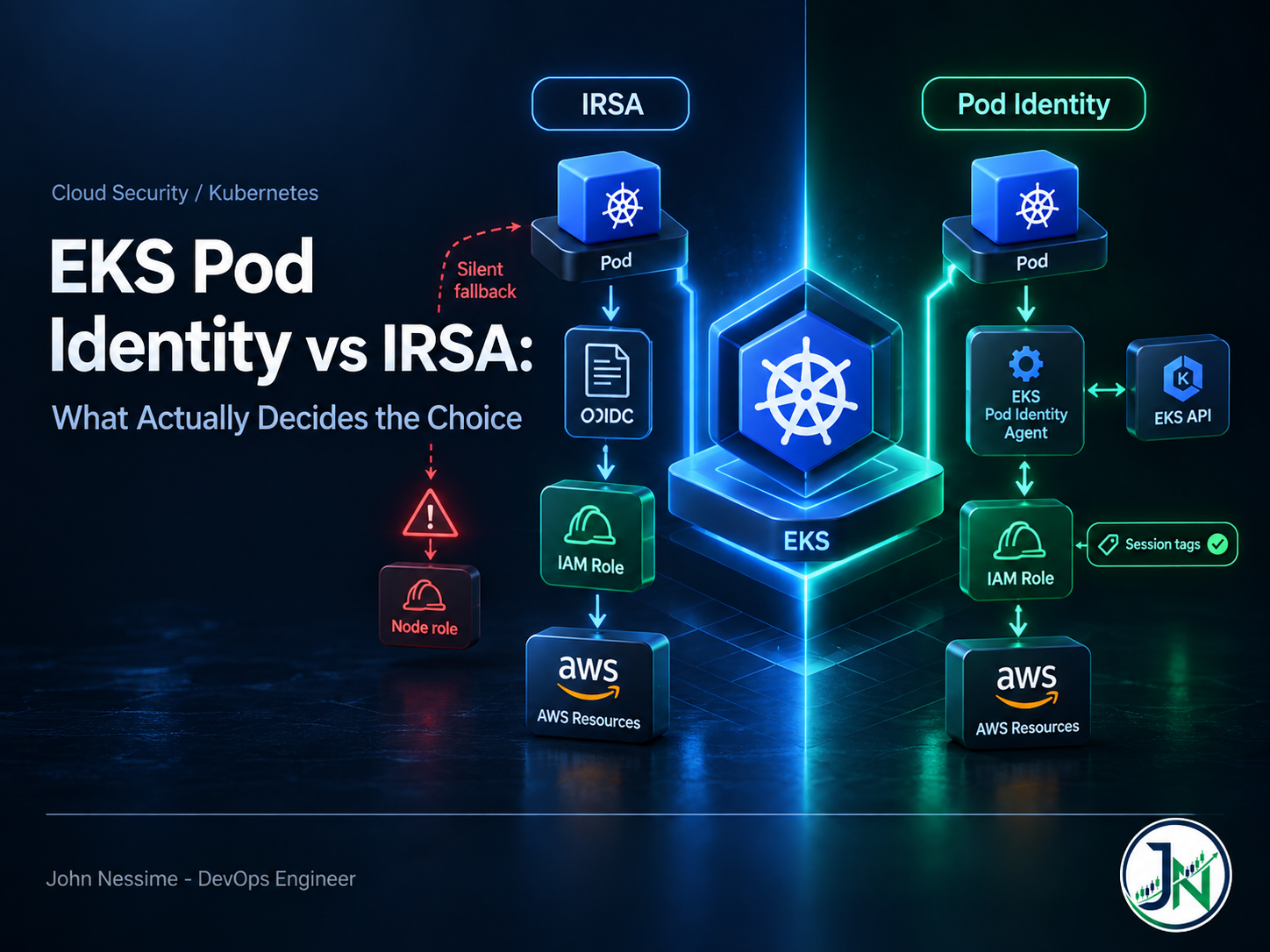
A service account gets an association, the deployment rolls, the pod comes up healthy, and the application keeps working. Weeks later someone reads CloudTrail during an access review and notices that every API call from that workload was made as the node role, not the role you carefully scoped. No AccessDenied. No crash loop. No alert. The permissions you thought you had removed were never actually removed, because the pod never used the identity you assigned it.
That failure should shape how you think about EKS Pod Identity vs IRSA. Both deliver the same end result to your application: short-lived, rotated credentials with nothing hardcoded. The differences are in how trust is expressed, who has to touch IAM to change it, and what happens when the wiring is subtly wrong.
This post compares the two on what actually decides the choice: how each scales across clusters, where each refuses to work at all, the failures each hides, and a decision procedure you can apply to a real cluster.
Same outcome, two very different trust shapes
Most of the trade-offs fall out of the mechanism, so it is worth being precise about both.
IRSA: federation through an OIDC provider
The cluster has an OIDC issuer, which you register as an identity provider in IAM. A projected service account token is mounted into the pod, and the SDK exchanges it for credentials through the web identity flow against STS. The role’s trust policy is what makes that work, and it names one specific cluster:
{
  "Version": "2012-10-17",
  "Statement": [{
    "Effect": "Allow",
    "Principal": {
      "Federated": "arn:aws:iam::111122223333:oidc-provider/oidc.eks.eu-west-1.amazonaws.com/id/EXAMPLED539D4633E53DE1B716D3041E"
    },
    "Action": "sts:AssumeRoleWithWebIdentity",
    "Condition": {
      "StringEquals": {
        "oidc.eks.eu-west-1.amazonaws.com/id/EXAMPLED539D4633E53DE1B716D3041E:sub":
          "system:serviceaccount:production:my-app",
        "oidc.eks.eu-west-1.amazonaws.com/id/EXAMPLED539D4633E53DE1B716D3041E:aud":
          "sts.amazonaws.com"
      }
    }
  }]
}
The important detail is that the issuer URL is unique per cluster. The relationship between a workload and a role lives inside IAM, and it is cluster-specific by construction.
Pod Identity: an EKS API and an on-node agent
Pod Identity moves that mapping out of IAM. You install the EKS Pod Identity Agent add-on, which runs as a DaemonSet, then create an association through the EKS API binding a namespace plus service account name to a role. The agent calls the EKS Auth API for temporary credentials, and the pod picks them up through the container credential provider that AWS SDKs already support.
The trust policy contains nothing cluster-specific:
{
  "Version": "2012-10-17",
  "Statement": [{
    "Sid": "AllowEksAuthToAssumeRoleForPodIdentity",
    "Effect": "Allow",
    "Principal": { "Service": "pods.eks.amazonaws.com" },
    "Action": [ "sts:AssumeRole", "sts:TagSession" ]
  }]
}
sts:TagSession is not decoration. Pod Identity attaches session tags on every assume, so a policy allowing only sts:AssumeRole fails. It is the most common first-attempt error.
Creating the association is a single call:
aws eks create-pod-identity-association
  --cluster-name prod-eu
  --namespace production
  --service-account my-app
  --role-arn arn:aws:iam::111122223333:role/my-app
Where IRSA still wins
Treating IRSA as legacy is the most common mistake here. For some workloads it is not the older option, it is the only option.
- Fargate pods. The Pod Identity Agent is a DaemonSet on EC2 nodes. Fargate has no node for it to land on, and AWS documents Fargate pods as unsupported. If part of your workload runs on Fargate, IRSA is the mechanism there, permanently, not as a stopgap.
- Windows nodes. Also documented as unsupported for Pod Identity.
- Older SDKs you cannot rebuild. The web identity flow has been in the SDKs far longer, so a vendor image you cannot patch is more likely to work with IRSA.
- Direct federation into workload accounts. If your model wants the pod’s identity federating straight into a role in the resource-owning account, IRSA does that natively. Pod Identity reaches other accounts by role chaining, a different trust shape even when the outcome looks the same.
- You already have it working at a scale you control. A few clusters with a Terraform module that provisions the provider and the roles is not a problem that needs solving.
Where IRSA hurts
The pain is administrative, and it grows with cluster count rather than workload count. Every new cluster brings a new OIDC issuer, which means editing the trust policy of every role those workloads use. Trust policies have a size limit, so a role trusting many issuers eventually runs out of room and you end up duplicating roles to work around it.
The same asymmetry shows up in blue/green cluster upgrades. Standing a new cluster beside the old one means every role used by every migrating workload needs a trust policy edit before the new cluster can do anything, and another edit afterwards to clean up. That is IAM work on the critical path of an upgrade, usually owned by a different team than the one doing it.
Where Pod Identity wins
- Roles become portable. One role, one generic trust policy, any number of clusters. Adding a cluster is an EKS API call per workload, not an IAM edit per role.
- The permission split matches how teams are organised. Creating an association needs EKS permissions, not
iam:UpdateAssumeRolePolicy, so cluster admins stop filing IAM tickets for every new service account. - Session tags arrive for free. Every assume carries
eks-cluster-arn,eks-cluster-name,kubernetes-namespace,kubernetes-service-account,kubernetes-pod-nameandkubernetes-pod-uid. That is usable attribute-based access control and the CloudTrail audit trail you always wanted. - Cross-account access without touching application code. An association can carry a target role ARN, and EKS performs the role chaining for you.
The ABAC angle is underrated. One policy can serve dozens of workloads, because the session tag identifies the caller:
"Condition": {
  "StringEquals": {
    "s3:ExistingObjectTag/team": "${aws:PrincipalTag/kubernetes-namespace}"
  }
}
Where Pod Identity hurts
The generic trust policy is a real trade-off. Written exactly as AWS shows it, that role can be assumed on behalf of any service account in any namespace in any cluster in the account, as long as someone with EKS permissions creates an association pointing at it. Blast radius control has moved from IAM into the EKS API. If those permissions are loosely held, you widened it.
The fix is to put the constraint back in the trust policy using the request tags Pod Identity sends:
"Condition": {
  "StringEquals": {
    "aws:RequestTag/kubernetes-namespace": "production",
    "aws:RequestTag/kubernetes-service-account": "my-app"
  }
}
You can also pin to a cluster with aws:SourceArn. That costs some of the portability you switched for, which is the point: decide per role. A role reading one team’s bucket should be pinned. A role used by an identical workload in six clusters should not.
The other cost is a new moving part. The agent is a DaemonSet, so it needs to tolerate your taints, and it must be running before pods on that node can get credentials.
The failures that actually bite
Silent fallback to the node role
This is the one from the opening, and it is invisible by design. Pod Identity works through the container credential provider, which the SDK finds by reading two environment variables EKS injects into the pod:
AWS_CONTAINER_CREDENTIALS_FULL_URI=http://169.254.170.23/v1/credentials
AWS_CONTAINER_AUTHORIZATION_TOKEN_FILE=/var/run/secrets/pods.eks.amazonaws.com/serviceaccount/eks-pod-identity-token
An SDK that predates that provider does not error on these. It does not know what they mean, so it keeps walking the credential chain until it reaches instance metadata and picks up the node role. The application works. The permissions are wrong. Nothing complains.
Two defences, and you want both. Check the minimum SDK version list in the EKS documentation and pin base images above it, and block pod access to IMDS so falling back has nowhere to fall. The first prevents the problem; the second turns a silent success into a loud failure.
Verify from inside the pod. The ARN in the response tells you which identity is really in use:
kubectl exec -n production deploy/my-app -- aws sts get-caller-identityThe association that matches nothing
An association is an exact match on cluster, namespace and service account name. A typo in any of the three produces an association that exists, looks fine in the console, and never applies to a pod. List them and read them against your manifests:
aws eks list-pod-identity-associations --cluster-name prod-euAssociations also only take effect for pods started after they exist. If you create one and nothing changes, restart the workload before you start debugging IAM.
Both mechanisms configured at once
During a migration you will often have a service account carrying an IRSA annotation and a Pod Identity association at the same time. Both paths can work, and which one the SDK uses depends on credential chain ordering. AWS documents that credentials found earlier in the chain keep being used even when an association exists.
Do not reason about it. Check the caller identity and check CloudTrail, then remove the one you are not keeping so nobody has to work it out again.
PackedPolicyTooLarge
Session tags, managed policy ARNs and inline session policies are compressed into a packed format with its own size limit, and six session tags on every assume is not free. The association can disable the automatic tags, at the cost of the ABAC and audit benefits that were half the reason to use Pod Identity.
A decision procedure for EKS Pod Identity vs IRSA
Work through these in order and stop at the first one that answers.
- Does this workload run on Fargate or Windows nodes? IRSA. There is no decision to make.
- Can you rebuild the image with a current SDK? If not, IRSA, or fix the image first.
- Does your model require direct OIDC federation into the resource account? IRSA. Role chaining is not the same shape, even if it reaches the same bucket.
- Will this role be used from more than one cluster, now or after the next upgrade? Pod Identity. The saving compounds every time you add or replace a cluster.
- Do you want cluster and namespace in the CloudTrail record without extra work? Pod Identity, because of the session tags.
- None of the above? Pod Identity for anything new, IRSA left alone where it already works.
AWS’s own guidance lands in the same place: Pod Identity for new applications on supported node types, IRSA where you already have it working or where Pod Identity cannot run.
Arguments that don’t survive contact
- “IRSA is deprecated.” It is not. AWS has said it continues to invest in it, and Fargate support alone guarantees it stays.
- “Pod Identity is less secure because the trust policy is generic.” Only if you leave it generic. Request tag conditions scope it as tightly as an IRSA trust policy, and you keep the session tags IRSA does not give you.
- “Run one mechanism per cluster, cleanly.” A mixed cluster is documented, supported, and for clusters with Fargate pods it is the permanent steady state, not a transitional mess.
- “EKS add-ons can only use IRSA.” True early on, and still repeated in older write-ups. Add-on creation and update now accept Pod Identity associations directly. Check your specific add-on rather than trusting a blog post, including this one.
- “Migrate everything, then delete the OIDC provider.” Deleting it breaks every role still trusting it, including ones you forgot. Migrate workload by workload, and delete the provider only after CloudTrail shows zero
AssumeRoleWithWebIdentitycalls for that issuer across a full batch cycle.
How I’d decide, and what I’d do first
- Default new workloads on EC2 or Karpenter-managed nodes to Pod Identity, and leave working IRSA alone until you have a reason to touch it.
- Add request tag conditions for anything sensitive. Portability helps a shared platform role and hurts a role that reads customer data.
- Restrict pod access to IMDS before you migrate anything, not after. It converts the silent failure into a visible one.
- Migrate with the role trusting both principals at once, so rollback is a manifest change rather than an IAM change.
- Put credential identity in your dashboards. A CloudTrail query counting calls made by node roles from workload namespaces catches the exact failure this post opened with. Amazon Managed Grafana or Grafana Cloud will render it if you already ship CloudTrail somewhere; a scheduled CLI check from a CI runner or a small VPS from Contabo or InterServer is a fine low-tech alternative.
- Codify associations in Terraform or OpenTofu from the start. They are cheap to create by hand and easy to lose track of.
Frequently asked questions
Is EKS Pod Identity replacing IRSA?
No. AWS recommends Pod Identity for new applications on supported node types and continues to support IRSA. Since Pod Identity cannot run on Fargate or Windows nodes, IRSA stays for the workloads that live there.
Can I use both in the same cluster?
Yes, and it is a documented, supported pattern. Older workloads on IRSA and new ones on Pod Identity is normal. Avoid configuring both for the same service account beyond a migration window, because which one wins depends on SDK credential chain ordering.
Why does my pod get AccessDenied after switching to Pod Identity?
Check the trust policy for sts:TagSession first. Pod Identity always sends session tags, so a trust policy allowing only sts:AssumeRole is rejected. After that, check that the namespace and service account in the association match the pod exactly.
Does Pod Identity work for cross-account access?
Yes, through role chaining. The association takes a role in the cluster account plus a target role in the resource account, and EKS chains them. It also exposes an external ID you can require in the target role’s trust policy to prevent a confused deputy problem.
Do I have to change my application code?
No, provided the SDK is recent enough. Both work through the default credential chain, so the application calls AWS as usual. The only change that bites is an SDK too old to understand the container credential provider.
How do I confirm which identity a pod is actually using?
Run aws sts get-caller-identity inside the container and read the assumed role ARN. If it names the node role rather than the one you assigned, the chain fell through. Cross-check in CloudTrail, where session tags also give you the namespace and service account for Pod Identity sessions.
The one thing worth remembering
The real question in EKS Pod Identity vs IRSA is not which is more modern. It is where you want the cluster-to-role relationship to live. IRSA puts it in IAM trust policies: precise, cluster-specific, and increasing administrative drag as clusters multiply. Pod Identity puts it in the EKS API: portable, fast to change, and it hands you the job of deciding per role how much of that portability you actually want.
Pick per workload, not per cluster. And whichever you pick, verify the identity from inside the pod, because the worst outcome here is not a permission error. It is a workload that has been running with the wrong credentials since the day you deployed it.
Need a second pair of eyes on your EKS workload identity?
Most of this work is unglamorous: reading trust policies, matching associations against manifests, proving what a pod is really authenticating as. Things I help with:
- Auditing every service account in a cluster and reporting which identity its pods actually use, not the one the manifest claims
- Planning and running an IRSA to Pod Identity migration workload by workload, with a rollback that needs no IAM change
- Writing scoped trust policies with request tag conditions, so portability is a deliberate choice per role
- Restricting pod access to IMDS and confirming nothing was silently depending on the node role
- Setting up cross-account access with target roles and external IDs, plus the CloudTrail view that proves it is used as intended
- Codifying associations and roles in Terraform or OpenTofu, so the next cluster is a variable change rather than a project
Send me a trust policy, a service account manifest, or the output of aws sts get-caller-identity from inside one of your pods, and I will tell you what it is really doing.