Someone sends you two screenshots: a Security Hub summary sitting in the high nineties, and a Trusted Advisor dashboard with almost everything green. Then the question. “So what’s actually left for a review to find?”
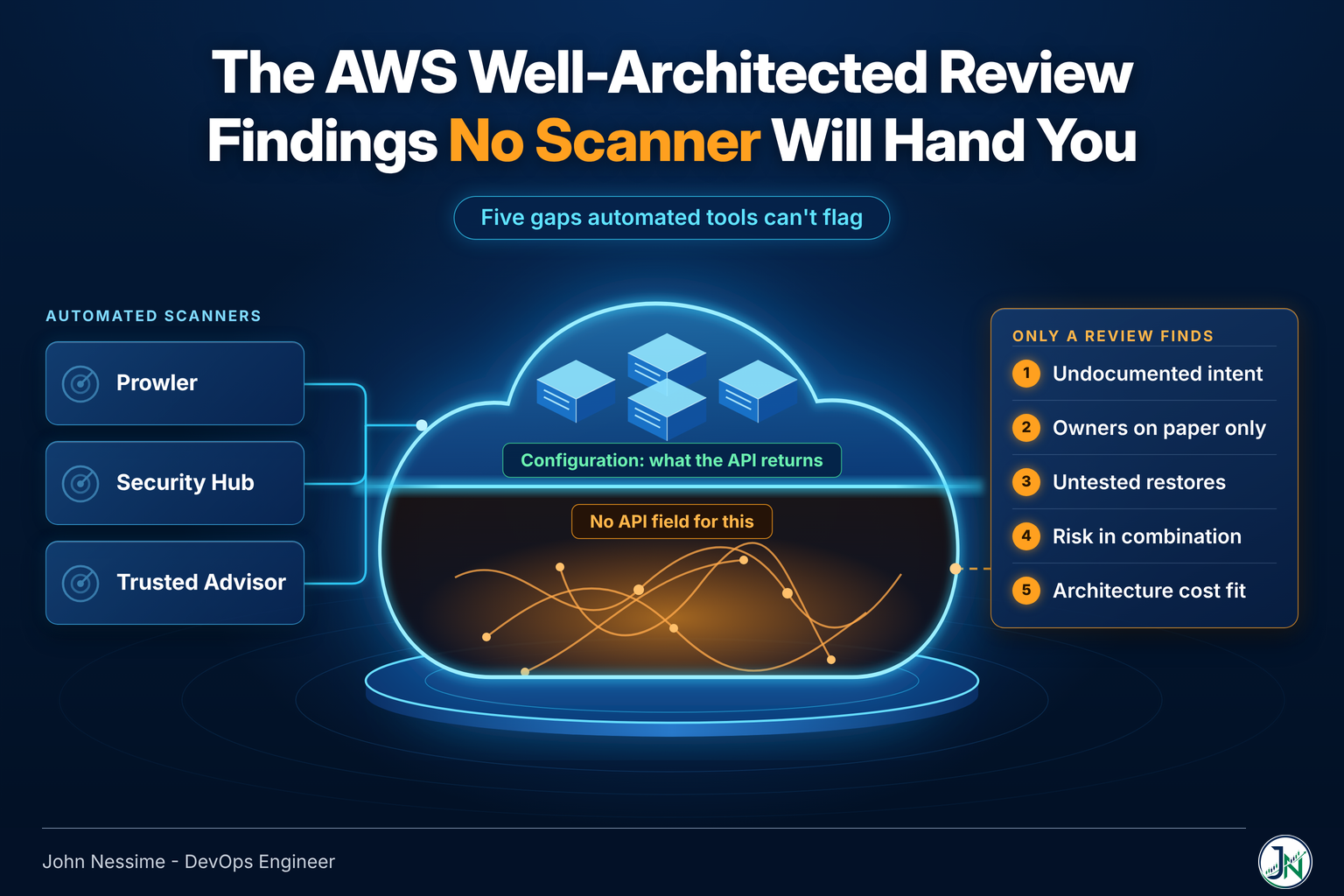
The honest answer is that scanners tell you what your resources look like. They cannot tell you what the people running them believe, what nobody has tested, or which two individually-fine decisions combine into one bad afternoon. That gap is the entire point of a human review, and it’s where most of the findings that matter actually live.
This post covers what I look for in an AWS Well-Architected review that automated tooling structurally cannot flag: the five gap families I work through, the questions I ask in the session, where the automated tools genuinely outperform a human, and how I’d sequence a review if you’re running one yourself.
Why scanners top out where they do
Every configuration scanner works the same way underneath. It calls describe and get operations across your account, compares the returned attributes against a rule set, and emits a finding when an attribute doesn’t match. Prowler, Security Hub, Trusted Advisor, and the commercial platforms differ in coverage, packaging and price, not in mechanism.
That mechanism has a hard ceiling. A rule can only fire on something the API returns. There is no API field for “the person who designed this left in March,” no attribute for “we’ve never restored this,” and no describe call that returns whether the multi-AZ setup was a deliberate resilience decision or an artifact of a console default.
So the review is not competing with the scanner. It’s covering the class of risk the scanner is blind to by construction. That’s five recurring families in my experience.
Gap one: the config is correct and nobody knows why
This one bites hardest, because it stays invisible until someone touches the resource. A security group has a rule allowing one strange CIDR. A Lambda has a timeout set to an oddly specific value. An RDS parameter group has one setting different from default. Every scanner passes all three, because none of them violates a rule. But nobody in the room can tell you why they’re there.
Undocumented intent is a latent outage. The next engineer sees the odd value, assumes it’s cruft, and cleans it up. Six weeks later something breaks in a way that has no obvious connection to the change.
What I look for here is not the setting. It’s whether the team can reconstruct the reasoning. Two questions do most of the work: “what would break if we removed this?” and “where is that written down?” If the answer to the second one is a person’s name, you’ve found a finding no tool will ever hand you.
The cheap fix is not documentation in the abstract. It’s a decision record attached to the thing itself, in the Terraform module or the resource tags, so the reasoning travels with the resource instead of living in a wiki nobody opens.
Gap two: the workload has an owner on paper only
Ownership sits in the operational excellence pillar, and it’s the pillar teams answer most optimistically. Everyone has an owner listed somewhere. The question is whether that owner can act. What I check:
- Who holds root credentials and MFA for each account, and what happens if that person is unreachable for a week
- Whether the on-call rotation in PagerDuty or Opsgenie matches the people who can actually diagnose this workload, or just the people who get woken up
- Whether the deploy path works without one named individual approving it
- Whether anyone other than the original author has ever executed the failover runbook end to end
- Which third-party accounts the workload depends on, and whose personal email is on them
That last one catches a surprising amount. The domain registrar, the monitoring account, the CI provider: those sit outside the AWS boundary entirely, which puts them outside every AWS-native tool’s field of view.
You can get a partial read from IAM data. Role usage timestamps tell you which paths are real and which are theoretical:
# RoleLastUsed shows the date and region of the last time
# this role was assumed. An emergency-access role that has
# never been used is a runbook that has never been rehearsed.
aws iam get-role --role-name break-glass-admin
A break-glass role with no last-used date is not automatically a problem. A break-glass role with no last-used date and a team that assumes it works is.
Gap three: backups that have never been restored
Every scanner can confirm a backup plan exists, has a retention period, and completed its recent jobs. None of that tells you whether a restore produces a working system inside your recovery objective. The check I run first is embarrassingly simple:
# Lists restore jobs Backup has run, with creation and
# completion timestamps. An empty result on a production
# account is the finding.
aws backup list-restore-jobs
An empty list on an account that’s been running for years means the recovery plan is a hypothesis. AWS Backup’s restore testing feature closes part of this by running restores on a schedule and reporting the outcome, and it’s worth turning on. But it validates that the data comes back, not that your application starts against it, not that DNS and secrets and dependent services line up, and not that anyone can drive the process under pressure. So the questions go past the backup itself:
- What’s the stated recovery time objective, and where did that number come from? If nobody can name the business conversation behind it, it’s a guess.
- Has a restore ever been timed, or is the objective aspirational?
- Does the restore path depend on credentials stored in the system being restored?
- Are backups in a separate account or vault with different access, or can the same compromised credential delete both the workload and its recovery point?
That last question is the one I’d promote to high risk almost every time. Backups that share a blast radius with the thing they protect are not backups.
Gap four: risk that only exists in combination
Scanners evaluate resources one at a time, so they miss the failure modes that come from how resources relate.
A single NAT gateway is not a finding. Three private subnets routing egress through it isn’t a finding either, per resource. But if the payment integration, the package installs and the log shipping all depend on that path, one component takes out three things that look unrelated on the diagram. Same shape, different flavors:
- Production and the CI/CD pipeline in the same account, so a compromised build role reaches live data
- One Route 53 hosted zone serving both the app and the status page you’d use to tell customers the app is down
- A shared KMS key across environments, so a key policy change in staging is a production incident
- Every service authenticating through one identity provider with no cached fallback
- Observability hosted inside the environment it observes
None of those are misconfigurations. Each is a reasonable decision that becomes a correlated failure when combined with the others. Finding them means tracing dependencies, not enumerating resources, which is exactly the work a rules engine can’t do.
AWS has moved into this space with Resilience Hub’s dependency discovery and failure mode analysis, which maps what a workload actually calls and flags single points of failure against your stated objectives. It’s useful and it changes what I bring to a session. It still works from the resources it can discover, though, so anything crossing into a SaaS dependency or a human process stays outside it.
Gap five: cost efficiency that measures the wrong thing
Cost tooling is the most mature automated category on AWS. Compute Optimizer, Cost Explorer’s rightsizing recommendations, Trusted Advisor’s idle-resource checks, and platforms like Vantage, CloudZero or nOps will all find the oversized instance and the unattached volume.
They all optimize within the current architecture. None of them asks whether the architecture should exist. The findings I look for are one level up:
- A rightsized cluster running a batch job that a scheduled task could do in a fraction of the time
- High Savings Plan coverage on a workload the team plans to migrate off within the commitment term, which converts flexibility into a liability
- Data transfer costs from a chatty service pair sitting in different Availability Zones for no stated reason
- A data pipeline reprocessing the full history nightly because nobody revisited the incremental logic after the volume grew
- Log retention set to a compliance number that nobody has checked against the actual obligation
Each of these reads as efficient on a dashboard. The commitment coverage one in particular scores well on every FinOps report right up to the moment the migration lands. If you want a rough shape for what an alternative architecture would cost before you argue for it, the AWS cost estimator is a fast way to sanity-check the direction.
The AWS Well-Architected review questions I actually ask in the room
The framework supplies the formal question set. These are the ones I add, in roughly the order I ask them:
- What broke most recently, and what did you change afterward? Real incidents route straight to real weaknesses.
- What are you afraid to touch? The answer names your undocumented coupling faster than any diagram.
- If the person who built this were unavailable for two weeks, what would stall?
- When did you last restore something for real, not as a drill on paper?
- What alert fired most often last month, and what did you do about it? Frequent alerts nobody acts on are a broken feedback loop.
- Which of these resources could you delete today with no consequence? Hesitation is the finding.
- What did you decide not to do, and why? This is where you find the deliberate trade-offs worth respecting instead of “fixing.”
The last one matters more than it looks. A review that treats every deviation from best practice as a defect will produce a report the team ignores. Some deviations are correct for the context, and writing that down is as valuable as raising the risk.
Where the automated tools beat me
None of this argues against running the scanners. They are better than a human at everything they cover.
- Coverage. Prowler ships a very large check library across AWS, Azure, GCP and Kubernetes. No human enumerates that in a session.
- Consistency. A rule fires the same way every time. My attention does not.
- Continuity. Security Hub and Trusted Advisor keep running after I leave. A review is a snapshot.
- Reachability analysis. IAM Access Analyzer uses automated reasoning over policies to determine whether external access is genuinely possible, including cases where a condition key makes a scary-looking wildcard harmless. That is not something to eyeball.
- Usage evidence. Access Analyzer’s unused access findings surface roles, keys and unused actions that no interview would surface.
The sequence I’d use: run the tools first, resolve or triage everything they find, then spend the human session entirely on the five gaps above. Walking into a review and spending an hour on findings a scanner would have handed you for free is a waste of the expensive part. If you want to pressure-test a specific policy before the session, the IAM policy checker is a reasonable first pass.
Arguments that don’t survive contact
“Our compliance score is high, so we’re in good shape.” A score is a percentage of implemented rules, weighted by whoever wrote the rules. It says nothing about whether the unimplemented ones are the ones that matter to you, and nothing at all about the categories above.
“We’ll do the review after we finish the migration.” The migration is when the decisions get made. Reviewing afterward means documenting choices instead of influencing them. A short pre-migration session on blast radius and recovery is worth more than a thorough post-migration one.
“The tool doesn’t know our context, so it’s noise.” Sometimes true, and it’s the reason suppression rules exist. But teams that reach for this often suppress by severity rather than by reasoning, and lose the genuine findings along with the false ones. Suppress with a written justification or don’t suppress.
“We answered every question honestly, so the improvement plan is complete.” The improvement plan reflects your answers. If a team believes its runbooks work, the questionnaire records working runbooks. Self-assessment has a self-assessment problem, and the fix is evidence: show me the restore job, the last incident review, the rotation schedule.
How I’d run the review
- Pick one workload. Reviews that try to cover an entire account produce answers vague enough to be useless.
- Run the automated tooling first and triage it. Bring the residue, not the raw output.
- Pull evidence before the session: recent restore jobs, role last-used dates, the last three incident writeups, the current on-call schedule.
- Run the pillar questions with the team, but treat “partially” and “we plan to” as unanswered rather than half-answered.
- Save a milestone in the Well-Architected Tool immediately after, before anyone changes anything. It’s the only way the next review can show movement.
- Rank findings by blast radius and by how long they’d take to detect, not by pillar. A slow-detection medium risk often outranks a loud high risk.
- Write down the deliberate deviations alongside the risks, with the reasoning, so the next reviewer doesn’t reopen a settled argument.
Two practical notes on the tooling. The Trusted Advisor integration inside the Well-Architected Tool requires a Business or Enterprise support plan, so on smaller accounts you’ll be supplying that evidence yourself from Prowler or the CLI. And custom lenses are worth the setup if you have internal standards, because they let the tool ask your questions rather than only AWS’s.
Frequently asked questions
Is the AWS Well-Architected Tool enough on its own?
It’s enough to structure a conversation and to track risk over time, which is genuinely valuable and costs nothing. It isn’t enough to validate the answers, because it records what you tell it. Pair it with scanner output for the configuration layer and with evidence for the operational layer.
How often should we run an AWS Well-Architected review?
Tie it to change, not to the calendar. A production workload that hasn’t changed architecturally gains little from a second full pass. A workload mid-migration, or one that just absorbed a new integration, is worth reviewing before the change lands rather than after. Annually is a floor for anything customer-facing, and a checkpoint on outstanding high-risk items in between is more useful than a full re-run.
Can Prowler or Security Hub replace a Well-Architected review?
No, and neither claims to. They cover the configuration surface thoroughly and continuously, which a review can’t. They don’t cover intent, ownership, tested recovery, dependency coupling or architectural fit, which is where the expensive failures come from. The two are complements with almost no overlap.
What’s the difference between a high risk issue and a medium risk issue?
In AWS’s framing, a high risk issue is a missing foundational practice with potential for significant business impact, while a medium risk issue is a missing enabling practice that would substantially improve the workload. In practice I re-rank both by blast radius and detection time for the specific workload, because a generic severity rating doesn’t know which of your systems is load-bearing.
Do we need a partner to run one?
No. The tool is free and self-service, and a competent internal team can run a good review. The argument for an outside reviewer is not expertise, it’s that outsiders ask the questions everyone internally has stopped noticing. If you run it internally, have someone from a different team facilitate.
What if the team disagrees with a finding?
Write the disagreement down with both positions and move on. A recorded, reasoned deviation is a legitimate outcome. What you want to avoid is silently downgrading a risk because arguing about it is uncomfortable, which is how a finding reappears identically two reviews later.
The one thing worth remembering
A scanner answers “is this resource configured correctly.” An AWS Well-Architected review answers “will this system survive contact with reality, and does anyone still understand it.” Those are different questions, and only one of them can be automated today.
Run the tools. Fix what they find. Then spend the human hours on intent, ownership, tested recovery, coupling and architectural fit, because that’s where the findings live that nobody else is going to hand you.
Where I can help
Most of my AWS work starts with someone who has more findings than time and needs to know which ones actually matter. Specifically:
- Facilitating a Well-Architected review as an outside voice, including the evidence-gathering pass before the session
- Triaging existing Prowler, Security Hub or Trusted Advisor output down to a ranked, owned remediation list instead of a dashboard
- Mapping blast radius and shared dependencies across accounts, including the SaaS and human dependencies the AWS tooling can’t see
- Designing and actually testing a recovery path, then timing it against a recovery objective you can defend
- Reviewing IAM boundaries, cross-account trust and break-glass access so emergency paths work when you need them
- Rewriting cost findings as architecture questions rather than rightsizing tickets
If you’re partway through this already, send me something concrete: a scanner export, an architecture diagram, or just the list of things nobody on the team wants to touch. That’s usually enough to tell you where the real risk is sitting.