The migration looked clean. Records flipped at 02:00, the new origin took traffic within a few minutes, synthetic checks went green, everyone went to bed. Two days later a support ticket arrives: a customer placed an order, got a confirmation email, and the order is not in the admin panel. It is not in the new database either. It is sitting in the old one, on a server that was supposed to be idle.
That is the failure mode a DNS cutover produces most often, and it is invisible for exactly as long as it takes someone to notice missing data. Nothing alerted. Nothing 500’d. A slice of traffic simply kept resolving to the old IP and the old origin was happy to serve it.
Most guidance on this topic stops at “lower your TTL to 300 seconds forty-eight hours ahead.” That advice is correct and it is nowhere near sufficient. It plans the forward move and says nothing about the two things that actually determine whether the cutover is safe: which caches ignored your TTL entirely, and how long you can still reverse the decision without making things worse.
This post covers the TTL arithmetic, the cache layers that never asked your opinion, how to size a real rollback window, and how to make the old origin safe rather than merely reachable. Commands are included where they explain something.
The TTL math is the easy part
A TTL is a promise to resolvers: you may reuse this answer for this many seconds without asking again. The countdown starts when the resolver caches the answer, not when you publish it. That single detail explains almost every mistake people make here.
Watch the countdown directly. Query the same name twice through a caching resolver and the TTL field drops:
dig +noall +answer app.example.com A
# app.example.com.  287  IN  A  203.0.113.10

# a few seconds later
dig +noall +answer app.example.com A
# app.example.com.  281  IN  A  203.0.113.10
Compare that with the authoritative answer, which always shows the full configured value because there is no cache in front of it:
dig @ns1.example-dns.net +noall +answer app.example.com A
# app.example.com.  300  IN  A  203.0.113.10
Lowering the TTL late does nothing
If the record currently carries a one day TTL and you drop it to 300 at 09:00, a resolver that cached the answer at 08:00 keeps serving the old IP until roughly 08:00 the next morning. Your new short TTL only applies to lookups that happen after that cache entry expires. The lower value has to be published, cached, and honored before it means anything.
The working rule is to lower the TTL at least twice the current TTL ahead of the change, and in practice at least a full day for anything meaningful. One TTL period gets most resolvers onto the new value; the second period covers the ones that refreshed a second before you published.
Negative answers have their own clock
If you create a new hostname during the cutover and something queried it beforehand, the “does not exist” answer was cached too. Negative caching is not governed by the record TTL, because the record did not exist. It is governed by the SOA of the zone, specifically the lesser of the SOA record’s own TTL and its MINIMUM field.
dig +noall +answer SOA example.com
# example.com. 3600 IN SOA ns1.example-dns.net. hostmaster.example.com. (
#   1042 7200 3600 1209600 3600 )
#   the final number is MINIMUM, used as the negative caching TTL
If that value is an hour and someone probed your new endpoint the day before go-live, you will spend an hour explaining why the record “is not propagating” when it published perfectly. Create new names before anything queries them, or lower the SOA minimum alongside your record TTLs.
The caches that never asked for your TTL
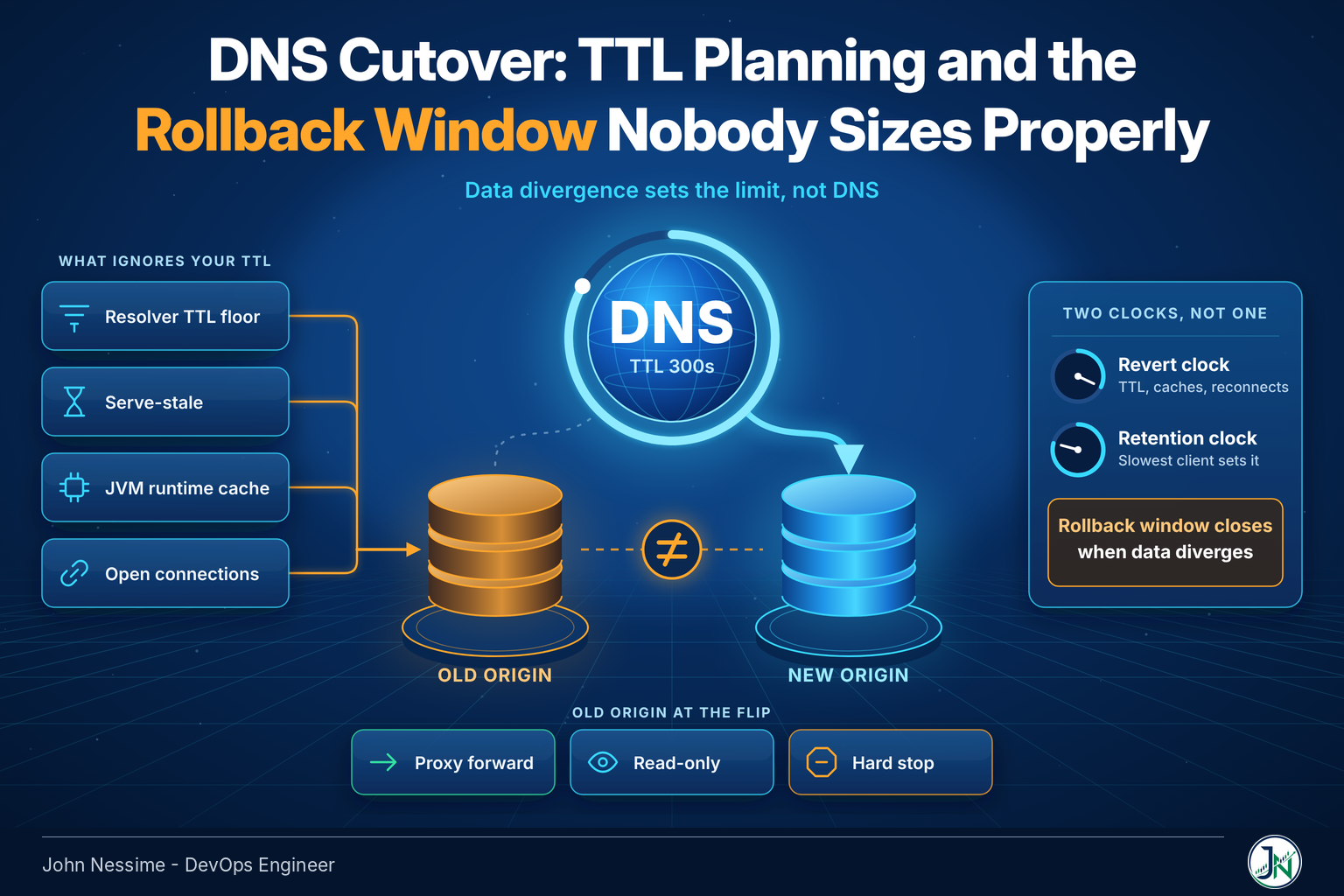
Here is the part that gets skipped. A TTL is advisory. Plenty of software in the path between your zone and a user’s socket either clamps it, extends it, or never consults it at all.
Resolvers with a TTL floor
Recursive resolvers can be configured to refuse short TTLs to cut query volume. Unbound exposes cache-min-ttl and cache-max-ttl. BIND has min-cache-ttl and max-cache-ttl. dnsmasq accepts --min-cache-ttl and --max-cache-ttl. Set a floor of twenty minutes on a corporate forwarder and every 300 second record in the world becomes a twenty minute record for that office, whatever the zone says.
You cannot audit this from outside. What you can do is expect it, and treat your published TTL as a floor on propagation time rather than a ceiling.
Serve-stale
RFC 8767 lets a resolver keep serving an expired answer when it cannot reach the authoritative servers, so a nameserver outage does not become a resolution outage. It is a good mechanism and it is widely implemented, including in Unbound via serve-expired and in BIND via its stale answer settings.
The consequence for a cutover is worth stating plainly. If your authoritative nameservers are unreachable or slow at the moment you flip, some resolvers will happily continue handing out the old IP past its expiry. That is exactly the wrong time to be changing DNS providers, rotating nameservers, and repointing records in the same maintenance window.
Application runtimes that cache forever
The JVM is the classic one. Its positive lookup cache is governed by the networkaddress.cache.ttl security property, and when a security manager is installed the default is -1, meaning cache for the life of the process. A long running Java service can hold a resolved address until someone restarts it, days after the DNS change.
# in $JAVA_HOME/conf/security/java.security  (Java 11+)
# or $JAVA_HOME/jre/lib/security/java.security (Java 8)
networkaddress.cache.ttl=60
networkaddress.cache.negative.ttl=10
There is a corresponding system property, sun.net.inetaddr.ttl, usable as a JVM argument when you cannot edit the security file. The security property is the supported path. Other runtimes and libraries have their own resolver caches with their own defaults, and none of them are visible in a dig output. If a client of yours is a service rather than a browser, ask what its resolver cache does before you plan the window.
Connections that are already open
DNS resolves a name to an address once, at connection setup. An HTTP keep-alive connection, a database pool, a long-polling websocket, an SFTP session pinned by a partner’s batch job: none of these re-resolve because a TTL expired. They re-resolve when they reconnect. A connection pool configured to keep idle connections alive indefinitely will sit on the old IP until the socket dies or the process restarts.
This is why the traffic tail after a cutover is so much longer for APIs than for websites. Browsers churn connections constantly. Machine clients do not.
Sizing the rollback window for a DNS cutover
People plan the forward move and assume reversing it is the same operation backwards. It is not, because a DNS cutover is not one clock. It is two, and they run in opposite directions.
- The revert clock. How long after you republish the old value until traffic actually returns. This is roughly your TTL, plus whatever floors and stale answers add, plus reconnect intervals for pooled clients.
- The retention clock. How long the old origin must remain able to serve correctly, counted from the flip. This one is bounded by your slowest client, not your TTL.
The useful definition of the rollback window is the period during which reverting the record makes things better rather than worse. It opens at the flip and it closes the moment the two origins have diverged enough that sending traffic back would lose data. If the new database has taken writes for an hour and there is no reverse replication, your rollback window closed an hour ago no matter what the TTL says.
Your rollback window is bounded by data divergence, not by DNS. TTL only decides how fast the reversal takes effect once you decide to make it.
Write both numbers down before the change. If the retention clock is longer than the rollback window, and it usually is, you have a period where you can neither go back nor decommission. That period needs a plan, and the plan is the next section.
Make the old origin safe, not just reachable
The lost order at the top of this post happened because the old origin stayed fully functional. It accepted the request, wrote to its own database, and returned a 200. The stale resolver was the trigger, but the fault was that the old endpoint was still willing to act as an authority.
Pick one of these deliberately, at the moment of the flip:
- Proxy forward. Turn the old origin into a reverse proxy pointing at the new one. Stragglers get correct answers and correct writes. This is the option I reach for first because it makes the retention clock harmless.
- Read-only. Keep serving reads, reject writes with a clear error. Good when proxying is impractical and losing a write is worse than showing an error.
- Hard stop. Return 503 for everything. Loud, unambiguous, and it converts a silent data problem into a visible availability problem. Sometimes that is the right trade.
What you should not do is leave it running as it was. A minimal Nginx proxy on the old host closes the gap in a few lines:
location / {
    proxy_pass https://new-origin.example.com;
    proxy_set_header Host $host;
    proxy_set_header X-Forwarded-For $proxy_add_x_forwarded_for;
    proxy_set_header X-Forwarded-Proto $scheme;
    proxy_set_header X-Stale-Origin "1";
}
The custom header is the point. It marks every request that arrived via the old address, so you can count stragglers at the new origin and know when the tail has actually ended. Without a marker like that you are guessing.
The cutover runbook
- Inventory every name. Apex, www, API hosts, mail, staging, certificate validation names, CDN aliases, IPv6 records, and anything a partner hardcoded. Export the zone if your provider allows it.
- Record the current TTL of each name you will touch. The largest one sets your lead time.
- Lower TTLs at least two of those periods ahead. 300 seconds is a reasonable target. Going below 60 mostly buys query load, not speed.
- Lower the SOA minimum too if you are introducing new hostnames.
- Confirm the lower value has taken effect from several public resolvers before you commit to the window.
- Bring up the new origin and test it by IP or by a temporary hostname. Certificates, Host header routing, and redirects all fail differently when reached by address.
- Flip the records, and put the old origin into proxy, read-only, or hard-stop mode in the same step. Not five minutes later.
- Watch the marked requests at the new origin. When that counter reaches zero and stays there, the tail is done.
- Raise TTLs back once you are past the rollback window. Longer TTLs are better for resilience and load the rest of the year.
- Decommission last. Deleting the old host is the step you cannot undo.
Verifying from outside your own network
Checking resolution from your laptop tells you about one resolver. Check several, from different networks:
for r in 1.1.1.1 8.8.8.8 9.9.9.9 208.67.222.222; do
  printf '%-16s ' "$r"
  dig @"$r" +short app.example.com A
done
Follow the delegation from the root when an answer looks wrong, because it shows you which nameservers are actually being consulted:
dig +trace app.example.com AGeography matters more than people expect, because resolver behavior varies by ISP and region. Running the same checks through exit points in a few different countries is a legitimate use for a commercial VPN such as NordVPN or Surfshark, and it is faster than asking colleagues in other offices to run dig for you. A synthetic monitoring product like Grafana Cloud or Cloudflare’s health checks gives you the same coverage on a schedule rather than on demand.
Local caches lie too. Flush them before you trust a negative result:
resolvectl flush-caches      # systemd-resolved
ipconfig /flushdns           # Windows
sudo dscacheutil -flushcache # macOS
When the delegation itself moves
Changing nameservers is a different and much slower operation than changing an A record, and the two get confused constantly. The NS records that matter live in the TLD zone, and their TTL is set by the registry, not by you. For many TLDs that is on the order of a day or two, and no amount of lowering TTLs in your own zone changes it.
dig +norecurse NS example.com @a.gtld-servers.netFor that whole period, part of the world queries the old nameservers and part queries the new ones. Both sets must serve identical zone content, or users get different answers depending on which they happened to hit. Keep the old provider’s zone updated and running until the delegation TTL has fully expired, then stop.
If the zone is signed, DNSSEC turns this from awkward into an outage. A DS record at the parent that no longer matches the keys of whoever is answering produces SERVFAIL for validating resolvers, which is a hard failure, not a stale answer. The safe sequencing is to get the DS state right at the parent and let its TTL expire before the delegation moves, or to run a properly coordinated multi-signer transfer where both operators publish each other’s keys. Do not treat DNSSEC as a detail to sort out after the nameservers change.
Troubleshooting
- Authoritative shows the new value, a public resolver shows the old one. You are waiting on a cache. Check the TTL in the resolver’s answer; it tells you how many seconds are left.
- One office sees the old IP long past the TTL. Suspect a forwarder with a minimum cache TTL, or a local resolver serving expired data.
- A single service keeps hitting the old address. Runtime resolver cache or an open connection pool. Restarting the process confirms the diagnosis immediately.
- SERVFAIL after a nameserver change. Check DNSSEC first. A DS record at the parent that does not match the answering keys will do this reliably.
- The name resolves nowhere at all. Look for a cached negative answer and check the SOA minimum before assuming the record failed to publish.
- Traffic looks fully migrated but data is diverging. Your marker header count is the source of truth. If you did not add one, compare request counts at both origins.
Common mistakes
- Lowering the TTL an hour before the change, which achieves nothing.
- Lowering the TTL on some records and forgetting the CNAME chain above them. Each hop caches independently.
- Treating a nameserver change and a record change as the same risk.
- Leaving the old origin fully writable after the flip.
- Decommissioning on the same day, because monitoring looked clean.
- Forgetting to raise the TTL back, then discovering the cost during a traffic spike or a resolver incident.
- Testing only from the office network, which is often the least representative resolver you have access to.
Best practices
- Rehearse on a throwaway hostname with the same TTL profile. Watching real propagation once teaches more than reading about it.
- Give the new origin a permanent hostname of its own so you can test it without touching the name users depend on.
- Mark traffic arriving via the old path so the tail is measurable rather than assumed.
- Decide the rollback criteria in advance and write them down. “It looks fine” is not a criterion.
- Keep DNS changes in version control if your provider has an API. Cloudflare, Route 53 and most managed providers do, and a diff beats a memory.
- Do one risky thing per window. Records, nameservers, and DNSSEC changes each deserve their own.
- Return to long TTLs once stable. Short TTLs are a migration tool, not a steady state.
FAQ
How long before a DNS cutover should I lower the TTL?
At least twice the current TTL, and a full day is a sensible minimum for anything that currently sits at an hour or more. The reason is mechanical: resolvers that cached the record under the old TTL have to let that entry expire before they ever see the new lower value.
What TTL should I use during the change?
300 seconds covers most cases. Going lower increases query volume against your authoritative nameservers for very little additional speed, and some resolvers clamp short values upward anyway. For a high traffic apex domain, measure the query volume impact before dropping to 60.
Why is one location still seeing the old IP after the TTL expired?
Almost always a cache that does not honor your TTL. A forwarding resolver with a minimum cache TTL, a resolver serving expired data because it could not reach your nameservers, an application runtime holding a resolved address, or a connection that never closed.
How long should I keep the old server running?
Until traffic arriving via the old address has been zero for long enough that you trust the measurement, which for API-heavy workloads can be days rather than hours. Keeping it as a proxy to the new origin makes that wait cheap and safe.
Does a low TTL let me roll back instantly?
It makes the DNS part fast. It does nothing about data written to the new system while the cutover was live. If there is no path back for that data, the rollback window closed the moment the first write landed, regardless of TTL.
Is changing nameservers riskier than changing records?
Considerably. The delegation TTL is controlled by the registry, often measured in days, and both old and new nameservers answer during that period. Add DNSSEC and a mismatched DS record becomes SERVFAIL rather than a stale answer.
Should I raise the TTL back afterwards?
Yes, once you are past the rollback window. Longer TTLs reduce load on your authoritative servers, shave a lookup off the critical path for users, and give resolvers something to fall back on if your DNS provider has a bad day.
Conclusion
If you take one thing from this: a DNS cutover is not finished when the record changes, and the TTL you published is a floor on how long the old answer survives, never a ceiling. Plan the TTL arithmetic, then plan for the caches that ignore it, then decide what the old origin does the second you flip. That last decision is the one that turns a silent data loss into a non-event.
Write down two numbers before every DNS cutover: how long until a reversal takes effect, and how long the old side must keep behaving correctly. If you cannot answer both, you do not have a rollback window. You have a hope.
Need a second pair of eyes on your cutover plan?
Migrations are one of the few operations where an hour of review before the change is worth more than a day of firefighting after it. Things I can help with:
- Auditing a zone before a move: every record that needs touching, the TTL lead time each one imposes, and the ones people usually miss.
- Writing the cutover runbook itself, with explicit rollback criteria and a defined retention period for the old origin.
- Setting up the old host as a proxy or read-only endpoint so stale resolvers cannot cause data divergence.
- Nameserver and DNS provider migrations, including DNSSEC sequencing so the delegation change does not turn into SERVFAIL.
- Instrumenting the tail: marking traffic that arrives via the old path and building the check that tells you when decommissioning is actually safe.
- Post-cutover review when something did go wrong and you need to know which cache layer caused it.
Send me your current zone export, the record list you plan to change, or the dig output that is confusing you, and I will tell you what I would do with it.