The pipeline log scrolls past and there it is again. The dependency install step, running in full, on a commit that touched one template file. Nobody edited the lockfile. The Dockerfile copies the lockfile before the source, exactly the way every guide says to. And it still reinstalls everything, every single time.
That gap, between a Dockerfile that looks correctly ordered and a build that behaves as if it isn’t, is where most Dockerfile layer caching problems live. The ordering advice everyone repeats is real, but it’s maybe a third of the story. The rest is about what actually invalidates a layer, where the cache physically lives, and whether the machine running your build can reach it at all.
So this is organized by failure family rather than by feature. Ordering that looks right and isn’t. A build context that quietly poisons your checksums. A cache that exists but is unreachable from CI. Cache mounts that promise more than they deliver. Multi-stage layouts and the COPY --link argument. Then how to prove which one you’re hitting instead of guessing.
How the builder actually decides to reuse a layer
Two different rules are running, and mixing them up causes half the confusion.
For most instructions, the builder compares the instruction string against the cached layer. That is the entire check. It does not look inside the container to see what changed. RUN apt-get update matches a cached layer whenever the text matches, regardless of what the package mirrors are serving today.
For COPY, ADD, and RUN instructions that use a bind mount, the builder computes a cache checksum from the metadata of the files involved. Modification time is deliberately excluded, which is why a fresh git clone on a CI runner doesn’t invalidate every copy by itself.
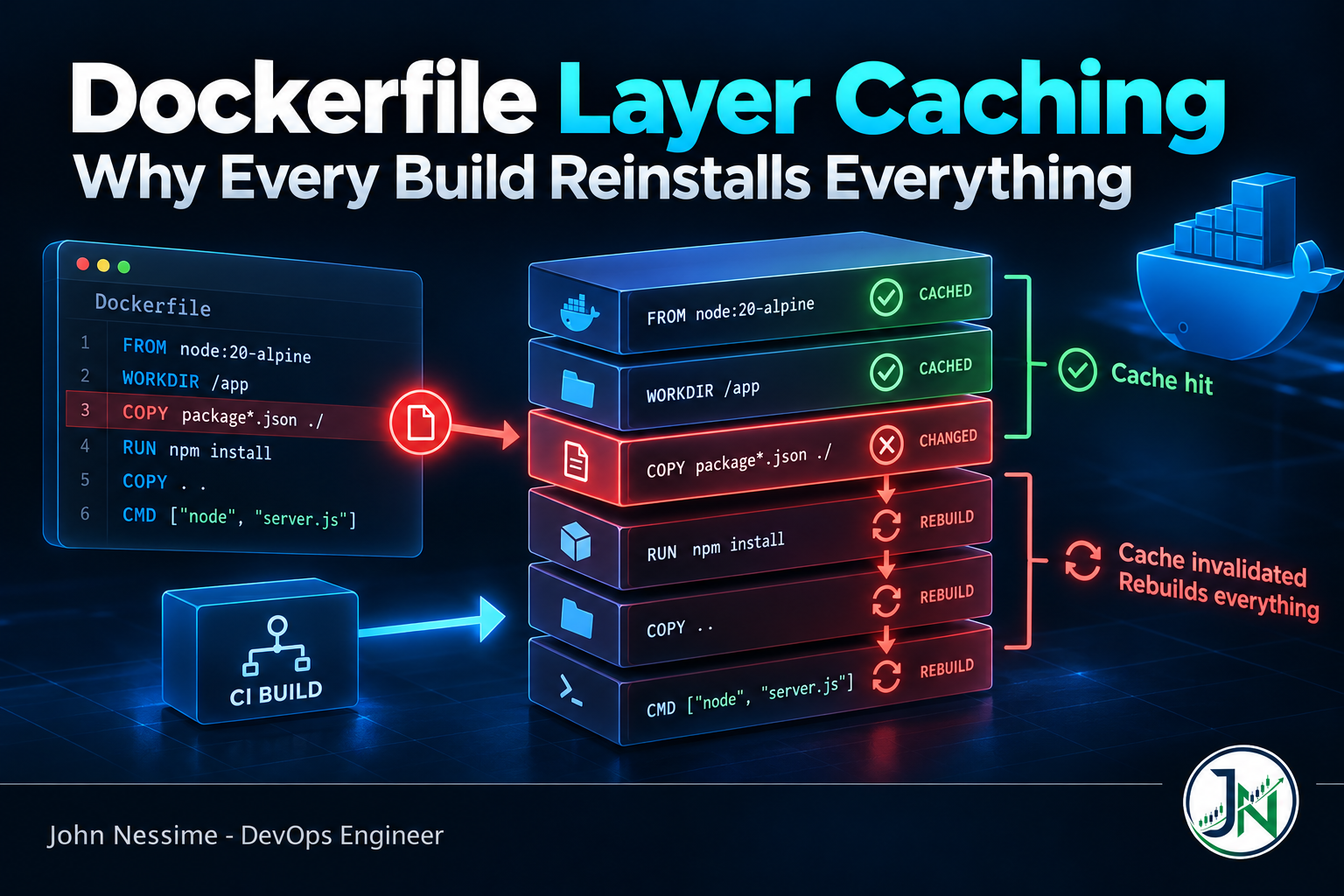
Then the rule that ties it together: once a layer misses, every layer after it rebuilds. No skipping ahead, no partial reuse. One bad instruction near the top costs you the whole tail of the file.
Three consequences catch people out. A RUN line that installs OS packages caches indefinitely, so rebuilding months later reproduces the original package versions and “just rebuild the image” is not a security response on its own. Build arguments do invalidate the cache, so an ARG carrying a commit SHA near the top of the file is expensive. And build secrets do not: their contents are excluded from the checksum, though their IDs and mount paths are part of it.
One more that bites teams chasing reproducible builds. WORKDIR respects the SOURCE_DATE_EPOCH build argument. Set it to a git commit timestamp for provenance and you invalidate WORKDIR and everything below it on every single commit. Pin it to a fixed value if you want deterministic timestamps without paying that.
Failure family one: ordering that looks right
The canonical fix is to split the copy so dependency installation sits above the source code. Cheap to write, and it works:
# syntax=docker/dockerfile:1
FROM node:22-bookworm-slim
WORKDIR /app

# Manifest and lockfile only. Changes rarely.
COPY package.json package-lock.json ./
RUN npm ci

# Source. Changes constantly. Everything below rebuilds, and that is fine.
COPY . .
RUN npm run build
What breaks this in real repositories is usually not the copy order. It’s something above it that nobody thinks of as a layer.
- An
ARGnear the top. A build arg whose value changes per build invalidates everything that follows. Declare args as low in the file as the build allows. - Labels carrying commit metadata.
LABELlines that embed a revision are cheap to run but they are still layers. Put them at the very bottom. - Wildcard copies that pick up more than you think.
COPY package*.json ./looks tidy until a generated file starts matching the glob. Name the files explicitly. - Monorepo manifests scattered across packages. If installing needs twelve manifest files from twelve directories, copy them individually or accept you’re copying a subtree and lean hard on
.dockerignore.
The general test: walk the file top to bottom and ask, for each line, “what makes this change?” Anything answering “every commit” belongs below anything expensive.
Failure family two: the build context poisons the checksum
When you run COPY . ., the checksum covers everything in the context that isn’t excluded. That means .git, node_modules, coverage output, local .env files, and whatever your last test run left behind. A colleague running the test suite before pushing is enough to change the checksum and rebuild the tail of your image.
A .dockerignore file in the root of the context fixes it, and the rules apply to subdirectories too:
.git
node_modules
coverage
dist
*.log
.env
.env.*
Dockerfile
.dockerignore
This pays twice. Smaller contexts transfer faster to the builder, and unrelated local files stop ending up inside your published image. If you have ever found a .git directory or a stray credentials file in a production image, this is the line of defense that was missing.
There’s a second option when the source is only needed to produce an artifact and shouldn’t live in the image at all. A bind mount makes the context available for the duration of one RUN without adding it to any layer:
# syntax=docker/dockerfile:1
FROM golang:1-bookworm
WORKDIR /build
RUN --mount=type=bind,target=. go build -o /app/server ./cmd/server
Two rules keep this from surprising you. The mount is read-only by default, so the output has to be written outside the mount target, which is why /app/server sits outside /build. And mounted files are not persisted into the final image or the build cache. Only what the RUN produced survives.
Failure family three: Dockerfile layer caching that never reaches CI
This is the invisible one, and it’s behind most “my Dockerfile is ordered correctly and CI is still slow” tickets.
The build cache is internal to the builder instance. Not to your account, not to your registry. To the builder. Switch builders and the cache doesn’t follow. Start a fresh ephemeral runner and there is no cache at all, so every instruction runs from scratch no matter how beautifully the file is ordered. Nothing warns you. The build just takes as long as a cold build, because it is one.
The fix is an external cache. --cache-to exports the cache somewhere durable, --cache-from imports it at the start of the next build.
docker buildx build
  --cache-from type=registry,ref=registry.example.com/app:buildcache
  --cache-to type=registry,ref=registry.example.com/app:buildcache,mode=max
  --tag registry.example.com/app:latest
  --push .
Four details decide whether this works or quietly does nothing:
mode=maxversus the default. The default exports only the layers of the resulting image. In a multi-stage build the expensive work happens in a stage that never ships, so the default exports almost nothing useful.mode=maxincludes intermediate stages. It costs storage and upload time, and it is usually the right trade.- Use a separate ref for the cache. A different tag or repository, anything that isn’t the tag you push the image to.
- Registry compatibility. The registry cache defaults to writing an image index and not every registry accepts one, with Amazon ECR the usual casualty. Setting
image-manifest=truealongsideoci-mediatypes=truewrites a single image manifest instead. - The default driver is limited. The plain
dockerdriver supports the inline, local, registry and GitHub Actions backends only when the containerd image store is enabled. Otherwise create a builder with the docker-container driver first.
On GitHub Actions the equivalent lives in the build action:
- uses: docker/setup-buildx-action@v4

- uses: docker/build-push-action@v7
  with:
    push: true
    tags: ghcr.io/acme/app:latest
    cache-from: type=gha
    cache-to: type=gha,mode=max
The GitHub Actions backend is convenient because it needs no credentials, but it draws from a per-repository storage budget shared with every other cache in that repo, and eviction is silent. A build that was fast last week can go cold with nothing changed in your Dockerfile. When that starts happening, move to a registry backend, or to an S3 or Azure Blob backend if you’d rather pay object storage rates than registry rates.
Failure family four: cache mounts that don’t survive the job
Layer caching is all or nothing per instruction. Add one dependency, the install layer misses, and you re-download the four hundred packages you already had. Cache mounts fix exactly that: a directory that persists across builds even when the layer around it rebuilds.
# syntax=docker/dockerfile:1
FROM python:3-slim
WORKDIR /app
COPY requirements.txt .
RUN --mount=type=cache,target=/root/.cache/pip
    pip install -r requirements.txt
Point the target at whatever directory that tool uses for its own cache. Go wants its module and build caches, Rust the Cargo directories, .NET the NuGet package folder. Apt is the one needing care, because it expects exclusive access to its data:
RUN --mount=type=cache,target=/var/cache/apt,sharing=locked
    --mount=type=cache,target=/var/lib/apt,sharing=locked
    apt-get update && apt-get install --no-install-recommends -y gcc
Without sharing=locked, parallel builds write to the same apt cache simultaneously and you get an inconsistent package database, intermittently, which is a genuinely unpleasant thing to debug.
Now the part that isn’t in most tutorials. Cache mounts live on the builder’s local storage and they are not exported by --cache-to. The external cache carries layers. It does not carry cache mount contents. On a fleet of ephemeral CI runners, every cache mount you add is a no-op: a fresh runner starts with an empty mount, fills it during the build, then throws the machine away.
They’re still worth adding for local development, where they pay for themselves immediately. Making them pay off in CI needs a builder with persistent storage behind it: a self-hosted runner that keeps its builder between jobs, a long-lived buildkitd on a VPS from somewhere like Contabo or InterServer reached over the remote driver, the Kubernetes driver with a volume attached to the builder pods, or a managed build service such as Docker Build Cloud or Depot that holds persistent cache volumes for you.
One hard rule regardless: never put something the image needs into a cache mount. Installing into /app/node_modules behind a cache mount produces an image that works on your machine and has no dependencies in production, because the mount contents are discarded when the instruction finishes. Cache the package manager’s download directory, not its output.
Failure family five: multi-stage builds and the COPY –link argument
Multi-stage builds help caching for a reason that has nothing to do with image size. They let you put expensive, rarely-changing work in a stage whose inputs are stable, and copy only the artifact forward.
# syntax=docker/dockerfile:1
FROM node:22-bookworm-slim AS deps
WORKDIR /app
COPY package.json package-lock.json ./
RUN --mount=type=cache,target=/root/.npm npm ci

FROM node:22-bookworm-slim AS build
WORKDIR /app
COPY --from=deps /app/node_modules ./node_modules
COPY . .
RUN npm run build

FROM node:22-bookworm-slim AS runtime
WORKDIR /app
ENV NODE_ENV=production
COPY --from=deps /app/node_modules ./node_modules
COPY --from=build /app/dist ./dist
CMD ["node", "dist/index.js"]
The catch wastes an afternoon if you hit it cold: export cache in the default mode and the deps stage isn’t in the export, because it isn’t part of the final image. Multi-stage plus external cache means mode=max, or the whole structure buys you nothing in CI.
Then there’s COPY --link, which comes up in every thread on this topic and deserves an honest treatment rather than a recommendation. The case for it is real: a linked copy creates an independent snapshot layer that doesn’t depend on the filesystem beneath it, then merges on top. The layer can be reused with --cache-from even when earlier instructions in the same stage changed, and it enables rebasing an image onto an updated base without re-running the build.
The case against is also real, and it’s mostly semantics you didn’t ask to change. Linked layers start from an empty filesystem, so a destination that resolved through a symlink created in an earlier layer no longer behaves the same, and ambiguous destinations resolve differently. Use explicit trailing slashes for directories. There are also reports of cache accounting misbehaving with linked layers, and a long-standing open report that the cache behavior doesn’t match the announcement.
Where I land: worth trying on artifact copies into a final stage, where destinations are plain directories and the win is largest. I wouldn’t blanket-apply it across a repository on the strength of a blog post, mine included. Measure a warm rebuild before and after. If the numbers don’t move, you’ve added a semantic footgun for nothing.
Troubleshooting: proving which layer missed and why
Stop guessing. The build output tells you, if you ask for the plain progress format:
docker buildx build --progress=plain --tag app:dev .- Find the first step not marked CACHED. Everything after it is guaranteed to rebuild, so everything after it is noise. There is exactly one problem and it is that step.
- If it’s a COPY or ADD, the inputs changed. List what the context actually contains, compare against
.dockerignore, and look for generated files or lockfiles being rewritten by a pre-build script. - If it’s a RUN, something above it changed. Scroll up. A build arg, a label, a base image tag that moved, or
SOURCE_DATE_EPOCHset from a commit timestamp. - If the earliest steps miss in CI but not locally, the import didn’t happen. Check the log for the cache manifest being imported. A missing or unreadable cache ref usually isn’t a hard failure, the build just proceeds cold.
- If it’s intermittent, suspect eviction. Garbage collection or a cache storage budget removed what you were relying on.
Two commands earn their place here. The first shows what the builder is currently holding, the second clears it so you can measure a genuine cold build:
docker buildx du
docker buildx prune --all
And when you want one stage to run fresh while keeping the rest cached, target it by name instead of nuking everything:
docker build --no-cache-filter deps --tag app:dev .Common mistakes
- Assuming the Dockerfile is the whole problem. If CI has no external cache configured, no amount of reordering helps. Check that first.
- Adding cache mounts to fix CI. Great locally, invisible in the pipeline unless the builder persists.
- Exporting cache in the default mode with a multi-stage build. The expensive stage isn’t in the export. This is the most common reason external caching looks configured and doesn’t help.
- Squashing everything into one giant RUN. Fewer layers is a size optimization, not a caching one. Collapsing distinct steps means any change reruns all of them.
- Treating a cached rebuild as a patched rebuild. A cached package install gives you the versions from the original build. If you rebuilt for a CVE, you need to break that cache on purpose.
- Using
latestas a base tag. The digest moves under you, invalidating everything below unpredictably and making builds non-reproducible at the same time.
Best practices worth the effort
- Order instructions by how often their inputs change, not by what feels logical. Stable and expensive at the top, volatile and cheap at the bottom.
- Write the
.dockerignorebefore the Dockerfile. Thirty seconds of work that prevents both cache churn and accidental secret inclusion. - Configure an external cache in CI on day one, with
mode=maxif the build has more than one stage. - Add cache mounts for every package manager in the build. One line each, and the difference between “added one dependency” and “re-downloaded the world”.
- Track warm build duration as a metric rather than a vibe. A Grafana panel showing build time per branch turns “the build feels slow” into something you can point at.
- Keep a scheduled no-cache build in the pipeline. It proves the Dockerfile still works from scratch and picks up base image updates that cached builds silently skip.
Frequently asked questions
Why does my Docker build ignore the cache even though nothing changed?
Usually because something did change and it wasn’t the file you were watching. Build with --progress=plain and find the first step not marked CACHED. If it’s a COPY, a gap in .dockerignore is letting local artifacts into the context. If it’s early in the file, check build args, labels carrying commit metadata, or a base image tag that moved. In CI, the usual answer is that there was no cache to hit at all.
Do fewer layers make Dockerfile layer caching better?
No, and the advice is often applied backwards. Combining commands into one RUN reduces image size and stops intermediate junk being committed into separate layers. It also means any change reruns all of it. Combine steps that genuinely belong together, like an update-and-install pair, and keep independent work in separate instructions.
Do cache mounts work in GitHub Actions?
Not usefully on the default hosted runners. Cache mounts live on the builder’s local storage and are not exported by --cache-to, so an ephemeral runner starts with an empty mount every time. You need a builder with persistent storage: a self-hosted runner keeping its builder between jobs, a remote buildkitd on your own host, the Kubernetes driver with a volume, or a managed build service.
Registry cache backend or the GitHub Actions one?
Start with the GitHub Actions backend because it needs no credentials and no extra infrastructure. Move to a registry backend when you outgrow the repository cache budget, when you want the cache shared across repositories or with local developer builds, or when silent evictions make build times unpredictable. Registry caching costs a round trip and some storage in exchange for being yours.
Does changing a build secret invalidate the cache?
No. Secret contents are deliberately excluded from the cache checksum, so rotating a token leaves every layer valid. The secret’s ID and mount path do participate, so renaming one invalidates. If a changed secret needs to force a rebuild, pair it with a build argument you also change, since build args do invalidate.
Why does a cached image still contain old, vulnerable packages?
Because a RUN instruction is matched on its text, not on what it would produce today. The package install layer stays valid indefinitely, so rebuilding without breaking that cache reproduces the original package set. Force it with --no-cache, target the relevant stage with --no-cache-filter, or move the base image tag so the layers below invalidate.
Is COPY –link safe to use everywhere?
Not everywhere. It changes destination semantics because linked layers start from an empty filesystem, so anything relying on symlinks created by earlier layers can break and ambiguous destinations resolve differently. It’s most defensible on artifact copies into a final stage with explicit directory paths. Try it, measure a warm rebuild, keep it only if the numbers justify the change.
The one thing worth remembering
Dockerfile layer caching fails in two categories that need completely different fixes. Either a layer is being invalidated when it shouldn’t be, which is a Dockerfile and build context problem, or the cache was never there to begin with, which is a builder and pipeline problem. Reordering instructions solves the first and does nothing at all for the second.
So before you spend an afternoon rearranging COPY lines, run one build with plain progress output and find the first step that isn’t CACHED. If it’s step one, your problem isn’t the Dockerfile. It’s that the machine running the build has never seen your cache and nobody told it where to look.
Need a second pair of eyes on your build pipeline?
Slow container builds are usually three or four small problems stacked, not one big one, and they unpick quickly once you can see the whole pipeline. I help teams with:
- Auditing a Dockerfile end to end for invalidation traps, oversized build contexts and stages that never cache
- Setting up external cache backends in GitHub Actions, GitLab CI or Jenkins, including registry and object storage backends and the awkward ECR manifest cases
- Standing up a persistent remote buildkitd on your own infrastructure so cache mounts actually pay off in CI
- Restructuring multi-stage builds so the expensive stages are cacheable and the runtime image stays small
- Adding build duration and cache hit visibility to your existing dashboards so regressions get caught early
- Separating “rebuild for a code change” from “rebuild for a security patch” so cached layers stop hiding unpatched packages
Send me your Dockerfile and a build log with --progress=plain output, and I’ll tell you which step is costing you and why.