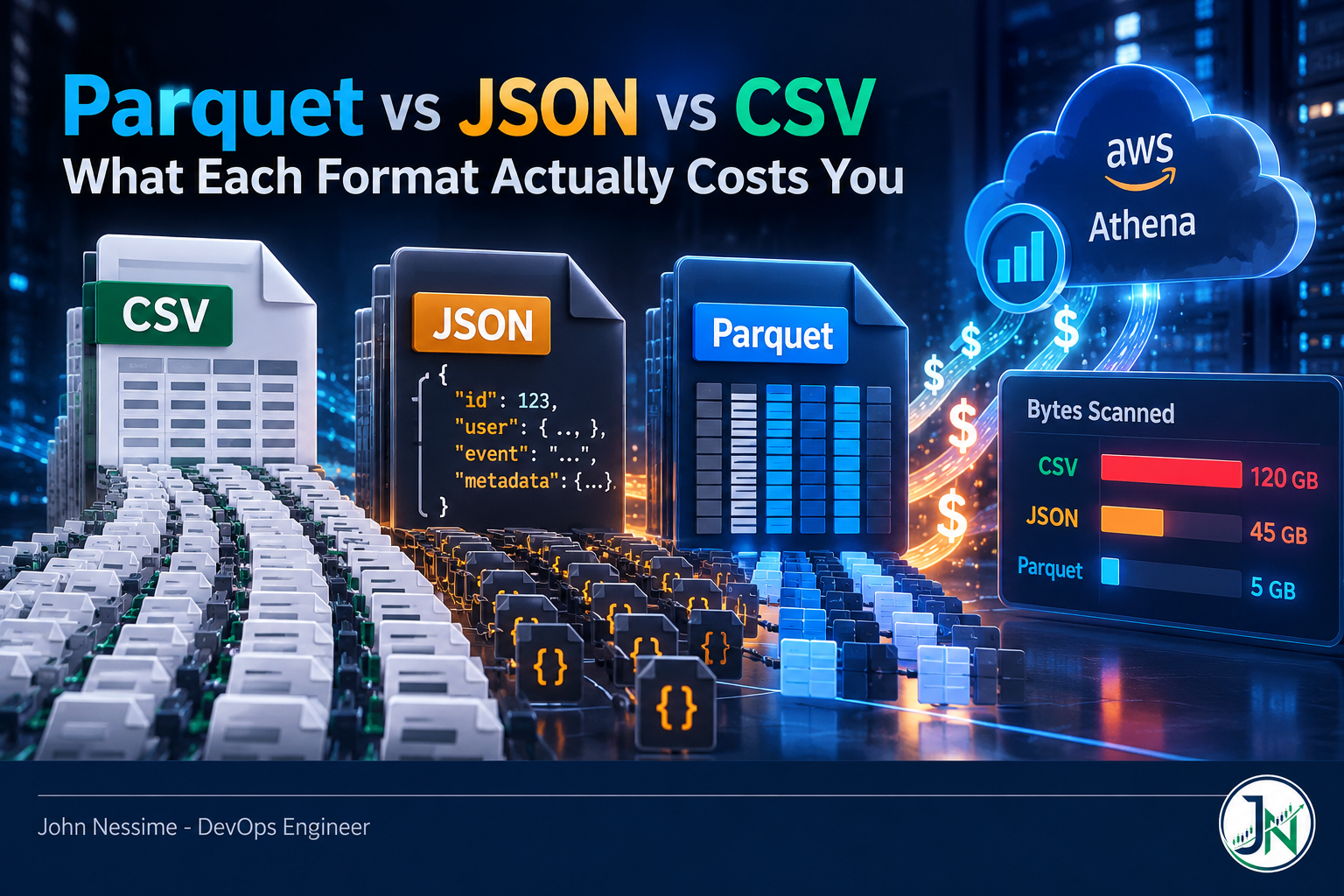
The ticket said “Athena spend tripled last month, nothing changed.” Nothing had changed on the query side. What changed was that an upstream team started dropping a wider export into the same S3 prefix, still as gzipped CSV, and every dashboard query that touched that table started reading every column of every file to answer a question about two of them.
That is the failure mode that makes this comparison worth writing about. The Parquet vs JSON vs CSV question almost never shows up as a performance complaint first. It shows up as a bill, weeks later, from a decision somebody made in an afternoon because CSV was easy to write.
This post breaks down where the money and the milliseconds actually go: what each format costs you on read, on write, and on the request path in between. Then a procedure for measuring it on your own data instead of trusting somebody else’s benchmark, and an honest look at where CSV and JSON still beat the columnar option.
The billing model is the whole story
Most serverless query engines bill on bytes read, not bytes returned. That one sentence explains almost every surprise bill I have seen on a data lake.
Amazon Athena charges for bytes scanned, rounded up to the nearest megabyte, with a 10 MB minimum per query. DDL statements are free. Cancelled queries are charged for whatever was scanned before the cancel landed. BigQuery’s on-demand model works the same way in spirit: charges round up to the nearest MB, with a 10 MB minimum per table referenced and a 10 MB minimum per query, and you are billed on the columns you select even when you put a LIMIT on the result.
That last part catches people. LIMIT 10 does not make a query cheap; the engine still reads enough to know which ten rows to give you, and on a row-based format that means reading whole rows.
So the question is not “which format is smaller on disk.” It is “how few bytes can the engine get away with reading.” Those diverge fast.
Four levers, not one
When people compare formats they usually compare compressed file sizes and stop. There are four levers that move real cost, and file size is the weakest of them.
1. Column pruning
Row formats store a whole record contiguously. To get one field you read the record. Columnar formats store each column separately, so an engine reads only the column chunks your query names. Query two columns out of forty and you skip most of the file. This is the single biggest lever and it only exists in columnar formats.
2. Block skipping
Parquet splits data into row groups, typically sized in the tens to hundreds of megabytes, and stores per-column statistics in the file footer: min, max, null count. An engine reads the footer first and skips any row group whose min/max range cannot possibly match your filter. Newer Parquet writers also emit page-level indexes and optional Bloom filters, which push the same idea down to a finer granularity.
The catch: this only works if your data is sorted or clustered on the column you filter by. Write rows in random order and every row group’s min/max spans the whole range, so nothing gets skipped and you paid for the statistics for nothing. Sorting before write is what turns the feature on.
3. Splittability
This is the one that bites silently. A gzip stream cannot be split at an arbitrary byte offset, so a distributed reader cannot hand different chunks of one .gz file to different workers. One gzipped CSV file means one task, on one core, no matter how large your cluster is. Spark has carried a long-standing issue about exactly this confusion, and the standard workarounds are ugly: decompress first, split the file up beforehand, or recompress with something splittable like bzip2 and eat the CPU cost.
Parquet sidesteps this entirely. Compression is applied per page inside the file, not across the whole stream, so a Parquet file stays splittable at row-group boundaries regardless of which codec you chose. Snappy is the usual default; ZSTD is the common pick when you want a better ratio and can spend a bit more CPU.
If your job takes an hour and one executor is doing all the work while the rest idle, check the file extension before you check anything else.
4. Request overhead
Object storage bills per request as well as per byte, and listing is slow. Ten thousand tiny files cost more in GET and LIST calls than one properly sized file, and those charges never appear under your query engine’s line item. It hits Parquet users hardest, because each file carries footer metadata that must be read separately before any data is. A thousand 1 MB Parquet files can be slower and dearer than a hundred 10 MB ones holding the same rows. The format is not a substitute for file sizing.
CSV: still the right answer more often than people admit
Where it wins. Every tool on earth reads it. A human can open it, diff it, grep it, and eyeball it in a terminal. It appends trivially: concatenate two files and the result is still valid. For interchange with a client, a finance team, or a vendor whose ingest spec you do not control, CSV is the format that never generates a support ticket. And for datasets small enough that the 10 MB query minimum dominates anyway, the whole debate is theatre.
Where it doesn’t. No types, no schema, no statistics. Every value is text until something guesses otherwise, and the guesses are where pipelines break: leading zeros stripped off ZIP codes, dates parsed in the wrong locale, a free-text field with an embedded comma. There is no column pruning, so a two-column query pays for a forty-column file. And gzipped CSV, the most common shape in the wild, is the splittability trap above.
CSV is an excellent transport format and a poor storage format. That distinction is the useful one.
JSON: the most expensive way to store a table
Where it wins. Nested and irregular data. If records genuinely differ, if fields come and go, if there are arrays of objects inside objects, JSON models that honestly and CSV cannot. It is self-describing per record, so a consumer that has never seen your schema can still make sense of a line. Newline-delimited JSON also appends cleanly, which is why it dominates log shipping and webhook capture. Most event pipelines are right to land raw JSON first.
Where it doesn’t. Every record repeats every key name. Store ten million events with a field called customer_identifier and you have stored that string ten million times. Compression claws a lot of that back, but the engine still pays to decompress and parse it, and parsing JSON costs meaningfully more per byte than splitting on a comma. No column pruning, no statistics, no skipping.
JSON as a landing format is fine. JSON as the format your analysts query every day is a recurring charge you are choosing to pay.
Parquet: cheap reads, real obligations
Where it wins. Everything above. Column pruning, footer statistics, per-column encoding chosen to suit the data (dictionary encoding for low-cardinality strings, run-length and delta encoding for sorted integers), and splittability regardless of codec. Compressing a string column and an integer column separately beats compressing rows that mix both. On a wide table with selective queries, the reduction in bytes scanned is not marginal.
Where it doesn’t. This is the part the enthusiastic posts skip.
- You cannot append. Adding rows means rewriting a file or adding another one. Streaming small batches straight to Parquet is how you end up with the small-files problem, which is why table formats like Apache Iceberg exist on top of it.
- Schema mismatches across files are a runtime error, not a warning. Write one file with a column as INT32 and another as a string, point a reader at the directory, and the job fails on type conversion. Debugging means finding which file in a prefix is the odd one out.
- Timestamps are a compatibility minefield. The old INT96 physical type carried nanosecond timestamps for historical reasons, is deprecated, and is still what some writers emit for compatibility with older engines. Readers expecting the INT64 logical timestamp types will refuse it. If timestamps arrive as garbage, check this first.
- It is opaque. You cannot grep it, tail it, or read it without tooling, and that costs real debugging time.
- Writing costs more. Encoding, statistics, and compression are work. If you write far more than you read, that trade may not pay off.
None of these are reasons to avoid Parquet for analytics. They are reasons to stop treating the conversion as free.
Measure it on your data, in about twenty minutes
Published benchmarks tell you about somebody else’s data. Yours has different cardinality, different width, different query patterns. Here is the procedure I would run before committing to a conversion.
- Get a real byte count for what you have now. Not an estimate, the actual prefix.
aws s3 ls s3://your-bucket/raw/events/ --recursive --summarize --human-readableThe summary at the end gives you total objects and total size. Object count matters as much as size here, because it tells you whether you have a small-files problem before you add to it.
- Convert a representative slice, not the whole thing. One partition is enough. In Athena, a CTAS statement writes the output for you.
CREATE TABLE events_parquet_sample
WITH (
  format = 'PARQUET',
  write_compression = 'ZSTD',
  external_location = 's3://your-bucket/experiments/events-parquet/'
) AS
SELECT * FROM events_csv WHERE dt = '2020-01-01';
Pick a date that exists in your data. Athena can read Parquet compressed with LZ4 or LZO but will not write those codecs, so stick to Snappy, GZIP or ZSTD on the write path.
- Run your three most common queries against both tables and compare bytes scanned. Athena reports this per query in the console and in the query execution statistics. This number, not the wall-clock time, is your bill.
- On BigQuery, price it before you run it. A dry run costs nothing and returns the byte estimate.
bq query --use_legacy_sql=false --dry_run
'SELECT user_id, amount FROM `project.dataset.events` WHERE dt = "2020-01-01"'- Inspect the Parquet file you just wrote. Check row group count and sizes, because a file full of tiny row groups will not perform the way the marketing says.
python3 -c "
import pyarrow.parquet as pq
f = pq.ParquetFile('part-0000.parquet')
print(f.metadata)
print(f.metadata.row_group(0))
"
That prints the number of row groups, rows per group, and compressed and uncompressed sizes. If you see dozens of row groups in a small file, your writer is flushing per batch and you need to buffer more before writing.
- Put a guardrail up before anyone else touches it. Athena workgroups support a per-query data scan limit that cancels a query which exceeds it. You still pay for what was scanned before the cancel, but it turns an unbounded mistake into a bounded one.
Running the comparison locally works too. DuckDB reads CSV, JSON and Parquet directly from a path, and a laptop or a small VPS from a provider like Contabo or InterServer will happily handle datasets that people reflexively push into a cluster.
Arguments that don’t survive contact
- “We gzip our CSVs, so we already save the money.” Compression reduces bytes scanned, and that is real. It does not give you column pruning, and it costs you parallelism. You have optimised one lever and broken another.
- “Parquet is always faster.” Not for full-table scans of narrow tables, not for tiny files where footer reads dominate, and not on the write path. Selectivity and table width are what make it win.
- “We’ll just convert everything to Parquet.” Converting a landing zone that receives appended events all day means fighting the format’s biggest weakness. Land raw, convert on a schedule, query the converted copy.
- “Storage is cheap so format doesn’t matter.” Storage is cheap. Scanning is not, and scanning is billed per query, repeatedly, forever. The recurring cost is the one to model.
- “Our BI tool caches, so nobody re-scans.” Until the cache misses, someone changes a filter, or a scheduled refresh runs hourly against a table nobody remembers owning.
How I’d decide
Not a scorecard. A short sequence of questions, in order.
- Is this data leaving your organisation? CSV, unless the recipient asked for something else. Interoperability beats efficiency at a boundary you do not control.
- Is it arriving continuously, one record at a time? Newline-delimited JSON or CSV into a landing prefix. Do not stream into Parquet.
- Is it read more than once, by more than one person, with filters? Parquet, partitioned on whatever people filter by most, sorted within partitions on the next most common filter.
- Is the whole dataset smaller than a few hundred megabytes? Use whatever is convenient. At that size the per-query minimums and human time dominate the byte costs.
- Are you fighting append semantics, concurrent writers, or schema evolution? You have outgrown bare files. That is the problem a table format like Iceberg solves, and it will still store its data as Parquet underneath.
The pattern most teams land on is not one format. It is raw JSON or CSV in a landing zone with a short lifecycle policy, Parquet in a curated zone that analysts actually query, and a scheduled job in between. Storage on the cheap tier, scanning on the cheap format.
Frequently asked questions
How much smaller is Parquet than CSV?
It depends entirely on your data, and anyone quoting a single multiplier is guessing about yours. Wide tables with repetitive low-cardinality strings compress dramatically because dictionary encoding does most of the work. Narrow tables of high-entropy values barely improve. Convert one partition and measure it; that takes minutes and gives you a number you can defend.
Does Parquet vs JSON vs CSV matter if I use BigQuery native tables?
Less than you would think, because once data is loaded into a BigQuery native table it lives in Google’s own columnar storage and on-demand billing is calculated from the logical size of the columns you select, based on their data types, rather than from whatever format you loaded from. The format question applies to your source files and to external tables over Cloud Storage. Batch loading itself is not charged.
Is ORC better than Parquet?
They are close enough that ecosystem support should decide it for you. ORC carries statistics at file, stripe and row-group levels; Parquet’s page indexes and Bloom filters have narrowed that gap. ORC has deeper roots in the Hive world, Parquet has broader support across Spark, Trino, DuckDB, Polars and the Python data stack. Pick the one your engines read best and stop optimising the choice.
Why did my query cost the same after I converted to Parquet?
Usually one of three things. You are running SELECT *, which reads every column and throws away the main advantage. Your data is unsorted, so no row group can be skipped. Or the table is not partitioned, so the engine still lists and touches everything. Parquet gives the engine the ability to skip work; your query and layout have to give it a reason to.
Should I use Snappy, GZIP or ZSTD for Parquet?
Snappy is the common default and favours speed over ratio. ZSTD gives a better ratio at moderate CPU cost and is a sensible pick for data you keep a long time and read occasionally. GZIP compresses well but decompresses slowly. Because Parquet compresses at page level, none of these break splittability, so this really is just a CPU-versus-bytes trade.
Can I query CSV and Parquet in the same table?
Not within one table definition, since a table declares a single input format. What you can do is keep them as separate tables over separate prefixes and union them in a view during a migration, then drop the CSV side once the backfill is verified. Mixing compression codecs within a single format is fine; Athena can read a Parquet table where some files are Snappy and others GZIP.
What about the cost of the conversion job itself?
Real, and worth modelling. A conversion reads all the data once and writes it again, whether through Athena CTAS, a Glue job, or a script on a box you own. If a table is queried a handful of times a month, the conversion may never pay for itself. If it backs a dashboard that refreshes hourly, it pays for itself almost immediately. Divide the one-off cost by the per-query saving and you have your break-even in queries.
The one thing worth remembering
The Parquet vs JSON vs CSV decision is not about disk space. It is about how many bytes an engine is forced to read to answer a question, how many workers it can put on the job, and how many requests it makes getting there. CSV and JSON force the engine to read everything. Parquet lets it read almost nothing, provided you sorted, partitioned and sized the files so it can.
Land raw in whatever arrives. Curate to Parquet on a schedule. Point people at the curated copy. Then go and look at your actual bytes-scanned numbers, because that is where the argument gets settled.
Need help cutting a data lake bill?
Most of the savings on a lake are unglamorous: layout, file sizes, and a handful of queries nobody has looked at since they were written. Things I can help with:
- Auditing which queries and tables drive your bytes-scanned spend, and which conversions would actually pay for themselves
- Designing partition and sort layouts around your real filter patterns instead of a default date partition nobody uses
- Building the raw-to-curated conversion pipeline, whether that is Athena CTAS, a Glue job, or something running on a box you control
- Fixing small-files and row-group sizing problems that quietly cap your read throughput and inflate request charges
- Diagnosing Parquet schema and timestamp compatibility failures across engines that disagree about types
- Setting up scan limits, cost alerting, and guardrails so the next surprise bill is caught in hours rather than at month end
If you want a concrete second opinion, send me a query execution history, a sample file, or the output of a bytes-scanned report and I will tell you where the money is going.