The site loads fine in your browser. Then a mobile app starts throwing handshake failures, a webhook from a payment provider stops arriving, and someone on the team runs curl and gets “SSL certificate problem: unable to get local issuer certificate”. Nothing changed on the server. Except something did, and your browser has been quietly covering for it.
Nearly every TLS certificate error I have had to chase down comes back to one of three things: the chain your server sends is incomplete, the certificate does not actually cover the hostname being requested, or it expired and no alert fired. This article walks through all three — how to identify which one you are looking at, the exact commands to prove it, and how to set up renewal automation so the third category stops being a category at all.
Why TLS certificate errors are so confusing to debug
Two things conspire to make this harder than it should be.
The first is that browsers are forgiving in ways other clients are not. When a server sends an incomplete certificate chain, most modern browsers will quietly fetch the missing intermediate using the Authority Information Access extension embedded in the certificate. They fix your misconfiguration on the fly and show you a padlock. Meanwhile curl, Python’s requests, Java clients, Go services, and older Android devices do no such thing. They fail. This is why “it works in Chrome” is worth almost nothing as a diagnostic signal.
The second is that error messages describe the symptom rather than the cause. “Unable to get local issuer certificate” sounds like a client problem. It usually is not — it usually means your server is not sending the full chain. Learning to translate the message into the actual failure is most of the work.
One command that tells you almost everything
Before touching config files, look at what the server is actually sending on the wire:
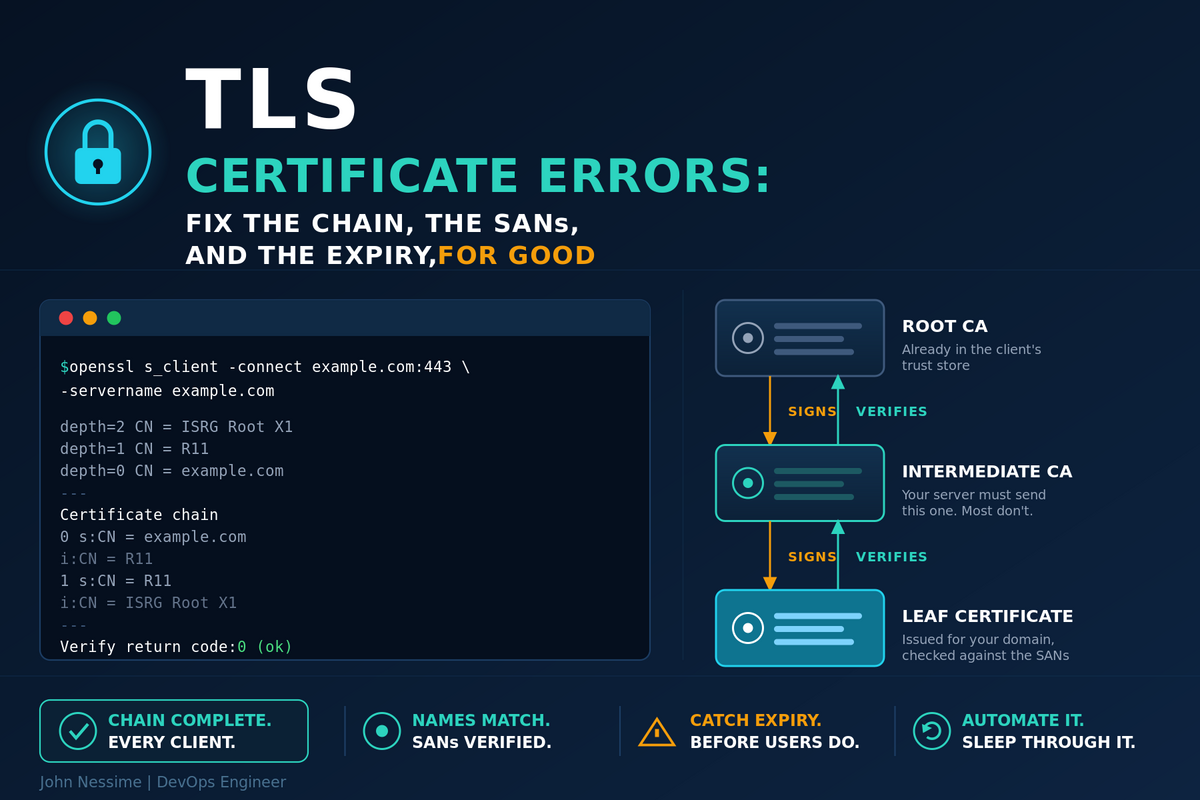
openssl s_client -connect example.com:443 -servername example.com -showcerts </dev/nullThe -servername flag matters more than people expect. It sets SNI, and without it you may be handed the server’s default certificate rather than the one for the domain you care about. Plenty of confusing “the certificate is for the wrong domain” reports come from testing without SNI.
Three parts of the output are worth reading carefully:
- The “Certificate chain” block near the top, listing each certificate the server sent with its subject and issuer.
- The “Verify return code” at the bottom.
0 (ok)is what you want.20and21both point at chain problems. - The subject line of the first certificate, which tells you whether you even got the certificate you expected.
If you want the certificate details without the chain noise, pipe it into x509:
echo | openssl s_client -connect example.com:443 -servername example.com 2>/dev/null
  | openssl x509 -noout -subject -issuer -dates -ext subjectAltName
That single line answers “who issued it”, “when does it expire”, and “what hostnames does it cover” in one shot. It is the first thing I run.
Family one: certificate chain issues
A publicly trusted certificate is almost never signed directly by a root. There is at least one intermediate CA in between. The client already trusts the root — it ships in the operating system or browser trust store — but it has no idea about the intermediate unless you hand it over. Your server’s job is to send the leaf certificate plus every intermediate needed to walk up to a trusted root.
The classic mistake: serving the leaf without the intermediates
If you use Let’s Encrypt, certbot writes several files into /etc/letsencrypt/live/example.com/. Two of them look interchangeable and are not:
cert.pem— the leaf certificate on its own.fullchain.pem— the leaf plus the intermediates.chain.pem— the intermediates on their own.privkey.pem— the private key.
Nginx wants fullchain.pem. Point it at cert.pem and browsers will still work, so the mistake survives testing and surfaces weeks later when an API client fails.
server {
    listen 443 ssl;
    server_name example.com www.example.com;

    ssl_certificate     /etc/letsencrypt/live/example.com/fullchain.pem;
    ssl_certificate_key /etc/letsencrypt/live/example.com/privkey.pem;
}
On Apache 2.4.8 and later, SSLCertificateFile can hold the leaf and the intermediates concatenated together, and SSLCertificateChainFile is deprecated. If you inherited a config that still uses the old directive, it will work, but it is worth cleaning up:
SSLCertificateFile    /etc/letsencrypt/live/example.com/fullchain.pem
SSLCertificateKeyFile /etc/letsencrypt/live/example.com/privkey.pem
Wrong order, or a root that should not be there
Order is part of the specification, not a suggestion. The leaf comes first, then each issuer in sequence walking upward. Some clients tolerate a shuffled bundle; several do not, and the ones that do not tend to be the ones you find out about from an angry customer.
Including the root certificate at the end is a different case: it is harmless from a trust perspective, since the client ignores it and uses its own copy, but it adds bytes to every single handshake for no benefit. Leave it out.
Verifying a chain offline
You can check a bundle before deploying it, which is far better than discovering the problem in production:
# Does the leaf verify against the intermediates you plan to serve?
openssl verify -untrusted chain.pem cert.pem

# Print the subject and issuer of every certificate in a bundle, in order
openssl crl2pkcs7 -nocrl -certfile fullchain.pem
  | openssl pkcs7 -print_certs -noout
That second command is the one I reach for most. Read the output top to bottom: the issuer of each certificate should be the subject of the next one down. The moment that pattern breaks, you have found your gap.
The key and the certificate do not match
Less common, but it produces a spectacularly unhelpful error. After a renewal where files were copied around by hand, confirm the pair still belongs together — the two hashes must be identical:
openssl x509 -noout -modulus -in cert.pem | openssl md5
openssl rsa  -noout -modulus -in privkey.pem | openssl md5
Family two: SAN mismatches
The Common Name field is dead. It has been deprecated for hostname matching for years, and Chrome stopped honouring it entirely back in 2017. What matters now is the Subject Alternative Name extension. If the hostname a client requested is not in the SAN list, the connection fails, regardless of what the CN says.
Check what a certificate actually covers:
# From a file
openssl x509 -noout -ext subjectAltName -in cert.pem

# From a live server
echo | openssl s_client -connect example.com:443 -servername example.com 2>/dev/null
  | openssl x509 -noout -ext subjectAltName
The four SAN mistakes that keep recurring
- Apex without www, or www without apex. These are two distinct names. A certificate for
example.comdoes not coverwww.example.com. Both need to be in the SAN list, and both need to be passed to certbot with separate-dflags. - Assuming a wildcard covers everything. It does not.
*.example.commatches exactly one label. It coversapi.example.com. It does not coverexample.comitself, and it does not coverstaging.api.example.com. Multi-level subdomains need their own wildcard or their own entry. - A new subdomain that never made it into the renewal. You add
metrics.example.comto nginx, point DNS at it, and forget that the certificate was issued for a fixed list of names. Adding a name means reissuing, not just reloading. - Connecting by IP address. Almost no public certificate includes an IP SAN, so hitting the server by IP will always fail hostname verification. That is expected behaviour, not a broken certificate.
One more that catches people out: if you use Cloudflare in proxied mode, the certificate a visitor sees is Cloudflare’s edge certificate, not yours. Debugging the origin means bypassing the proxy and testing the origin IP directly with the Host header set correctly, or temporarily turning the orange cloud grey.
Family three: expiry, and why automation is no longer optional
Expiry used to be a calendar problem. You bought a certificate for a year, set a reminder, and dealt with it once. That era is closing.
In April 2025 the CA/Browser Forum passed ballot SC-081v3, which phases the maximum validity period for publicly trusted TLS certificates down from 398 days to 47 days. The schedule runs in three steps: 200 days from 15 March 2026, 100 days from 15 March 2027, and 47 days from 15 March 2029. The first phase is already in force. Domain validation reuse windows shrink alongside it.
The 47-day target was chosen deliberately: short enough that manual renewal stops being viable at any meaningful scale. Automation is the point of the change, not a side effect of it.
If you run a handful of domains, this is a nuisance. If you run fifty, manual renewal is already finished as a strategy.
Getting ACME renewal right
Certbot installs a systemd timer or cron entry that attempts renewal twice a day and does nothing unless the certificate is close to expiry. Confirm it is actually there:
systemctl list-timers | grep certbot
certbot renew --dry-run
The dry run exercises the whole path against the staging environment without touching rate limits. Run it after any change to your web server config, not just after installing certbot. A renewal that worked last quarter can break because someone added a redirect that intercepts the ACME challenge path.
The trap: renewal succeeds, the site still serves the old certificate
This is the failure I see most often, and it is genuinely maddening because every log says success. Certbot writes the new certificate to disk. Nginx has the old one loaded in memory and keeps serving it until it is told otherwise. The certificate on disk is valid, the certificate on the wire is expired, and everything looks fine from the server’s point of view.
The fix is a deploy hook, which runs only when a certificate was actually renewed:
certbot renew --deploy-hook "systemctl reload nginx"Better still, make it permanent by adding it to the renewal configuration at /etc/letsencrypt/renewal/example.com.conf, under the [renewalparams] section, so it survives however the renewal happens to be triggered:
renew_hook = systemctl reload nginxUse reload rather than restart. A reload picks up the new certificate without dropping connections.
Remember that anything else terminating TLS needs the same treatment. A mail server, a database proxy, a Docker container with the certificate baked into its image — each one needs its own reload step, and containers in particular will happily run for months with an expired certificate mounted from the host.
Wildcards need DNS-01
Wildcard certificates cannot be issued through HTTP-01 validation. They require DNS-01, which means certbot needs to create a TXT record on your domain, which means API credentials for your DNS provider. Use a provider plugin rather than the manual mode — manual DNS-01 cannot be automated, and an unautomated wildcard on a 47-day cycle is an outage with a scheduled start time.
If issuance fails outright with a policy error, check your CAA records before assuming the ACME client is broken. A CAA record that names a different CA will block issuance entirely:
dig CAA example.com +shortMonitor from outside, not from the server
Checking the certificate file on disk tells you what should be served. Only an external check tells you what is being served. Given the reload trap above, that difference is the entire point.
A minimal check that works anywhere:
#!/usr/bin/env bash
# Usage: ./cert-days.sh example.com
# Exits non-zero if fewer than 21 days remain.
set -euo pipefail

DOMAIN="$1"
THRESHOLD=21

END=$(echo | openssl s_client -connect "${DOMAIN}:443" -servername "${DOMAIN}" 2>/dev/null
      | openssl x509 -noout -enddate | cut -d= -f2)

DAYS=$(( ( $(date -d "${END}" +%s) - $(date +%s) ) / 86400 ))
echo "${DOMAIN}: ${DAYS} days remaining (expires ${END})"

[ "${DAYS}" -lt "${THRESHOLD}" ] && exit 1
exit 0
If you already run Prometheus, the blackbox exporter gives you this for free through the probe_ssl_earliest_cert_expiry metric. An alert rule looks like this:
groups:
  - name: tls
    rules:
      - alert: TLSCertificateExpiringSoon
        expr: (probe_ssl_earliest_cert_expiry - time()) / 86400 < 21
        for: 10m
        labels:
          severity: warning
        annotations:
          summary: "TLS certificate expiring in under 21 days"
Set the threshold well above your renewal window. With 200-day certificates renewing at 30 days remaining, a 21-day alert gives you nine days of warning that something in the pipeline broke. Once 47-day certificates arrive, those numbers compress hard, and an alert that fires too late is the same as no alert.
A workflow for diagnosing TLS certificate errors
When something breaks, work through it in this order. It takes about a minute and rules out whole families of causes as you go.
- Reproduce outside the browser. Use
curl -voropenssl s_client. If the browser works and curl does not, you are almost certainly looking at a chain problem. - Read the verify return code. Code 20 or 21 means a chain issue. A hostname mismatch message means a SAN issue. A date error means expiry — or a wrong system clock on the client.
- Print the dates. Rules expiry in or out in one command, and tells you whether the certificate on the wire matches the one on disk.
- Print the SANs. Confirm the exact hostname being requested appears in the list. Watch for apex versus www.
- Walk the chain. Each certificate’s issuer should be the next one’s subject. Find where the sequence breaks.
- Compare disk against wire. If the file is newer than what is being served, you have a reload problem, not a certificate problem.
- Check the client’s trust store. If everything above is clean and one specific client still fails, the problem has moved to their end — an old Android device, a Java service with its own
cacerts, or a container image built on a base with a stale CA bundle.
Common mistakes worth avoiding
- Testing only in a browser, and mistaking its silent chain repair for a working configuration.
- Pointing the web server at
cert.peminstead offullchain.pem. - Renewing without reloading the service that holds the certificate in memory.
- Running
certbot renewon a schedule but never running--dry-runafter config changes. - Copying key and certificate files between servers by hand and losing track of which pair belongs together.
- Monitoring the file on disk rather than the certificate actually being served.
- Forgetting that mail servers, load balancers, and containers terminate TLS too, and need their own renewal path.
- Adding a subdomain to the web server config and assuming the existing certificate covers it.
Best practices that hold up over time
- Automate issuance and renewal from day one, even for a single domain. The habit matters more than the scale.
- Always use a deploy hook, and always reload rather than restart.
- Alert on days remaining, measured externally, with a threshold at least twice your renewal window.
- Keep an inventory of every hostname you hold a certificate for. You cannot monitor what you have forgotten about.
- Prefer DNS-01 with a provider plugin if you need wildcards, and never rely on manual DNS validation.
- Set CAA records deliberately so you know which CAs are permitted to issue for your domain.
- Test with a non-browser client before calling a certificate deployment finished.
Frequently asked questions
Why does my site work in Chrome but fail in curl?
Almost always an incomplete chain. Browsers fetch missing intermediate certificates automatically using the Authority Information Access extension; curl does not. Point your web server at the full chain file rather than the leaf certificate and both will work.
What does “unable to get local issuer certificate” actually mean?
The client could not build a path from your certificate to a root it trusts. Nine times out of ten the server is not sending its intermediates. Occasionally the client’s own CA bundle is out of date, which is common in older container base images.
Does a wildcard certificate cover the root domain?
No. *.example.com matches a single label, so it covers www.example.com but not example.com and not a.b.example.com. Include the apex explicitly as an additional SAN entry when you request the certificate.
My certificate renewed but the site still shows it as expired. Why?
The service holding the certificate has not reloaded. The new file is on disk; the old one is still in memory. Add a deploy hook that reloads the service on renewal, then verify from outside with openssl s_client rather than trusting the file timestamp.
How short will certificate lifetimes actually get?
Under the CA/Browser Forum schedule, 200 days applies from March 2026, 100 days from March 2027, and 47 days from March 2029. Private and internal CAs are not bound by these rules, but public certificates are.
Is the Common Name field still used at all?
Not for hostname validation. Modern clients read only the Subject Alternative Name extension. A certificate whose CN matches but whose SAN list does not include the hostname will be rejected.
Wrapping up
TLS certificate errors feel opaque mostly because the error text points at the wrong layer. Once you sort them into chain, SAN, or expiry, each one has a short diagnostic path and an obvious fix. Get comfortable with openssl s_client and openssl x509 and you will resolve most incidents faster than it takes to find the right dashboard.
The expiry category is the one worth engineering away permanently. With maximum lifetimes dropping toward 47 days, any process that depends on a person remembering something will fail eventually. Automate the renewal, add the deploy hook, and alert on what is actually being served rather than what is sitting on disk. Do that once and TLS certificate errors go back to being a rare curiosity instead of a recurring outage.
Need help with TLS, certificates, or infrastructure automation?
I work with teams on exactly this kind of problem — broken certificate chains, ACME automation across multiple servers, expiry monitoring wired into Prometheus and Grafana, and the wider DevOps plumbing that keeps it all running quietly in the background.
If you would rather hand this off than debug it at two in the morning, you can hire me on Upwork.