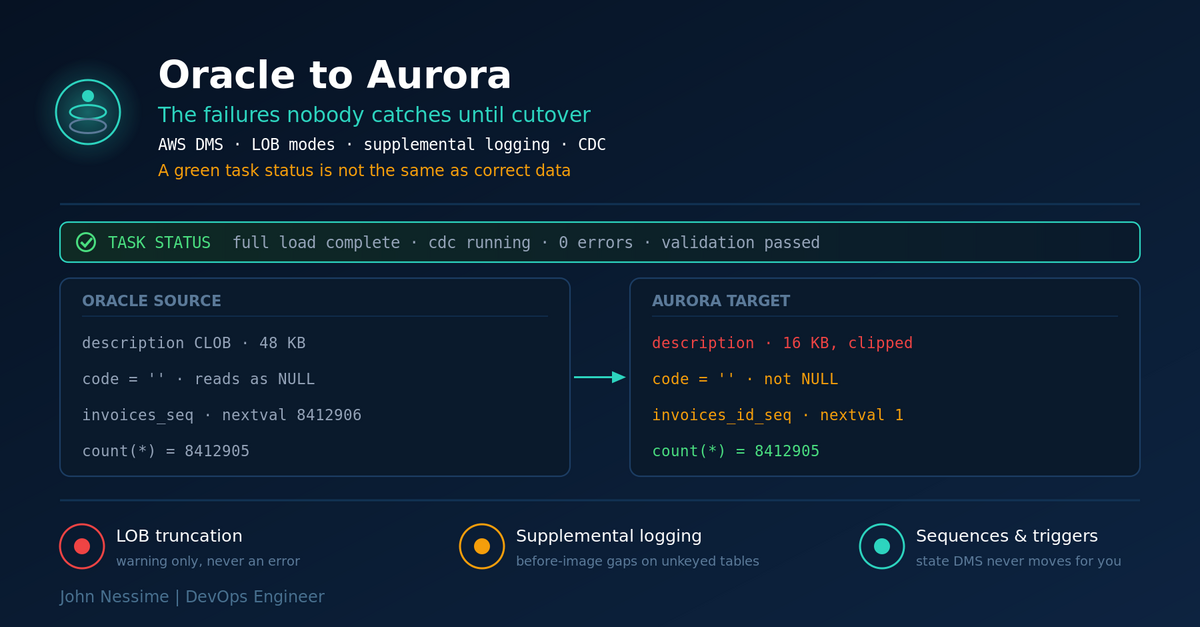
Three weeks after cutover, someone in finance sends you a spreadsheet. Forty-one invoice records have a description field that stops mid-sentence. Not blank, not garbled. Just shorter than it used to be.
So you open the AWS DMS console. The task is green. Full load completed, change data capture running, zero errors. Data validation passed on every table in scope.
Both of those things are true at the same time, and that is the part that catches people out. An Oracle to Aurora migration almost never fails with a stack trace and a rollback. It fails with a green dashboard and a handful of rows that are subtly, permanently wrong.
This post is not a walkthrough of the console wizard. AWS documents that well enough. It covers the four families of failure I would go looking for before signing off on an Oracle to Aurora migration: large objects that arrive truncated, change capture that records less than you assume, the semantic gaps between Oracle and PostgreSQL that compile cleanly and behave differently, and the database state that DMS simply does not move for you. Then how to validate properly, and what to do when a task stalls.
Pick the Aurora engine before you pick the migration tool
Amazon Aurora comes in a PostgreSQL-compatible edition and a MySQL-compatible edition, and the choice shapes everything downstream. Do not let it get decided by whoever on the team happens to like MySQL.
Aurora PostgreSQL is the realistic default coming from Oracle, and the reason is procedural code. PL/SQL and PL/pgSQL are close enough that automated conversion gets you a long way: packages, cursors, exceptions, custom types, and analytic functions all have recognisable counterparts. PostgreSQL also has the orafce extension, which reimplements a chunk of Oracle’s built-in functions and packages inside a compatibility schema, so a lot of converted code can keep calling things it already calls.
The honest case for Aurora MySQL: if the Oracle database is essentially a table store with the business logic living in the application tier, and your team already runs MySQL in production, you will move faster on the engine you can operate at 3am. Migration difficulty is real, but so is the cost of running a database nobody on the rota understands. If your schema has no packages, no triggers worth keeping and no PL/SQL, that argument holds.
Where it falls apart is the moment you find twelve thousand lines of PL/SQL that someone will have to rewrite by hand. At that point the engine choice has stopped being an operational preference and become a rewrite project.
Schema conversion: SCT or the DMS console
There are two ways to convert the schema. The AWS Schema Conversion Tool is a desktop Java application that connects to both databases, reads the source objects, and emits target DDL plus an assessment report of everything it could not convert. DMS Schema Conversion is the same idea run from the DMS console using instance profiles and data providers, with no local install and no JDBC drivers to manage.
Start with the console version. It is less setup and the assessment report is the thing you actually want early: a list of objects with action items, so you can size the manual work before committing to a date. Fall back to the desktop tool when you need something the console flow does not cover, such as converting application SQL files or SQL*Plus scripts.
Either way, treat the assessment report as a project plan, not a progress bar. The red items are the schedule.
Failure family one: LOB columns that arrive shorter than they left
This is the invoice description problem, and it is the single most common way an Oracle to Aurora migration loses data without telling anyone loudly.
DMS gives you three ways to handle CLOB, NCLOB and BLOB columns:
- Full LOB mode moves every LOB regardless of size. DMS has no idea how big they are, so it moves them one at a time, piece by piece. Correct, and slow.
- Limited LOB mode asks you for a maximum size up front. DMS pre-allocates memory and loads LOBs in bulk, which is dramatically faster. Anything larger than the limit is truncated to the limit, and a warning goes into the task log.
- Inline LOB mode sets a threshold. LOBs under it go inline with the row; larger ones fall back to the full LOB path with a lookup against the source. Good when most of your LOBs are small and a few are not.
Read the middle one again. Limited LOB mode is the default answer to “the full load is too slow”, it is the mode most tutorials use, and it silently clips your data. The warning lands in the task log, mixed in with everything else, and nobody is reading task logs line by line on a table with four million rows.
Worse, the task still reports success. Truncation is not an error condition in DMS. It is expected behaviour for the mode you asked for.
Measure before you set the limit
The fix is boring: go and find out how big your LOBs actually are, per column, on the source. Run this against Oracle for every LOB column in scope.
-- Largest LOB values in a single column, biggest first.
-- dbms_lob.getlength returns length in characters for CLOB/NCLOB,
-- bytes for BLOB. Check the top rows, not the average.
SELECT dbms_lob.getlength(description) AS lob_length
FROM   app.invoices
ORDER  BY dbms_lob.getlength(description) DESC
FETCH  FIRST 10 ROWS ONLY;

-- Same thing expressed in KB, which is the unit the DMS
-- "Max LOB size (K)" setting expects.
SELECT MAX(dbms_lob.getlength(description)) / 1024 AS max_kb
FROM   app.invoices;
Two things to know once you have the numbers.
First, with Oracle as a source, DMS treats LOBs as VARCHAR data wherever it can, because bulk-fetching them is much faster than the LOB API. Oracle’s VARCHAR ceiling is 32K, so a limited LOB size under 32K is where the mode performs best. If your real maximum is comfortably under that, limited LOB mode is genuinely the right call.
Second, memory. During full load, DMS pre-allocates roughly the max LOB size multiplied by the commit rate multiplied by the number of LOB columns. Push the limit up and that product grows fast. When the replication instance cannot allocate it, it starts swapping, and your “faster” mode becomes slower than full LOB mode. If limited LOB mode is dragging, drop the commit rate before you drop the size limit.
Split the LOB tables into their own task
The pattern I reach for first: one task with limited LOB mode for the bulk of the schema, a second task for the handful of tables with genuinely large LOBs, using full or inline mode. You can also override task-level LOB settings per table inside the table mapping rules, which keeps it to a single task if you prefer.
{
  "TargetMetadata": {
    "SupportLobs": true,
    "FullLobMode": false,
    "LimitedSizeLobMode": true,
    "LobMaxSize": 16,
    "InlineLobMaxSize": 0,
    "LobChunkSize": 64,
    "BatchApplyEnabled": false
  }
}
That is limited mode with a 16 KB ceiling. To use inline mode instead, set FullLobMode to true and give InlineLobMaxSize a non-zero value, which is the threshold below which LOBs travel inline.
One requirement that bites during ongoing replication: for CDC, tables with LOB columns need a primary key, because DMS looks the LOB value up in the source rather than reading it out of the redo stream. Full load does not care. CDC does. A LOB table with no primary key will load fine and then fail to replicate changes.
Failure family two: CDC that captures less than you think
Ongoing replication is what buys you a short cutover window. It is also where the assumptions hide.
DMS reads Oracle’s redo logs. For that to work at all, the source has to be in ARCHIVELOG mode with enough retention that DMS can still find the logs it needs after a pause, a network blip or an overnight stall. Retention is the one people get wrong: a task that stops for six hours against a two-hour retention window does not resume, it fails, and you restart from a full load.
Supplemental logging is not optional
Oracle’s redo logs, by default, contain enough information for Oracle to recover the database. That is not the same as enough information to reconstruct a row-level change for a different database. Supplemental logging is what closes that gap.
-- Minimal supplemental logging at the database level.
ALTER DATABASE ADD SUPPLEMENTAL LOG DATA;

-- Identification key logging: writes every column of a row's
-- primary key into redo on UPDATE, even when the key didn't change.
-- Without this, DMS cannot reliably match the row on the target.
ALTER DATABASE ADD SUPPLEMENTAL LOG DATA (PRIMARY KEY) COLUMNS;

-- Per-table alternative, if you only need a subset of tables
-- and want to keep the source overhead down.
ALTER TABLE app.invoices ADD SUPPLEMENTAL LOG DATA (PRIMARY KEY) COLUMNS;
The case that actually bites is a table with no primary key and no unique index. For those, key-level logging gives DMS nothing to work with, and it needs supplemental logging on all columns so the before-and-after image of the row lands in redo. Miss that, and DMS cannot build a safe UPDATE or DELETE statement for the target. You will not notice during full load. You will notice when an update on the source produces no change on the target, or changes the wrong row.
DMS ships premigration assessments that check exactly this. Run them. There are individual checks for supplemental logging on keyed tables, supplemental logging on all columns for unkeyed tables, ARCHIVELOG configuration, the CDC method in use, target permissions, and triggers enabled on the target. It takes minutes and it replaces a category of guesswork.
LogMiner or Binary Reader
DMS can read redo two ways. Oracle LogMiner is an Oracle-side API; DMS calls it and Oracle does the parsing. Binary Reader is DMS’s own parser reading the redo files directly.
If you specify nothing, you get LogMiner. That is usually correct. It needs fewer privileges, it handles ASM without extra plumbing, and it supports Oracle features like encryption and compression that the direct parser does not cover. The grants are small:
GRANT EXECUTE ON DBMS_LOGMNR TO dms_user;
GRANT SELECT ON V_$LOGMNR_LOGS TO dms_user;
GRANT SELECT ON V_$LOGMNR_CONTENTS TO dms_user;
GRANT LOGMINING TO dms_user;
Binary Reader earns its keep in one situation: a source generating redo faster than LogMiner can chew through it, or several concurrent migration tasks against the same database. LogMiner runs inside the source instance, so its CPU cost lands on the database you are trying not to disturb. Binary Reader shifts that work to the replication instance.
The trade-off is setup. Binary Reader needs additional privileges and file-level access to the redo logs, which means either a directory the replication instance can reach or a copy step. If your source is a busy production Oracle instance and CDC latency is climbing steadily rather than spiking, that is the signal to switch. Otherwise stay on LogMiner and spend the complexity budget elsewhere.
Whichever you pick, put CDC latency on a dashboard for the whole replication window, not just cutover day. The DMS task metrics publish to CloudWatch, and pulling them into whatever you already run for alerting, whether that is Grafana Cloud, Datadog or New Relic, is worth the twenty minutes. Source latency climbing while target latency stays flat means you are not reading redo fast enough. Both climbing together usually means the target cannot apply fast enough.
Failure family three: the semantics Oracle and PostgreSQL do not share
Schema conversion produces code that compiles. Compiling is not the same as behaving identically, and this is where a migration goes wrong in ways no tool flags.
Empty string is not NULL
Oracle treats the empty string and NULL as the same thing. PostgreSQL does not. This one difference propagates into comparisons, concatenation, unique constraints, and any procedural code that checks whether a value is “empty”.
-- PostgreSQL
SELECT '' IS NULL;        -- false
SELECT NULL || 'abc';     -- NULL
SELECT '' || 'abc';       -- abc

-- Oracle
SELECT CASE WHEN '' IS NULL THEN 'yes' ELSE 'no' END FROM dual;  -- yes
SELECT NULL || 'abc' FROM dual;                                  -- abc
SELECT '' || 'abc' FROM dual;                                    -- abc
Every one of those lines is a place a report can quietly change its numbers. Unique constraints are worse. Oracle stores an empty string as NULL, and NULLs are not compared for uniqueness, so it will happily accept many rows with an empty value in a uniquely constrained column. PostgreSQL sees zero-length strings, which are equal to each other, so the second one is rejected. Same schema, same data, different outcome, and the failure surfaces as an application error nobody can reproduce locally.
There is no switch for this. Either the application changes, or you wrap the affected functions, or you normalise on write with a trigger or a check constraint. Decide which, per column, before cutover. The orafce extension helps with function behaviour but it is not a global compatibility mode, and enabling the parts that change NULL semantics has its own consequences.
The rest of the list
- ROWID has no PostgreSQL equivalent. DMS Schema Conversion can emulate it with a bigint or a character varying column, but if application code depends on ROWID ordering or reuse semantics, emulation will not save you.
- SYSDATE and time zones. Conversion settings let you choose whether to emulate Oracle’s time zone handling or use native PostgreSQL behaviour. Native is faster. It is only safe if the database and the application genuinely run in the same time zone.
- TO_CHAR, TO_DATE, TO_NUMBER format masks. Oracle accepts parameters PostgreSQL does not. The converter emulates them by default, which is correct and slower. Turning emulation off is a per-codebase decision, not a global one.
- DUAL does not exist. PostgreSQL does not need a FROM clause, so most references just get dropped, but any dynamic SQL that builds a query string around DUAL needs finding.
- Synonyms have no direct equivalent. Search path adjustments and views cover most cases.
- Materialized views can be converted to real materialized views or to plain tables. The refresh semantics differ, so check what the reporting layer expects.
- NUMBER without a scale. An Oracle NUMBER column with no scale specified converts to something with a default, and if the source holds values wider than that default you get rounding or overflow. There is a premigration assessment specifically for this.
One data-level quirk worth knowing: if an Oracle column contains a NULL character (hex U+0000), DMS converts it to a space (U+0020) on a PostgreSQL target, because PostgreSQL cannot store it in a text column. Rare, but if you are migrating anything that stuffed binary into a VARCHAR, that is a real change to your data.
Failure family four: the state DMS never moves
DMS moves rows. It does not move everything that makes a database work, and the gaps are not obvious until you point traffic at the new cluster.
Sequences
Schema conversion creates the sequences. DMS copies the rows. Nothing advances the sequence counters to match the data that just arrived, so your target sequences sit at their starting value while the table already contains eight million rows.
The first insert after cutover collides with an existing primary key. Then the second. Then every write for the next eight million attempts.
Fix this after you stop replication and before you open traffic, not earlier, or you will do it twice.
-- Advance a sequence to match the data already loaded.
-- Run once per sequence, after CDC has stopped.
SELECT setval('app.invoices_id_seq',
              (SELECT max(id) FROM app.invoices));

-- Confirm before you open the doors.
SELECT last_value FROM app.invoices_id_seq;
Triggers on the target
If your converted schema has triggers and they are enabled during the load, they fire on every row DMS inserts. Audit tables get populated with a migration’s worth of fake activity. Derived columns get recalculated against half-loaded data. Anything that writes to another table doubles your write volume.
Disable target triggers for the load, re-enable at cutover. There is a premigration assessment that checks for enabled triggers on target tables in task scope, which is a decent backstop against forgetting.
Secondary indexes and foreign keys
Every secondary index present during full load is an index being maintained row by row while you are trying to move data as fast as possible. Foreign keys are worse, because DMS does not guarantee parent-before-child load order across tables.
Standard sequence: drop or disable secondary indexes and foreign key constraints before full load, recreate them afterwards, then let CDC catch up. Keep primary keys, since CDC needs them. Script the recreation and check it into version control alongside everything else, because rebuilding forty indexes from memory at 2am is not a plan.
Validation you can actually trust
DMS data validation compares source and target row by row and reports mismatches. It supports Oracle and PostgreSQL-compatible endpoints in both directions, so an Oracle to Aurora PostgreSQL path is covered. Turn it on.
Then understand what it will not tell you.
- It needs a primary key or unique index on both sides. Unkeyed tables are not validated, and those are exactly the tables most likely to have gone wrong.
- Collation and sort order differ between Oracle and PostgreSQL. When they disagree, validation reports failures on records that are actually fine, and the noise trains people to ignore the report.
- It does not run when the migration uses custom filtering, or when you are consolidating several source databases into one target.
- It costs real resources. Validation issues its own queries against both databases, on top of the migration traffic. Budget for that on the source.
- For LOB columns it compares checksums rather than values, using DBMS_CRYPTO on the Oracle side.
Because validation runs alongside migration, a task that stops takes validation with it. Validation-only tasks solve that: same endpoints, same table mappings, no data movement, running independently of the migration task. Use one when the validation load is hurting the source and you want to run it off-peak, or when you want validation to survive a migration task restart.
None of that replaces your own reconciliation. Before cutover, run business-level checks on both sides: rows per table, sums of every monetary column, min and max of every date column, distinct counts on anything you join on. Those catch things row comparison does not, because they answer the question the business actually asks.
And specifically for the LOB problem, compare maximum lengths, not just row counts.
-- On Aurora PostgreSQL, after the load.
-- Compare this against dbms_lob.getlength on the Oracle source.
SELECT count(*)                 AS row_count,
       max(length(description)) AS max_len,
       count(*) FILTER (WHERE description IS NULL) AS null_count
FROM   app.invoices;
If the target maximum is suspiciously round, exactly 16384 or exactly 32768, you have found your truncation.
Troubleshooting an Oracle to Aurora migration that stalls
Full load runs, then one table sits at zero
Almost always LOBs. Full LOB mode moves large objects one at a time with a source lookup per value, and on a table with a million large CLOBs that is a very long time with no visible progress. Check the table statistics for that table, then check whether it has LOB columns. Move it to its own task with limited or inline mode and an appropriate size.
CDC latency climbs and never comes down
Look at which latency is climbing. Source latency means redo is arriving faster than DMS can read it, which is the LogMiner to Binary Reader conversation, or a redo volume problem on the source. Target latency means Aurora cannot apply fast enough, which points at indexes still present, triggers still enabled, or an undersized writer instance.
Task fails on restart with missing archived logs
Retention. The logs DMS needed were removed before it came back. Increase archived log retention on the source to comfortably exceed your worst realistic outage, then restart from a fresh full load for the affected tables. There is no recovering the gap.
Updates on the source do not appear on the target
Supplemental logging, nine times out of ten. Check whether the affected table has a primary key or unique index, and whether logging is configured at the right level for that answer. The premigration assessments cover both cases.
Errors about a unique index on the target
DMS does not support replication to a table with a unique index built on a coalesce expression. If schema conversion produced one, or someone added it by hand to work around the empty-string problem, replication to that table will not work. Restructure the constraint.
Common mistakes
- Accepting the default limited LOB size without measuring the source. This is the truncation bug, and it has a specific, preventable cause.
- Treating a green task and a passed validation as proof of correctness. Both are true when data has been truncated.
- Skipping the premigration assessments because the wizard let you continue without them.
- Forgetting to advance sequences, then discovering it under production write load.
- Leaving triggers enabled on the target during full load and polluting audit tables.
- Assuming schema conversion handled empty strings. It converted the syntax, not the semantics.
- Setting archived log retention to the length of a normal outage rather than a bad one.
- Doing the first end-to-end rehearsal on cutover night.
Best practices
- Run the assessment report first and size the manual work from it. The red items are your timeline, and they are better known in week one than week nine.
- Inventory LOB columns before configuring anything. Maximum size per column, in KB, written down.
- Separate the LOB-heavy tables into their own task. Different tables want different modes, and one global setting will always be wrong for someone.
- Enable supplemental logging deliberately, per table class. Key-level for keyed tables, all-columns for unkeyed ones.
- Drop secondary indexes and foreign keys for the load. Script the recreation, version it, test it.
- Rehearse the whole cutover at least twice, including the sequence advance and the trigger re-enable. A scratch environment for the dry run does not have to be expensive: a temporary Aurora cluster you tear down afterwards, or a cheap dedicated box from somewhere like InterServer or Hetzner running a trimmed source copy, both work.
- Run your own reconciliation alongside DMS validation. Counts, sums, min and max dates, maximum LOB lengths.
- Keep the Oracle source running and readable for a while after cutover. The bugs that surface at week three are the ones you can only diagnose by comparing against the original.
Frequently asked questions
Should I migrate Oracle to Aurora PostgreSQL or Aurora MySQL?
Aurora PostgreSQL for anything with meaningful PL/SQL, because PL/pgSQL is close enough that automated conversion does most of the work, and the orafce extension covers a chunk of the rest. Aurora MySQL is defensible when the schema is plain tables, the logic lives in the application, and your team already operates MySQL. The deciding question is how many lines of procedural code you would have to rewrite by hand.
Can AWS DMS migrate stored procedures and packages?
No. DMS moves data. Schema and code conversion is a separate job, handled by DMS Schema Conversion in the console or the AWS Schema Conversion Tool on the desktop. Both convert most objects automatically and produce an action-item list for the rest.
Why is my DMS task green when data is missing?
Because truncation in limited LOB mode is expected behaviour, not an error. DMS writes a warning to the task log and carries on. Task status reflects whether the task is running, not whether the data is faithful. Compare maximum LOB lengths between source and target to catch it.
Do I need downtime for an Oracle to Aurora migration?
Some, but it can be short. Full load plus CDC means the target stays current while you test, so the outage is limited to stopping writes, letting CDC drain, advancing sequences, re-enabling triggers, recreating indexes and repointing the application. Rehearse it and that usually fits a maintenance window rather than a weekend.
Does DMS migrate sequences?
It copies row data, not sequence state. Schema conversion creates the sequence objects; you advance them yourself after stopping replication, using setval against the current maximum key value. Skipping this produces primary key collisions on the first write after cutover.
LogMiner or Binary Reader for Oracle CDC?
LogMiner unless you have a reason. It is the default, needs fewer privileges, and handles ASM, encryption and compression without extra work. Move to Binary Reader when redo volume is high enough that LogMiner cannot keep up, when you are running several tasks against the same source, or when the CPU cost of parsing on the source database is unacceptable.
Will DMS data validation catch every problem?
No. It needs a primary key or unique index on both sides, it can report false failures where Oracle and PostgreSQL collations disagree, and it does not run with custom filtering or multi-source consolidation. Treat it as one layer and add business-level reconciliation on top.
The one thing worth remembering
An Oracle to Aurora migration does not usually announce its failures. The task goes green, validation passes, and the damage shows up weeks later as a truncated field, a duplicate key, a report whose totals moved slightly.
So build the migration around proving correctness rather than proving completion. Measure your LOBs before you set a limit. Configure supplemental logging for the tables that have no key, not just the ones that do. Assume the semantic gaps between Oracle and PostgreSQL are still there after conversion, because they are. Advance the sequences. Then reconcile at the level the business cares about, not just row by row.
Green means the pipe is open. It does not mean what came out the other end is what went in.
Need a second pair of eyes on your Oracle to Aurora migration?
Most of the work on these projects is not running the wizard. It is finding the handful of things that will be wrong afterwards. That is the part I help with:
- Reviewing DMS task settings and table mappings for LOB truncation risk, per column, before you run a full load you cannot easily repeat.
- Working through the schema conversion assessment report and turning the red items into an actual estimate rather than a wall of warnings.
- Setting up supplemental logging and CDC correctly for tables with no primary key, including the LogMiner versus Binary Reader call for your redo volume.
- Writing the cutover runbook: index recreation scripts, sequence advance, trigger re-enable, ordered, tested, and timed against a real rehearsal.
- Building the reconciliation layer that sits on top of DMS validation, so you can sign off on the data with something better than a green tick.
- Post-cutover triage when something on Aurora behaves differently from Oracle and nobody can work out which layer changed.
If you have a task settings JSON, an assessment report, or a validation failure log you cannot make sense of, send it over and I will tell you what I see in it.